Table of Contents
Some links on JAK Digital Hub are affiliate links, meaning we may earn a small commission at no extra cost to you. Read full disclaimer.
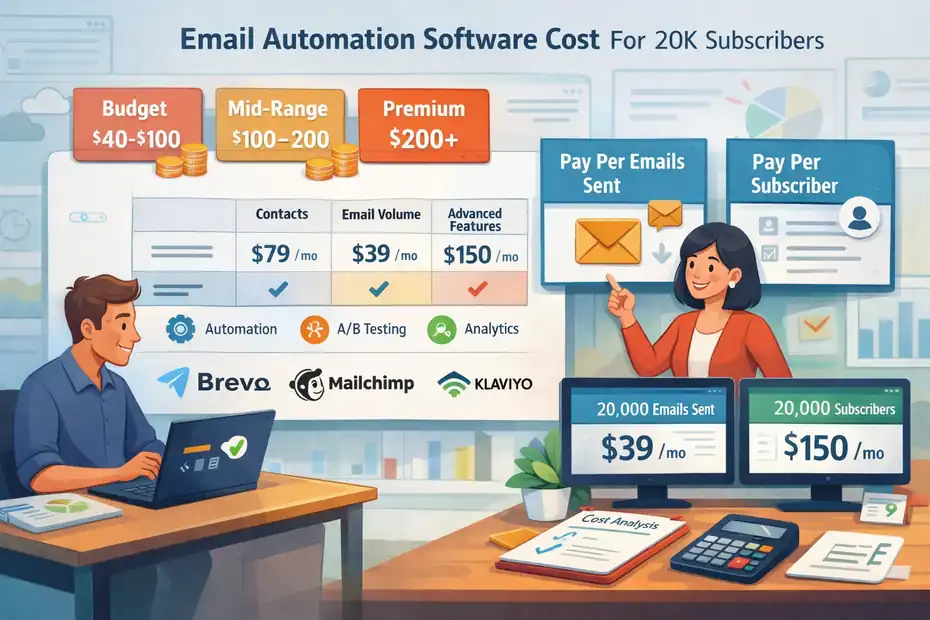
Email automation software cost for 20k subscribers usually lands in a much wider range than most people expect. You are not really buying “20,000 contacts.” You are buying a pricing model, a feature set, a sending allowance, and a certain level of complexity.
That is why one business can spend under $50 per month while another pays $200, $400, or more for a list the same size.
In my experience, the real question is not just what it costs, but what kind of business model makes that cost worth it.
What Email Automation Software Cost For 20K Subscribers Really Means
When you search for email automation software cost for 20k subscribers, you are usually trying to answer one of three questions: What will I pay every month, what features should be included at that price, and which platform gives me the best value for my business model.
What You Are Actually Paying For
At 20,000 subscribers, the monthly bill is rarely based on list size alone. Many platforms price around one or more of these variables:
- Contact count: You pay for the number of subscribers stored in your account.
- Email volume: You pay based on how many emails you send each month.
- Feature tier: Automation, advanced segmentation, A/B testing, and reporting often sit behind higher plans.
- Support and onboarding: Better support, migration help, and account strategy usually cost more.
This is why two tools can both say they support 20,000 subscribers while producing very different invoices. Brevo, for example, leans heavily on email volume instead of list size, while Klaviyo and many traditional platforms center pricing around active profiles or contact bands.
Why 20K Is A Pricing “Turning Point”
For many businesses, 20,000 subscribers is the point where email moves from a cheap channel to an actual budget line. That is also where automation starts to matter more.
You stop thinking only about newsletters and start caring about welcome sequences, abandoned cart flows, lead nurture campaigns, win-back automations, and segmentation rules.
That matters because email still has strong upside. Litmus reported in 2025 that many marketing leaders continued to see high returns from email, with 35% reporting $10 to $36 back per $1 spent, 30% reporting $36 to $50, and 5% reporting more than $50.
The Cost Trap Most Buyers Miss
I believe the biggest mistake is comparing sticker price without comparing operating style. A creator who emails twice a month does not need the same pricing model as an ecommerce brand running daily campaigns and behavior-based flows.
A cheap platform can become expensive through overages, feature limits, or the time your team loses working around missing automation tools.
ActiveCampaign, for example, notes flexible contact bands and also documents send limits and overage rules, which means list size is only part of the cost story.
Typical Monthly Cost Range At 20K Subscribers
The short answer is that email automation software cost for 20k subscribers often falls somewhere between about $40 and $300+ per month for mainstream platforms, with enterprise or ecommerce-heavy setups going higher depending on channels, service, and advanced features.
This section gives you the realistic bands.
Budget Range: Roughly $40 To $100 Per Month
This range is usually realistic if your platform is built for lower-cost sending, lighter automation needs, or list-friendly pricing.
Brevo is the clearest example because it prices around send volume, not just stored contacts. Its official pricing page shows paid plans beginning with email-volume allowances, and comparison content from MailerLite shows examples such as 20,000 emails for $29, 40,000 for $39, and 60,000 for $55. That can be excellent value when you have 20,000 subscribers but do not email all of them frequently.
MailerLite also sits in the value category. Its pricing page shows low starting prices for Growing Business and Advanced plans, and MailerLite’s own 2025 comparison article lists 10,000 subscribers at $73 and 50,000 at $289, which suggests 20,000 subscribers falls in a mid-range zone that is still much lower than many premium competitors.
Mid-Market Range: Roughly $100 To $200 Per Month
This is where many established small businesses end up. You typically get stronger automations, cleaner builders, better templates, and more segmentation depth.
Mailchimp lives in this band for many users. Its pricing pages confirm Standard and Premium tiers plus a 15% discount offer for businesses with 10,000+ contacts during the first 12 months.
Third-party pricing comparisons published by MailerLite place Mailchimp at about $110 for 10,000 subscribers and $385 for 50,000, which makes 20,000 subscribers a meaningful but not insane recurring expense.
Kit also tends to land in this zone for creators. Kit’s pricing interface explicitly includes 20,000 subscribers as a selectable band, and comparison content from MailerLite places Kit at $139 for 10,000 subscribers and $379 for 55,000, which implies a 20,000-subscriber account sits well above entry pricing but still below heavy ecommerce tools.
Premium Or Ecommerce-Centric Range: Roughly $150 To $300+ Per Month
This is common if you need advanced customer data, product-triggered automations, multi-step journeys, and higher-volume segmentation.
Klaviyo is a classic example. Its official pricing page confirms pricing is based on active profiles and send limits on the free tier, while comparison data from MailerLite shows Klaviyo at $150 for 10,000 subscribers and $720 for 50,000, making it one of the pricier options for growing ecommerce brands.
ActiveCampaign also often sits here once you need meaningful automation depth. Its pricing page highlights flexible contact bands and no setup fees, and MailerLite’s comparison places ActiveCampaign at $149 for 10,000 subscribers and $609 for 50,000 on a higher-feature plan comparison.
How Pricing Models Change The Real Cost
This is the part I recommend paying the most attention to. The platform that looks cheapest on a pricing page may be the wrong financial choice once your sending habits show up.
Contact-Based Pricing Works Best For Frequent Senders
Contact-based pricing is simple. If you have 20,000 people on your list, you pay for a 20,000-contact tier whether you send one newsletter or twenty. That sounds painful at first, but it can be cost-efficient if you send often.
Imagine you run a content-heavy brand with a weekly newsletter, a welcome sequence, a lead magnet series, and a re-engagement workflow. In that case, a contact-based model may actually protect you from rising send-volume costs.
This is a big reason why ecommerce and mature B2B teams sometimes tolerate higher platform fees. The predictability helps budgeting, especially when monthly volume varies.
Send-Volume Pricing Works Best For Large But Quiet Lists
Brevo is the obvious example here. Its model can be much cheaper when your list is big but your cadence is light. If you email 20,000 subscribers once or twice a month, you are not paying a “20,000 contact penalty” in the same way you would elsewhere.
Official and comparison materials both reinforce that Brevo’s plans center on monthly email volume, with example levels like 20,000, 40,000, 60,000, and 100,000 emails.
I suggest this model for businesses like:
- Consultants and agencies with occasional nurture emails
- Creators who send one newsletter per week or less
- Local businesses with long lists but infrequent campaigns
Active Profiles And “Billable Contacts” Can Change Everything
Klaviyo’s official pricing language focuses on active profiles, not just raw database size. That sounds like a subtle distinction, but it matters. If you keep lots of inactive contacts in your account and the platform still counts them, your bill grows faster than your revenue.
This is where list hygiene becomes a cost-control tactic, not just a deliverability tactic. If you suppress cold subscribers and clean dead weight, you may improve open rates and reduce your monthly bill at the same time.
Real Platform Examples For 20K Subscribers
You cannot judge email automation software cost for 20k subscribers without seeing actual platform patterns.
The numbers below are best treated as current directional pricing, not permanent guarantees, because vendors change bands, discounts, and packaging.
A Practical Comparison Snapshot
| Platform | Pricing Style | Useful Current Reference Point | Best Fit |
|---|---|---|---|
| Brevo | Email volume | Examples published at $29 for 20k emails, $39 for 40k, $55 for 60k | Large lists, lighter sending |
| MailerLite | Subscriber-based | $73 at 10k, $289 at 50k in comparison data | Budget-conscious businesses |
| Mailchimp | Contact-tier pricing | $110 at 10k, $385 at 50k in comparison data; 15% discount for 10k+ contacts on some plans | Familiar all-rounder |
| Kit | Subscriber-based | $139 at 10k, $379 at 55k in comparison data | Creators, courses, newsletters |
| ActiveCampaign | Contact-tier pricing | $149 at 10k, $609 at 50k in comparison data | Advanced automation users |
| Klaviyo | Active profile pricing | $150 at 10k, $720 at 50k in comparison data | Ecommerce-first brands |
| Omnisend | Contact count + credits by plan | Standard starts at $16; email credits equal contacts × 12; Pro starts at $59 with unlimited email | Ecommerce stores needing SMS paths |
What These Numbers Mean In Practice
The same 20,000-subscriber list can create very different monthly costs depending on the kind of business behind it.
A newsletter publisher might find Kit worth the premium because the product is shaped around creators. An ecommerce brand might gladly pay more for Klaviyo or Omnisend because revenue-tracking, segmentation, and product-triggered flows can justify the extra spend.
An agency or small B2B firm might choose ActiveCampaign because the automation builder saves labor even if the software itself is not the cheapest.
My Honest Take On Value
In my experience, the cheapest tool wins only when your needs are genuinely simple. Once you need dependable automations, flexible branching, detailed segmentation, or revenue attribution, low-cost platforms can start feeling expensive in a different way. You save cash but lose speed, precision, or visibility.
That is why I would not ask only, “What is the monthly price?” I would ask, “How much manual work does this tool remove?”
Features That Should Be Included At This Price
Once you reach 20,000 subscribers, you should expect more than just a sending engine.
The software should help you automate outcomes, not just broadcast emails.
Core Automation Features You Should Expect
At this list size, I would consider these basic, not premium:
- Welcome sequences
- Tag or segment-based triggers
- Behavior-based automations
- Basic A/B testing
- List cleaning or suppression tools
- Performance analytics
- Template builder
- Forms or popups
If a platform makes you upgrade just to build standard automations, that is a red flag.
Litmus also reported growing interest in AI and more advanced automation support, including using AI to improve how teams decide when and how emails trigger.
It also noted a major drop in teams taking two weeks or more to produce a single email, from 62% in past years to 6% in 2025, which suggests automation and AI are changing the productivity baseline.
Features Worth Paying Extra For
Some features genuinely deserve a higher bill if you will use them:
- Predictive sending or send-time optimization
- Revenue attribution
- Advanced ecommerce triggers
- CRM or sales pipeline tools
- Multi-channel automation with SMS or WhatsApp
- Dedicated onboarding or migration help
For example, ActiveCampaign emphasizes broad integrations and multi-channel capabilities, while Omnisend builds email and SMS together into ecommerce-focused plans.
Features You Probably Do Not Need Yet
I suggest being careful with flashy add-ons that sound strategic but rarely get used:
- Enterprise governance layers
- Large-seat team permissions
- Custom objects or advanced data warehousing
- Heavy AI modules you will not operationalize
At 20,000 subscribers, you can absolutely be overbuying software.
Hidden Costs That Inflate Your Budget
This is where buyers get burned. The monthly plan price is only part of the total cost of ownership.
Migration, Setup, And Cleanup Costs
Moving 20,000 subscribers is not always plug-and-play. You may need to:
- Rebuild forms
- Recreate automations
- Warm up sending reputation
- Clean inactive contacts
- Fix tags, fields, and segments
Even when a vendor offers free migration, your internal time still has a cost. ActiveCampaign highlights free migration and onboarding on its pricing materials, which can offset some switching friction.
Overage And Sending Limit Problems
Not every “unlimited” claim means what you think it means. Some plans cap emails by month, by contact multiple, or by channel.
Omnisend’s Standard plan, for example, states that email credits equal contact count × 12 per billing cycle, while Pro includes unlimited email.
ActiveCampaign also maintains help documentation around send limits and overage fees.
A realistic scenario: You have 20,000 subscribers, send four campaigns a month, and run two active automations. Suddenly your monthly send count is well beyond your “cheap” plan assumptions.
Paying For Dead Weight On Your List
A lot of businesses think 20,000 subscribers means 20,000 opportunities. In reality, some chunk of that list is often inactive, unengaged, or deliverability risk.
Cleaning the list can reduce cost and improve performance. MailerLite’s list management guidance makes the point bluntly: a smaller engaged list can be more profitable than a much larger disengaged one.
I strongly agree. A list of 14,000 engaged subscribers can outperform a bloated list of 20,000 almost every time.
How To Choose The Right Platform For Your Business Model
The best answer to email automation software cost for 20k subscribers depends less on company size and more on how you make money.
Best Choice For Creators And Newsletter Businesses
If you sell courses, memberships, sponsorships, or digital products around an audience-first business, Kit is often easier to justify than a general-purpose platform. Its pricing explicitly scales by subscriber band, and its product messaging centers on creator workflows and automations.
I would lean toward Kit when your questions sound like this:
- “How do I build evergreen sequences?”
- “How do I deliver lead magnets automatically?”
- “How do I segment readers by interests?”
Best Choice For Ecommerce Brands
For stores, I would usually look first at Klaviyo or Omnisend. Yes, they can cost more, but stores need deeper event-triggered automation, segmentation, and revenue tracking. Omnisend also packages email and SMS more directly for ecommerce, with Standard and Pro plans designed around contact count and send structure.
If one abandoned-cart flow pays for the platform, the conversation changes fast.
Best Choice For B2B, Agencies, And Service Businesses
For service businesses, agencies, coaches, or SaaS teams, ActiveCampaign often makes more sense than a pure newsletter tool. Its value is not “cheap email.” Its value is more sophisticated lifecycle automation and broader integration flexibility.
Brevo is also worth considering if your list is large but your send cadence is light. I especially like that angle for firms with big databases and modest monthly newsletters.
How To Lower Your Email Automation Software Cost Without Hurting Results
You do not always need to switch platforms to reduce spend. In many cases, the best savings come from tightening how you operate.
Clean Your List More Aggressively
This is the fastest lever. Remove or suppress subscribers who have not engaged in a long time. That can reduce billable contacts, improve opens, and lower spam risk at the same time.
A simple rule I suggest: review unengaged segments every 60 to 90 days. If someone has not opened or clicked in a long window, move them into a reactivation flow. If they still do nothing, suppress them.
Match Your Pricing Model To Your Send Behavior
This sounds obvious, but many businesses never do it.
- Infrequent sender with a big list: Volume-based pricing can save a lot.
- Frequent sender with strong engagement: Contact-based pricing may be more predictable.
- Store with revenue-producing automations: Higher software cost may still be the cheaper choice overall.
A lot of “email software is too expensive” complaints are really “we chose the wrong pricing architecture.”
Audit Features You Are Not Using
Look hard at your plan and ask:
- Are you paying for SMS you barely use?
- Are you on a premium tier just for one report?
- Are you buying seats or service levels you do not need?
- Are you paying extra for channels outside your actual strategy?
I believe this is where mature teams quietly waste the most money. They upgrade once for a feature, then never revisit the account structure.
Final Verdict
For most businesses, email automation software cost for 20k subscribers is not a single fixed number. A realistic range is roughly $40 to $300+ per month, with outliers above that when ecommerce complexity, multi-channel messaging, or premium service layers enter the picture.
Brevo and MailerLite tend to be friendlier on price for simpler or lighter-sending use cases, while Kit fits creators, and ActiveCampaign, Klaviyo, and Omnisend earn their higher cost when automation depth and revenue tracking matter more.
If I had to give one practical recommendation, it would be this: do not shop for the cheapest plan at 20,000 subscribers. Shop for the cheapest path to reliable revenue. That is usually the number that matters more.
FAQ
What is the average email automation software cost for 20k subscribers?
The average email automation software cost for 20k subscribers typically ranges from $40 to $300+ per month. Pricing depends on whether the platform charges by contacts, email volume, or features. Businesses with advanced automation or ecommerce needs often pay more than those with simple newsletter use cases.
Why does email automation software cost vary so much for 20k subscribers?
Costs vary because platforms use different pricing models such as contact-based, send-volume, or active user pricing. Feature access, automation complexity, and support levels also impact pricing. A business sending frequent campaigns or using advanced segmentation will usually pay more than one with basic email needs.
Is it cheaper to choose volume-based pricing for 20k subscribers?
Volume-based pricing can be cheaper if you send emails infrequently. This model charges based on the number of emails sent rather than total contacts. However, if you send emails often, costs can increase quickly, making contact-based pricing more predictable and sometimes more cost-effective.
What features should be included at this price level?
At 20k subscribers, you should expect automation workflows, segmentation, analytics, A/B testing, and email templates. More advanced plans may include predictive sending, revenue tracking, and multi-channel automation. Paying more is justified if these features directly improve conversions and save time.
How can I reduce email automation software cost for 20k subscribers?
You can reduce costs by cleaning inactive subscribers, choosing a pricing model that matches your sending frequency, and avoiding unused premium features. Regularly reviewing your plan and optimizing your email strategy helps ensure you are not overpaying while still maintaining strong performance.

Juxhin B is a digital marketing researcher and founder of JAK Digital Hub, specializing in email marketing software, marketing automation platforms, and digital growth tools. His work focuses on software testing, platform comparisons, and real-world performance analysis to help businesses choose the right marketing technology.
Related posts:
 GetResponse Automation Limits: What’s Actually Holding You Back?
 Best Email Automation Platform For Advanced Segmentation
 Email Automation Tool With Advanced Workflows: Top Picks
 Best Email Automation Software For Performance Marketers
 Email Automation For Multiple Brands Compared
 Best Email Automation Software For Subscription Business