Table of Contents
Some links on JAK Digital Hub are affiliate links, meaning we may earn a small commission at no extra cost to you. Read full disclaimer.
Email marketing has changed a lot over the last few years, and choosing the right email automation tool with advanced workflows can make the difference between sending basic newsletters and building a fully automated revenue engine.
If you’ve ever tried to manually send welcome emails, follow-ups, abandoned cart reminders, or lead nurturing sequences, you already know how messy it becomes. That’s exactly where advanced workflow automation comes in. Instead of reacting to every subscriber manually, you build smart sequences that trigger automatically based on behavior.
In this guide, I’ll walk you through the best email automation tools with advanced workflows in 2026, explain how they actually work, and show you how to choose one that fits your business stage. We’ll also cover real automation scenarios, pricing comparisons, and optimization strategies so you can build systems that run in the background while you focus on growing your business.
Email Automation Tool With Advanced Workflows: Top Picks
What an Email Automation Tool With Advanced Workflows Actually Does
Before choosing a platform, it helps to understand what “advanced workflows” really mean in practical terms.
Most basic email platforms allow you to send broadcasts or simple autoresponders. Advanced workflow tools go much further. They allow you to create multi-step automation sequences that react to subscriber behavior in real time.
Instead of sending the same email to everyone, the system adapts based on actions like:
- Email opens
- Link clicks
- Purchases
- Page visits
- Tags or list segmentation
- Time delays
- Custom conditions
In simple terms, an advanced workflow acts like a decision tree for your subscribers.
Example scenario:
Imagine you run an online course.
Automation flow example:
- A visitor downloads your free guide.
- The automation sends a welcome email.
- If the subscriber clicks a link about pricing → they enter a sales sequence.
- If they ignore the email → they receive educational content instead.
- If they purchase → the system stops the sales emails automatically.
All of this happens without manual intervention.
According to HubSpot’s 2025 marketing report, automated email campaigns generate 320% more revenue than non-automated campaigns, largely because of behavioral targeting.
Advanced workflow tools typically include:
- Visual automation builders
- Behavioral triggers
- Conditional logic
- CRM integration
- Ecommerce tracking
- Lead scoring
- Multi-channel automation (email, SMS, push notifications)
The difference between basic automation and advanced workflows is intelligence. Instead of scheduling emails, you’re building automated marketing systems.
Key Features That Define Advanced Email Automation Workflows
Not every automation platform is truly “advanced.” Some tools advertise automation but only provide basic autoresponders.
Let’s break down the features that actually matter when evaluating an email automation tool with advanced workflows.
Visual Workflow Builders
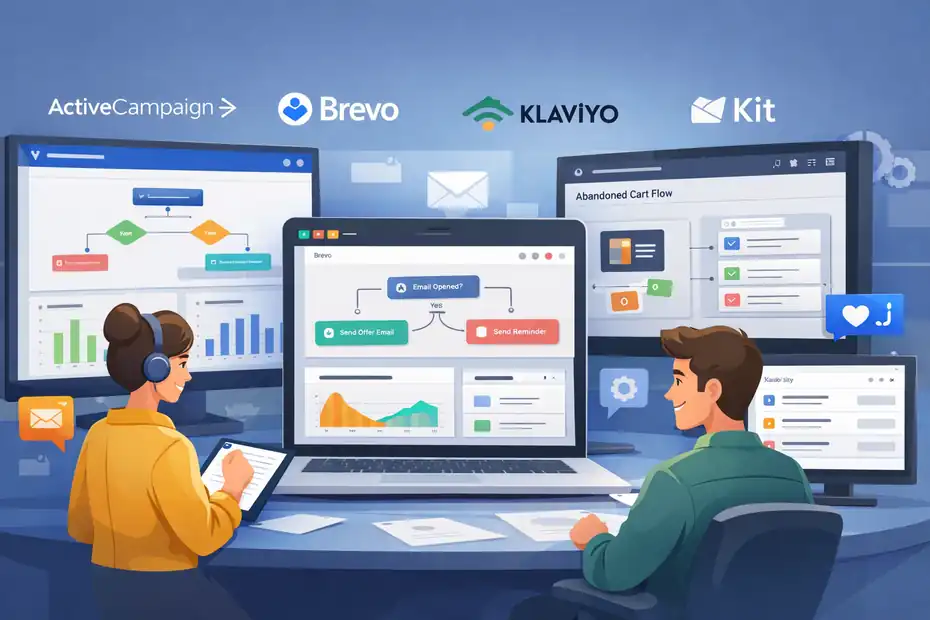
A visual automation builder allows you to design automation sequences using a drag-and-drop interface.
Instead of configuring complicated settings, you create workflows visually.
Typical elements include:
- Trigger blocks
- Conditions
- Time delays
- Email steps
- If/else logic
- Goal tracking
For example, platforms like ActiveCampaign and Brevo allow you to visually map out an entire customer journey.
Why this matters:
Complex automation becomes much easier to manage when you can see the entire flow instead of navigating hidden menus.
From my experience, visual builders also reduce automation mistakes, especially when workflows grow to 20+ steps.
Behavioral Triggers and Event Tracking
Advanced automation tools rely heavily on behavior-based triggers.
These triggers start workflows automatically when users perform specific actions.
Common triggers include:
- Subscriber joins a list
- Email opened
- Link clicked
- Product purchased
- Form submitted
- Website page visited
- Tag added or removed
Example:
Imagine you run an ecommerce store.
Trigger example:
If a user views a product page but does not purchase within 24 hours → send a reminder email with a discount.
Platforms that support strong behavioral tracking include:
Behavior-based automation dramatically increases relevance. Instead of guessing what your audience wants, your emails react to real user behavior.
Conditional Logic and Branching Paths
Conditional logic is where workflows become powerful.
Instead of sending the same sequence to everyone, advanced tools allow branching paths based on conditions.
Example logic:
- If subscriber clicks “pricing page” → enter sales funnel
- If subscriber clicks “blog content” → enter nurture sequence
- If subscriber purchases → exit automation
This type of if/then automation logic is essential for advanced personalization.
In my experience, conditional branching can easily double conversion rates because the messaging becomes highly relevant.
Example real scenario:
A SaaS company might run this workflow:
- User signs up for free trial.
- If they activate a key feature → send onboarding tips.
- If they don’t activate it within 48 hours → send tutorial videos.
- If trial expires → send upgrade offer.
Instead of a rigid email series, the workflow adapts to behavior.
Segmentation and Dynamic Personalization
Advanced automation tools also allow deep audience segmentation.
Segmentation allows you to group subscribers based on:
- Demographics
- Behavior
- Engagement
- Purchase history
- Lead score
- Tags or categories
Example segments:
- Highly engaged subscribers
- Repeat buyers
- Inactive users
- Free trial users
- Webinar attendees
Dynamic personalization can also change email content automatically.
For example:
An email could show different product recommendations depending on:
- Past purchases
- Category interests
- Location
- Device type
This level of targeting is one reason why segmented email campaigns generate up to 760% more revenue, according to Campaign Monitor research.
Top Email Automation Tools With Advanced Workflows (2026)
Let’s now look at the best platforms currently offering powerful automation workflows.
These tools were selected based on:
- Workflow complexity
- Automation flexibility
- Deliverability
- Integrations
- Pricing scalability
ActiveCampaign
ActiveCampaign is widely considered one of the most powerful email automation platforms available.
If your goal is to build highly customized workflows, it’s one of the best options.
Key automation strengths:
- Advanced visual automation builder
- Conditional branching
- CRM integration
- Lead scoring
- Predictive sending
- Website tracking
Example workflow capability:
You can build automation sequences that combine:
- Email triggers
- Sales pipeline actions
- CRM task assignments
- Behavioral tracking
For instance, a SaaS company could automatically move leads through a sales pipeline while sending personalized onboarding emails.
Pricing (2026 estimate):
| Plan | Starting Price |
|---|---|
| Starter | ~$39/month |
| Plus | ~$79/month |
| Pro | ~$149/month |
In my experience, ActiveCampaign is ideal for:
- SaaS businesses
- advanced affiliate marketers
- course creators
- marketing agencies
However, beginners sometimes find the interface overwhelming at first.
Brevo (formerly Sendinblue)
Brevo is one of the best automation platforms for small businesses that want advanced workflows without paying enterprise-level pricing.
Its automation builder supports:
- Event triggers
- Conditional logic
- Email + SMS workflows
- CRM integration
- ecommerce triggers
Example workflow:
An online store could automatically send:
- Abandoned cart reminders
- Discount offers after 24 hours
- Cross-sell emails after purchase
What makes Brevo attractive is its email sending model, which is based on volume instead of contacts.
Pricing example:
| Plan | Price |
|---|---|
| Free | Limited sends |
| Starter | ~$25/month |
| Business | ~$65/month |
Brevo works particularly well for:
- ecommerce brands
- small SaaS startups
- local businesses
- bloggers building newsletters
Klaviyo
Klaviyo is heavily focused on ecommerce automation.
If you run a Shopify, WooCommerce, or BigCommerce store, Klaviyo offers some of the most powerful purchase-driven workflows.
Advanced features include:
- deep ecommerce integrations
- customer lifetime value tracking
- product recommendation automation
- predictive analytics
- revenue attribution
Example automation flows:
- abandoned cart recovery
- browse abandonment emails
- replenishment reminders
- post-purchase cross-sell sequences
Real-world data shows that Klaviyo users often generate 20–30% of ecommerce revenue directly from automated flows.
Pricing overview:
| Subscribers | Price |
|---|---|
| Up to 500 | Free |
| 5,000 | ~$100/month |
| 10,000+ | Scales upward |
In my experience, Klaviyo is almost the default choice for serious ecommerce email marketing.
Kit (formerly ConvertKit)
Kit focuses heavily on creators, bloggers, and digital product sellers.
Its automation system is built around a concept called visual automation funnels.
Key workflow capabilities:
- tag-based automation
- subscriber segmentation
- product purchase triggers
- creator-friendly email sequences
Example automation:
A blogger might build this workflow:
- Subscriber downloads a free ebook.
- Automation sends a 5-email nurture sequence.
- If subscriber clicks product link → move to sales sequence.
- If subscriber purchases → move to customer onboarding sequence.
Kit simplifies automation for creators who don’t want complex CRM systems.
Pricing example:
| Plan | Price |
|---|---|
| Free | Up to 1,000 subscribers |
| Creator | ~$29/month |
| Creator Pro | ~$59/month |
This platform works best for:
- bloggers
- YouTubers
- course creators
- newsletter creators
How to Choose the Right Email Automation Tool
With so many platforms available, the best choice depends heavily on your business model.
Here’s a simplified comparison.
| Platform | Best For | Workflow Power | Learning Curve |
|---|---|---|---|
| ActiveCampaign | SaaS, agencies | Very advanced | Medium |
| Brevo | Small businesses | Strong | Easy |
| Klaviyo | Ecommerce | Very advanced | Medium |
| Kit | Creators & bloggers | Moderate | Easy |
When choosing a platform, I suggest focusing on three questions:
1. What triggers will your business need?
Example:
- ecommerce purchase triggers
- SaaS trial events
- blog content engagement
2. How complex will your workflows become?
If you plan to build 20+ step automation funnels, you’ll need a platform with strong visual automation.
3. How quickly will your list grow?
Some tools charge based on contacts, while others charge based on email sends.
Pricing scalability becomes important as your list grows past 10,000 subscribers.
Common Mistakes When Using Email Automation Workflows
Even the best email automation tool won’t perform well if the workflows are poorly designed.
Here are mistakes I see frequently.
Overcomplicated Automation
Many marketers build automation trees that are far too complex.
More conditions does not always mean better performance.
I usually recommend starting with 3–5 core automations:
- welcome sequence
- lead nurture funnel
- abandoned cart sequence
- re-engagement campaign
- post-purchase follow-up
You can expand later once the system works.
Ignoring List Hygiene
Automation workflows rely heavily on email deliverability.
If your list contains inactive subscribers, your emails may start landing in spam folders.
Best practice:
Run re-engagement campaigns every 90 days.
Example workflow:
- Identify inactive subscribers.
- Send a “still interested?” email.
- Remove subscribers who remain inactive.
This protects your sender reputation.
No Revenue Tracking
Many businesses run automation without measuring ROI.
Platforms like Klaviyo and ActiveCampaign provide revenue attribution tracking, which shows exactly how much each automation generates.
For example:
An abandoned cart workflow might generate $3,000/month.
Without tracking, you wouldn’t know which automation deserves further optimization.
Advanced Workflow Strategies to Maximize Results
Once your basic automation system is working, you can implement more advanced strategies.
Multi-Stage Lead Scoring
Lead scoring assigns points to subscribers based on engagement.
Example scoring system:
- Email open: +1 point
- Link click: +5 points
- Webinar attendance: +10 points
- Pricing page visit: +15 points
When a subscriber reaches a score threshold, they enter a sales sequence.
This helps prioritize high-intent leads.
Behavior-Based Product Recommendations
Ecommerce brands can dramatically increase revenue by using automation for personalized recommendations.
Example workflow:
If a customer buys running shoes → send email recommending socks, apparel, and accessories.
Many ecommerce automation platforms can dynamically insert these recommendations.
Lifecycle Email Automation
Instead of isolated campaigns, advanced marketers build customer lifecycle workflows.
Example lifecycle:
- New subscriber welcome sequence
- Educational nurture sequence
- Product promotion
- Customer onboarding
- Cross-sell campaigns
- Loyalty rewards
- Re-engagement campaigns
This approach turns email marketing into a long-term relationship channel rather than occasional promotions.
Final Thoughts
A powerful email automation tool with advanced workflows can transform email marketing from a manual task into a scalable growth system.
Instead of constantly sending emails yourself, you build automation that reacts to subscriber behavior automatically.
If you’re just starting out, tools like Brevo or Kit offer a gentle learning curve.
If you need deep automation and CRM integration, ActiveCampaign is one of the strongest options.
For ecommerce brands, Klaviyo remains one of the most powerful platforms available.
From what I’ve seen, the biggest gains rarely come from sending more emails. They come from sending the right email at the right moment based on behavior.
Once you build those workflows, email marketing becomes one of the highest ROI channels in your entire business.
And the best part? Much of it runs automatically in the background while you focus on creating value for your audience.
FAQ
What is an email automation tool with advanced workflows?
An email automation tool with advanced workflows is software that sends emails automatically based on subscriber behavior, conditions, and triggers. Instead of sending one-time campaigns, these tools create automated sequences that react to actions like link clicks, purchases, or sign-ups, allowing businesses to deliver personalized messages at the right time.
How do advanced email workflows improve marketing results?
Advanced workflows improve email marketing results by sending behavior-based emails rather than generic campaigns. For example, a subscriber who clicks a product link can automatically enter a targeted sales sequence. This level of personalization increases engagement, conversions, and revenue compared to basic autoresponders.
Which businesses benefit most from advanced email automation tools?
Businesses that rely on lead nurturing or repeat purchases benefit the most from advanced email automation tools. Ecommerce stores use them for abandoned cart emails and product recommendations, while bloggers, SaaS companies, and course creators use automated sequences to nurture leads and convert subscribers into customers.
What features should an email automation tool with advanced workflows include?
A strong email automation tool with advanced workflows should include a visual workflow builder, behavioral triggers, conditional logic, segmentation, and analytics tracking. These features allow marketers to build automated customer journeys that respond to subscriber actions instead of sending the same message to everyone.
What is the difference between basic email automation and advanced workflows?
Basic email automation typically sends simple sequences such as welcome emails or scheduled autoresponders. Advanced workflows go further by using behavioral triggers, conditional paths, and segmentation. This allows marketers to build dynamic email journeys where subscribers receive different messages depending on their actions.

Juxhin B is a digital marketing researcher and founder of JAK Digital Hub, specializing in email marketing software, marketing automation platforms, and digital growth tools. His work focuses on software testing, platform comparisons, and real-world performance analysis to help businesses choose the right marketing technology.
Related posts:
 Best Email Automation Platform For Advanced Segmentation
 Best Email Automation Platform For Scaling Business Fast
 Cheaper Email Automation System For Growing List Fast
 Email Automation Systems That Drive Revenue
 Email Automation Tools for New Ecommerce Store: What to Start With
 Email Automation Tools for 100k Subscribers: Best Value Picks