Table of Contents
Some links on JAK Digital Hub are affiliate links, meaning we may earn a small commission at no extra cost to you. Read full disclaimer.
Choosing the right email automation tool with CRM built in can completely change how a business manages leads, follow-ups, and sales. Instead of juggling separate email marketing software and customer databases, these platforms combine everything into one system—automation, contact management, segmentation, and pipeline tracking.
For bloggers, ecommerce stores, freelancers, and online businesses, this integration saves time and removes a lot of technical headaches. You can capture leads, track interactions, nurture subscribers, and close sales without constantly exporting data between tools.
I’ve tested many email platforms over the years, and the difference between email-only tools and automation platforms with built-in CRM is huge. The right system doesn’t just send newsletters—it manages your entire customer journey.
In this guide, I’ll walk you through the best email automation tools with CRM built in ranked, how they work, who they’re best for, and how to choose the right one for your business in 2026.
What Is an Email Automation Tool With CRM Built In?
An email automation tool with CRM built in combines email marketing automation and customer relationship management (CRM) into a single platform.
Instead of using separate software for managing contacts and sending automated emails, everything happens inside one system.
How Email Automation and CRM Work Together
Email automation focuses on trigger-based messaging—emails that automatically send when someone performs an action.
CRM focuses on tracking relationships with leads and customers.
When these systems merge, something powerful happens: your email automation can react to real customer behavior.
For example:
- A visitor downloads a lead magnet.
- The CRM creates a new contact.
- Automation triggers a welcome sequence.
- The system tracks email opens and clicks.
- When engagement increases, the lead moves into a sales pipeline.
In practical terms, this means your marketing and sales teams work from the same data source.
Instead of guessing where a lead is in the buying journey, the platform tells you.
Typical workflow might look like this:
- Lead enters through form
- Contact stored in CRM
- Automated email sequence begins
- Lead scoring updates based on behavior
- Qualified leads move to sales pipeline
Many businesses underestimate how valuable this is.
According to Salesforce research, companies using CRM systems improve sales productivity by up to 34% because teams spend less time managing data and more time engaging customers.
Key Features That Define These Platforms
Not every email marketing platform qualifies as an automation + CRM system. True platforms combine several core capabilities.
1. Contact management
Every subscriber becomes a record inside the CRM, including:
- Email history
- Website activity
- Tags and segmentation
- Purchase data
- Notes and tasks
2. Visual automation workflows
Most modern tools allow you to build automation with drag-and-drop workflow builders.
Example automation:
Subscriber joins list
→ Send welcome email
→ Wait 2 days
→ If email opened → send offer
→ If not opened → resend with new subject
3. Sales pipeline tracking
Many platforms include deal pipelines, where leads move through stages like:
- Lead
- Qualified
- Demo scheduled
- Proposal sent
- Closed
This is especially useful for service businesses or high-ticket products.
4. Lead scoring
Lead scoring assigns points based on behavior.
Example scoring model:
| Action | Score |
|---|---|
| Email open | +2 |
| Link click | +5 |
| Product page visit | +8 |
| Demo request | +20 |
Once a lead crosses a score threshold, automation can notify sales or trigger new campaigns.
5. Advanced segmentation
Instead of sending the same email to everyone, you can segment based on:
- behavior
- purchase history
- location
- engagement
This dramatically improves email performance.
Campaign Monitor reports that segmented campaigns can generate up to 760% more revenue than non-segmented campaigns.
Email Automation Tool With CRM Built In Ranked (2026)
There are dozens of email platforms available today, but only a handful truly combine advanced automation with powerful CRM capabilities.
Below are the platforms that consistently perform best across automation, CRM functionality, scalability, and pricing.
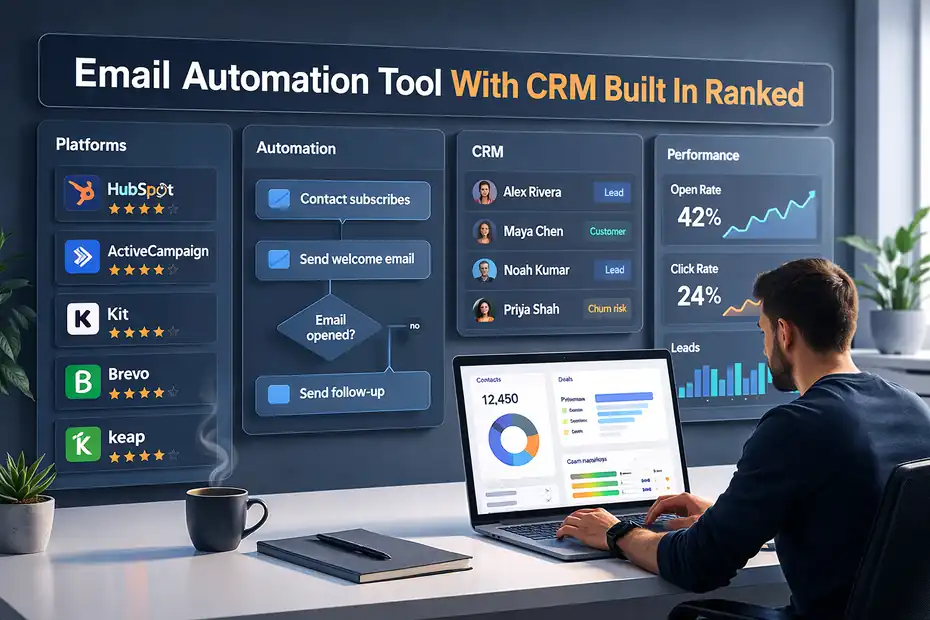
1. HubSpot
HubSpot is often considered the gold standard for email automation combined with CRM.
The platform was built around CRM from day one, which makes the integration between email marketing and contact management extremely powerful.
Key strengths include:
- Advanced marketing automation workflows
- Deep contact history tracking
- Built-in sales pipelines
- Powerful reporting dashboards
- Strong integrations with ecommerce and websites
One thing I personally like about HubSpot is how easy it is to visualize the entire customer journey.
For example, you can see:
- when someone visited your website
- which emails they opened
- what pages they viewed
- whether they interacted with sales
Few platforms track interactions this deeply.
However, the main downside is cost.
While HubSpot offers a free CRM and basic email tools, advanced automation features are locked behind higher pricing tiers.
Typical pricing:
| Plan | Monthly Price |
|---|---|
| Starter | ~$20 |
| Professional | ~$800+ |
| Enterprise | $3600+ |
Because of the price jump, HubSpot usually works best for:
- growing SaaS companies
- agencies
- large ecommerce stores
- marketing teams
2. ActiveCampaign
ActiveCampaign is one of the most popular email automation platforms with built-in CRM for small and medium businesses.
If HubSpot is the enterprise powerhouse, ActiveCampaign is the automation specialist.
Where it shines most is automation complexity.
You can build extremely detailed workflows that respond to:
- page visits
- email engagement
- purchase events
- tags
- custom fields
Many marketers choose ActiveCampaign specifically for its visual automation builder, which is one of the most flexible systems available.
CRM features include:
- deal pipelines
- lead scoring
- automated sales tasks
- contact history tracking
Here’s a simplified automation example:
Lead downloads guide
→ Tag: SEO Guide
→ Send welcome email
→ Wait 3 days
→ If link clicked → add sales pipeline
→ Notify sales rep
Pricing is relatively accessible.
| Plan | Monthly Price |
|---|---|
| Starter | ~$29 |
| Plus | ~$49 |
| Pro | ~$79 |
From what I’ve seen, ActiveCampaign often becomes the best balance between price and automation power.
It works especially well for:
- bloggers
- course creators
- digital product businesses
- affiliate marketers
3. Kit (formerly ConvertKit)
Kit focuses heavily on creators, bloggers, and digital entrepreneurs.
Unlike enterprise CRM systems, Kit keeps things simple while still offering automation and basic contact management.
This makes it easier to learn than most CRM-based platforms.
Core features include:
- visual email automation
- subscriber tagging
- landing pages
- email sequences
- creator-friendly monetization tools
Instead of complex pipelines, Kit organizes contacts using tags and segments.
For example:
- Tag: Newsletter
- Tag: Product Buyer
- Tag: Webinar Lead
Automation can then trigger based on tags.
Example workflow:
User buys product
→ Add tag: Customer
→ Remove tag: Prospect
→ Start onboarding sequence
Pricing typically starts around:
| Plan | Monthly Price |
|---|---|
| Free | Up to 1000 subscribers |
| Creator | ~$15 |
| Creator Pro | ~$29 |
I often recommend Kit for:
- bloggers
- newsletter creators
- YouTubers
- personal brands
It’s not as powerful as enterprise CRM systems, but for creators it hits the sweet spot.
4. Brevo (formerly Sendinblue)
Brevo is one of the most affordable email automation platforms that also includes CRM features.
Many small businesses choose it because it offers:
- email marketing
- SMS campaigns
- CRM
- live chat
- automation workflows
All inside one dashboard.
Brevo’s CRM tracks:
- contacts
- deals
- communication history
- tasks and notes
Automation is based on event triggers such as:
- email engagement
- purchases
- contact updates
Brevo also uses a unique pricing model based on emails sent rather than number of contacts, which can significantly reduce costs.
Typical pricing:
| Plan | Monthly Price |
|---|---|
| Free | 300 emails/day |
| Starter | ~$25 |
| Business | ~$65 |
For small ecommerce stores or startups, Brevo can be one of the most cost-effective options.
5. Keap (formerly Infusionsoft)
Keap focuses on sales automation and CRM-driven marketing.
It’s particularly popular among service businesses and consultants who need strong client management features.
Keap combines:
- email automation
- CRM
- appointment scheduling
- invoicing
- sales pipelines
This makes it more of a business operations platform rather than just an email tool.
Example automation inside Keap:
New lead enters CRM
→ Send welcome email
→ Assign sales rep
→ Schedule follow-up task
→ Send reminder SMS
The CRM component is especially strong for tracking long sales cycles.
Pricing is higher than most email tools.
| Plan | Monthly Price |
|---|---|
| Pro | ~$159 |
| Max | ~$229 |
Because of that, Keap works best for:
- coaches
- consultants
- agencies
- service providers
How to Choose the Right Email Automation Tool With CRM Built In
Choosing the right platform isn’t just about features. It’s about matching the tool to your business model and growth stage.
Match the Tool to Your Business Model
Different businesses need different levels of CRM complexity.
For example:
| Business Type | Recommended Platform |
|---|---|
| Blogger | Kit |
| Affiliate marketer | ActiveCampaign |
| SaaS company | HubSpot |
| Small ecommerce store | Brevo |
| Consultant or agency | Keap |
If your main focus is content and email newsletters, a creator-focused platform works better.
If you run sales teams and pipelines, a stronger CRM system becomes necessary.
In my experience, many beginners make the mistake of choosing enterprise-level software too early, which adds complexity without delivering real benefits.
Start with something that fits your current workflow.
You can always migrate later.
Consider Automation Complexity
Not every business needs advanced automation.
A simple creator workflow might only require:
- welcome email
- nurture sequence
- product launch campaign
But if you run a larger business, you may want automation that responds to:
- website behavior
- purchase triggers
- lead scoring
- CRM pipeline movement
Platforms like ActiveCampaign excel here.
Before choosing a tool, I recommend sketching out your ideal workflow.
Ask yourself:
- What should happen after someone subscribes?
- What happens after they buy?
- What happens if they stop engaging?
Your answers will determine how complex your automation system needs to be.
Evaluate Pricing as You Scale
One hidden challenge with email platforms is pricing growth.
Some platforms charge based on contacts, others charge based on email volume.
As your list grows, the price difference becomes significant.
Here’s a simplified comparison:
| Subscribers | Typical Monthly Cost |
|---|---|
| 1,000 | $15–$30 |
| 10,000 | $80–$150 |
| 50,000 | $300–$600 |
Before committing to a platform, always check pricing tiers for larger lists.
Otherwise, a tool that seems cheap today might become extremely expensive later.
Common Mistakes When Choosing Email Automation Platforms
Choosing the wrong email automation system can create technical headaches later.
I’ve seen businesses rebuild entire marketing systems simply because their original platform couldn’t support their growth.
Choosing an Email Tool Without True CRM
Some platforms advertise CRM features but only offer basic contact storage.
A real CRM should include:
- contact timelines
- interaction tracking
- lead scoring
- deal pipelines
- automation triggers tied to sales stages
Without these features, you’re basically using a traditional email tool with a contact list.
Always verify the CRM capabilities before committing.
Overpaying for Features You Won’t Use
Enterprise platforms often include features most small businesses never touch.
Examples include:
- advanced predictive analytics
- enterprise permission structures
- multi-region infrastructure
- complex API management
While these features sound impressive, they rarely provide value for smaller teams.
Instead of choosing the most powerful platform available, choose the simplest system that solves your real workflow problems.
Ignoring Migration Flexibility
Switching email platforms later can be surprisingly difficult.
Some platforms make migration easier by allowing:
- easy contact export
- automation rebuilding
- integration flexibility
Others lock data into proprietary systems.
If you plan to grow quickly, consider whether the platform supports clean migration or integrations with other marketing tools.
Advanced Automation Strategies Using CRM Data
Once your system is set up, the real magic happens when you start using CRM data to personalize automation.
Behavioral Email Sequences
Behavior-based email sequences react to what a subscriber actually does.
Examples include:
- Sending product recommendations after browsing a category
- Triggering abandoned cart reminders
- Offering discounts after repeated visits
Behavioral targeting works because it sends emails at the moment of highest interest.
Research from Omnisend shows that automated emails generate 320% more revenue than standard promotional emails.
Lead Scoring for Sales Automation
Lead scoring can dramatically improve sales efficiency.
Here’s a basic scoring framework:
| Behavior | Points |
|---|---|
| Opens email | +2 |
| Clicks link | +5 |
| Visits pricing page | +10 |
| Requests demo | +20 |
When a lead crosses a threshold (for example 50 points), automation can:
- notify sales
- move the contact into a pipeline
- trigger a high-intent email sequence
This prevents sales teams from chasing low-quality leads.
Lifecycle Email Marketing
Lifecycle marketing sends different emails depending on where someone is in the customer journey.
Typical lifecycle stages include:
- Subscriber
- Engaged lead
- Customer
- Repeat buyer
- Advocate
Each stage should receive different messaging.
For example:
- subscribers receive education
- leads receive product benefits
- customers receive onboarding
- advocates receive referral programs
When email automation integrates with CRM data, lifecycle marketing becomes much easier to implement.
Final Thoughts
Finding the right email automation tool with CRM built in can simplify your entire marketing and sales workflow.
Instead of managing disconnected systems, these platforms bring together:
- email marketing
- automation workflows
- contact management
- sales pipelines
- behavioral tracking
If you’re just getting started, tools like Kit, Brevo, or ActiveCampaign offer excellent balance between ease of use and automation power.
For larger teams or complex sales processes, HubSpot or Keap provide deeper CRM capabilities.
Ultimately, the best platform is the one that fits your business today while still giving you room to grow.
Start simple, build your automation workflows gradually, and focus on creating meaningful relationships with your subscribers.
Because in the end, the most powerful automation system isn’t the one with the most features.
It’s the one that helps you connect with people at the right moment.
FAQ
What is an email automation tool with CRM built in?
An email automation tool with CRM built in combines email marketing automation and customer relationship management in one platform. It lets businesses manage contacts, track interactions, automate email campaigns, and monitor sales pipelines without using separate marketing and CRM software.
Why should businesses use an email automation tool with CRM built in?
Using an email automation tool with CRM built in helps businesses track leads, automate follow-ups, and manage customer relationships from one system. This reduces manual work, improves targeting, and increases conversion rates by sending emails based on customer behavior.
What features should you look for in an email automation tool with CRM built in?
Key features include contact management, visual automation workflows, lead scoring, segmentation, sales pipelines, and behavioral tracking. These capabilities allow businesses to nurture leads automatically while monitoring the entire customer journey from subscriber to paying customer.
Which businesses benefit most from email automation tools with CRM built in?
Bloggers, ecommerce stores, freelancers, agencies, and SaaS companies benefit the most. These tools help manage subscribers, nurture leads with automated sequences, track engagement, and organize prospects inside a CRM without switching between multiple platforms.
How do email automation tools with CRM improve marketing performance?
Email automation tools with CRM improve marketing by triggering personalized emails based on behavior. Businesses can segment contacts, track interactions, and automatically send relevant messages, which increases engagement, improves lead quality, and boosts overall sales conversions.

Juxhin B is a digital marketing researcher and founder of JAK Digital Hub, specializing in email marketing software, marketing automation platforms, and digital growth tools. His work focuses on software testing, platform comparisons, and real-world performance analysis to help businesses choose the right marketing technology.
Related posts:
 Best Email Automation System That Scales Affordably
 Should You Upgrade Email Automation Platform For Scaling?
 Cheaper Email Automation System For Growing List Fast
 Best Email Automation Tool For Affiliate Marketers
 Email Automation Tools for New Ecommerce Store: What to Start With
 Is There Better Email Automation Software For Ecommerce?