Table of Contents
Some links on JAK Digital Hub are affiliate links, meaning we may earn a small commission at no extra cost to you. Read full disclaimer.
Email automation tools cost for 20k subscribers can feel like a financial guessing game. One minute you’re paying $49/month, and the next you cross a list threshold and your software bill quietly doubles.
If you’re scaling toward (or already at) 20,000 subscribers, pricing isn’t just about features anymore — it’s about profitability, margins, migration fear, and whether your tool is actually worth the cost.
Let’s break down exactly what you’ll pay in 2026, tool by tool.
Kit Pricing For 20k Subscribers In 2026
Email automation tools cost for 20k subscribers varies a lot, and Kit is usually the first tool creators compare because of its simplicity. At 20,000 subscribers, pricing jumps in meaningful ways, so understanding the real monthly cost matters.
Monthly Cost On Creator And Creator Pro Plans
For 20k subscribers, Kit’s pricing typically places you in its mid-tier ecosystem. The Creator Plan often sits in the ~$129–$149/month range, while the Creator Pro Plan tends to land closer to ~$179–$199/month as of 2026.
In my experience, the jump happens fast once your list crosses 10k—many creators don’t see it coming.
I’ve walked a few clients through their invoices, and the biggest surprise isn’t the monthly fee but how quickly annual billing becomes the only way to control costs.
If you’re budgeting, assume the annual plan is about 10–15% cheaper, but still sizable.
What Automation Features Are Included At 20k
At 20k subscribers, you unlock all core automations, including:
- Visual automation builder (great for onboarding and nurture sequences)
- Rules-based tagging and segmentation
- Behavior-triggered workflows
- Creator Network recommendations
What I personally love: Kit keeps things simple enough that you actually use the automation instead of feeling overwhelmed. But the simplicity comes with limitations—especially if you need advanced behavioral logic or multi-branch conditions.
If your business requires behavior-based scoring, deep eCommerce triggers, or advanced A/B testing, you’ll likely feel these limits immediately.
Hidden Costs: Commerce, Team Seats, Add-Ons
Here’s where most creators feel the “pricing creep”:
- Commerce Fees: Kit charges platform fees for digital products. If you’re selling a high-volume low-ticket offer, these fees add up fast.
- Team Seats: Extra users increase the bill if you’re running operations with a small team.
- Deliverability Add-Ons: Some creators end up paying for additional tools to handle warmups, domain monitoring, or spam-score checks because Kit doesn’t include advanced deliverability tools by default.
I’ve seen creators assume the base price is all they’ll pay—until they start selling or collaborating. At 20k subscribers, these extras can elevate your real monthly cost by 10–30%.
When Kit Becomes Expensive For Scaling Creators
Kit stops being “cheap” once your business crosses two thresholds:
- High-frequency sending. If you email daily, your ROI drops unless your email revenue per subscriber is strong.
- Advanced funnels. If you rely on customer journeys, lead scoring, or multi-condition automations, Kit forces you into workarounds or complementary tools.
A quick rule of thumb I use with clients:
If your email list generates less than $1 per subscriber monthly, Kit’s Pro-level pricing can feel heavy once you hit 20k.
It’s still creator-friendly—but it’s no longer budget-friendly.
ActiveCampaign Pricing For 20k Contacts Breakdown

The moment someone asks me about email automation tools cost for 20k subscribers, ActiveCampaign almost always enters the conversation. That’s because it offers deep automation—sometimes too deep. But pricing is usually where people pause.
Lite Vs Plus Vs Pro Plan Cost Differences
At 20k contacts, ActiveCampaign’s pricing widens dramatically by tier:
- Lite: Usually around ~$229–$259/month
- Plus: Typically ~$339–$379/month
- Professional: Often ~$449–$549/month
The jump is so big because pricing is tied not just to subscriber count but also to automation, CRM, and reporting capabilities. If you want anything beyond basic drip sequences, Lite becomes limiting fast.
When I help clients choose plans, I often see them land on Plus because Lite lacks essential tools like:
- CRM functions
- Lead scoring
- Contact attribution
- Advanced conditional logic
Pro is usually for businesses running sales teams or complex automations across multiple customer journeys.
Automation Depth Compared To Entry Tools
ActiveCampaign’s automation engine is in a different league than entry tools like Kit or MailerLite. You get:
- Conditional branching
- Split testing inside automation flows
- Dynamic content swapping
- Multi-channel triggers
If you’re running a multi-product business or you want automated retargeting tied to user activity, this depth is a lifesaver.
But here’s the honest truth:
Most creators at 20k subscribers use only 20–30% of ActiveCampaign’s automation power.
Advanced doesn’t equal necessary. But it does equal pricey.
CRM And Sales Automation Price Impact
Once you activate CRM or pipeline automations, your costs creep upward—not always in subscription fees, but in operational overhead.
For example:
- Adding deal pipelines increases internal complexity
- Sales team permissions add extra charges
- Event-based tracking sometimes requires a developer or Zapier layer
- Advanced attribution requires integration fees or technical setup
If you’re not actively selling high-ticket offers, this pricing tier becomes more cost than value.
Reality Check: Is ActiveCampaign Overkill?
The honest answer: It depends on your business model.
ActiveCampaign becomes overkill when:
- You only send newsletters + a few automations
- You don’t run complex sales pipelines
- You rely heavily on simple tagging instead of deep segmentation
But it becomes a profit driver when:
- You run multiple product funnels
- You need detailed customer journeys
- You measure revenue attribution
- You automate sales follow-ups
I tell creators this all the time:
If automation complexity saves you hours or increases conversions, ActiveCampaign pays for itself. If not, you’re overpaying for unused power.
Brevo Pricing For 20k Subscribers Explained
When people ask me about the email automation tools cost for 20k subscribers, Brevo usually pops up because its pricing model works differently than most email platforms.
Instead of simply charging based on subscribers, Brevo uses a hybrid model that mixes contact limits with email volume limits—which can be great or frustrating depending on how you email.
Contact-Based Vs Email Volume Pricing
Brevo’s pricing at 20k subscribers is a little unique because your cost depends on how often you email. With their Marketing Platform tiers, the Starter plan remains relatively affordable, but the real pricing shift happens once you increase your monthly email volume.
Here’s the part most people don’t notice at first:
Brevo often appears cheaper upfront, but heavy senders quickly experience plan creep once they start emailing daily or running automated sequences.
For 20k contacts, you’re usually looking at:
- A lower base price compared to traditional email tools
- But a higher cost if you send 300k+ emails per month (very normal at 20k subscribers)
In my experience, Brevo is cost-effective if you send 4–6 campaigns per month, but once you push beyond that, pricing can climb as fast as tools like ActiveCampaign.
Marketing Automation Limits On Each Plan
Brevo keeps some of its automation features behind mid-tier plans and above. At 20k subscribers, the limiting factors to watch are:
- Workflow caps (Starter plan restricts you)
- Advanced branching rules (conditional splits, dynamic paths)
- A/B testing inside automation sequences
- Multi-step scoring models for segmentation
Creators running basic newsletters and welcome sequences never feel these limits. But ecommerce brands or funnel-heavy businesses usually hit them within weeks.
One of my ecommerce clients tried using Brevo’s lower-tier plan and hit a wall the moment they wanted to create a multi-step abandoned checkout flow. Once they upgraded, the automation features were fantastic—but the cost doubled.
SMS And Transactional Cost Add-Ons
Brevo is one of the few platforms that blends email, SMS, and transactional email in one dashboard, but each has its own costs:
- SMS credits are billed per message and per country, and they add up very fast if you run cart reminders or OTP flows.
- Transactional emails (order confirmations, password resets, account creation emails) require separate credit packs.
- Dedicated IPs become recommended at higher sending volumes, which adds another monthly cost.
If you run an ecommerce store, you’ll likely use all three communication channels, so budgeting realistically becomes important.
A quick example:
A Shopify store sending 500–800 transactional emails per day could easily spend an additional $20–60/month on transactional credits alone.
Best Fit: Ecommerce Vs Content Creators
Brevo tends to shine brightest for ecommerce brands because of:
- Native SMS marketing integration
- Transactional email support
- Solid API integrations
- Affordable entry-level email volume
If you’re a creator or blogger, Brevo is a good fit if you:
- Send only a few campaigns per month
- Want a lightweight automation tool
- Prefer transparent pricing
But if your business sends high-frequency newsletters or relies on deep behavior-based segmentation, you may outgrow Brevo faster than expected.
I often summarize Brevo like this:
It’s brilliant for ecommerce stores with moderate send volume, and “just fine” for creators who want simple automation at low cost.
MailerLite Cost For 20k Subscribers Detailed
When evaluating the email automation tools cost for 20k subscribers, MailerLite is often seen as the “budget-friendly alternative.” And yes, it can be inexpensive—but only up to a point. At 20k subscribers, the pricing and limitations start becoming much more noticeable.
Advanced Plan Monthly Pricing At 20k
MailerLite’s Advanced plan is where most 20k-subscriber businesses land, mostly because the lower tiers lack essential features like:
- Multiple automation triggers
- Advanced segmentation
- Promotion pop-ups
- Dynamic email content
At 20k subscribers, the Advanced plan typically falls in the ~$100–$140/month range.
But here’s the part many people overlook:
MailerLite requires you to upgrade if you want features that most creators consider “basic” once they hit 15k+ subscribers.
If you’re trying to save money, it’s still cheaper than Mailchimp, but the gap narrows fast.
Automation Capabilities And Limitations
MailerLite is simple, intuitive, and friendly—but still limited compared to tools like ActiveCampaign or Brevo. At 20k, the limitations start to matter more because your automations become revenue drivers instead of “nice-to-haves.”
Here are the bottlenecks I see most often:
- No advanced workflow branching
- No native lead scoring
- Limited ecommerce triggers
- No multi-path A/B testing inside automations
If your automation strategy is mainly:
- Welcome sequence
- Newsletter
- A simple funnel
…then MailerLite is enough.
But if you want a multi-step behavioral journey (browse abandonment, multi-tag scoring, interest-based filtering, etc.), you’ll hit the ceiling quickly.
I once helped a SaaS founder scale from 10k to 20k subscribers on MailerLite. By 18k subscribers, we were copying and pasting workaround automations because of the branching limits. It worked, but it wasn’t elegant—and it raised operational complexity.
Deliverability And Infrastructure Considerations
MailerLite has historically had solid deliverability, but at 20k subscribers, deliverability becomes business critical. Issues I often see include:
- Shared IP congestion during peak seasons
- Need for manual warmups after list imports
- Occasional spam-folder placement with Gmail if engagement dips
MailerLite can perform well, but it requires more maintenance.
Creators with large lists often need to:
- Clean their list every 60–90 days
- Monitor bounce rates and spam complaints manually
- Use separate tools for deep deliverability tracking
This is why some 20k+ lists move to enterprise-level infrastructures like ActiveCampaign or Klaviyo—they want stability without constant monitoring.
When MailerLite Stops Being “Budget Friendly”
MailerLite’s affordability starts to diminish when:
- You run multiple automations
- Your send volume increases
- You need advanced analytics or attribution
- You rely on ecommerce behavioral triggers
- You need team access or advanced user roles
A helpful way I describe it is:
MailerLite stays cheap only if your marketing stays simple.
The moment your list grows into a revenue engine (which usually happens around the 20k mark), the limitations push you toward higher-tier plans—or toward another platform entirely.
MailerLite is still a great choice for creators who want predictable pricing and simple workflows. But for fast-scaling brands, the hidden costs show up as time, workarounds, or missed automation opportunities.
GetResponse Pricing At 20k Subscriber Level

When people ask me about the email automation tools cost for 20k subscribers, GetResponse is one of those tools that looks affordable at first glance—but the pricing shifts once you add webinars, funnels, and ecommerce automation.
At the 20k mark, you really start to feel what GetResponse is built for.
Marketing Automation Plan Cost Overview
For 20,000 subscribers, GetResponse typically places you inside its Marketing Automation or Ecommerce Marketing tiers. The Marketing Automation plan usually sits in the ~$119–$139/month range, depending on billing cycle, and includes advanced automation workflows, segmentation, and event-triggered emails.
From my experience, this plan is where most digital product creators land because it unlocks the automation builder—the main reason people upgrade from the Email Marketing tier.
But once you run complex sequences or multi-branch workflows, you’ll start eyeing the Ecommerce plan, which increases the monthly cost significantly.
When comparing cost vs features, I often tell clients:
Webinar And Funnel Builder Price Impact
GetResponse has something most email platforms don’t: Webinars built directly into your account.
That sounds amazing until you look at the actual cost implications:
- Adding webinars bumps you into higher tiers.
- The attendee limit impacts your pricing.
- Automated webinars require upper-tier plans.
If you run a webinar-heavy business model—like weekly workshops or evergreen funnel webinars—GetResponse becomes cost-effective because you replace tools like Zoom or Demio.
But if you only run a webinar once every few months, you’ll end up paying for functionality you barely use. I’ve seen creators save $600–$1,000/year by offloading webinars to a standalone tool instead of staying in a higher GetResponse tier.
Ecommerce Automation Pricing Factors
The Ecommerce Marketing plan unlocks features like:
- Transactional emails
- Cart abandonment flows
- Product-based segmentation
- Event triggers from Shopify or WooCommerce
These features are powerful for ecommerce brands, but they also bump your monthly payment into the ~$200+/month range once your list hits 20k subscribers.
A scenario I see often:
An online store grows past 15k subscribers, turns on cart abandonment, and suddenly needs more automation depth—so they upgrade. This instantly adds 40–70% to their monthly bill.
GetResponse shines when you need an all-in-one email + funnels + webinars + ecommerce engine. But that convenience comes with a noticeable pricing curve.
Long-Term Scaling Cost Projection
Once your list grows beyond 20k, GetResponse pricing accelerates. List size is the main driver, and every tier jump adds $30–$70/month.
In a two-year projection for a client scaling from 20k → 40k subscribers:
- Costs increased by roughly 65%
- Automation usage doubled
- Webinar attendance stayed the same
- ROI remained positive because of ecommerce automation
So the takeaway is simple:
GetResponse scales well when you’re making money from your automations. It becomes expensive when you’re not.
Mailchimp Cost For 20k Subscribers Analyzed
The email automation tools cost for 20k subscribers becomes especially dramatic when you look at Mailchimp. Mailchimp is famously expensive at scale, and the 20k threshold is where creators often start feeling “locked in” financially.
Standard Vs Premium Plan At 20k
Mailchimp’s pricing structure forces most 20k lists into either the Standard or Premium tier.
What this usually looks like:
- Standard Plan: Often ~$230–$260/month
- Premium Plan: Frequently $350–$500/month depending on required features
Here’s the kicker:
Many core marketing features are locked behind Premium once your automations or segmentation needs increase.
This is why Mailchimp’s pricing escalates faster than nearly every competitor.
Automation Restrictions By Tier
Mailchimp’s automation engine is deceptively limited unless you’re on Premium. Even on Standard, you’ll run into roadblocks such as:
- No advanced conditional branching
- Limited send-time optimization
- Restricted access to multivariate testing
- Fewer behavioral triggers
- Inflexible customer journey mapping
I worked with a creator who wanted to build a multi-branch nurture sequence based on link clicks. They were shocked to learn they needed the Premium plan—doubling their monthly cost—just to unlock basic branching.
Contact Overages And Audience Structure Costs
Mailchimp counts contacts in a way that often results in inflated costs:
- Unsubscribed contacts still count unless manually removed
- Duplicate emails in different audiences count separately
- Archived contacts require maintenance
- Overages trigger immediate billing increases
This is where Mailchimp can silently get pricey. A list of 20k can actually cost as much as 22k–24k subscribers if not cleaned correctly.
I’ve seen accounts overpay by $80–$150/month purely because of contact storage inefficiencies.
Why Mailchimp Gets Expensive Fast
There are four pricing accelerators inside Mailchimp’s ecosystem:
- Audience structure limitations force creators into managing multiple lists.
- Automation limitations push users toward higher tiers.
- Overage fees quietly add up.
- Premium-only features lock essential growth tools behind a paywall.
Mailchimp works well for beginners, but at 20k subscribers, it often becomes the most expensive mainstream platform.
I often tell creators:
Mailchimp doesn’t scale with you. It scales against you.
Comparing Email Automation Tools Side By Side
Here’s where things get real. When you compare email automation tools cost for 20k subscribers directly, the differences become much clearer—and it’s easier to see which tool fits your business stage and sending habits.
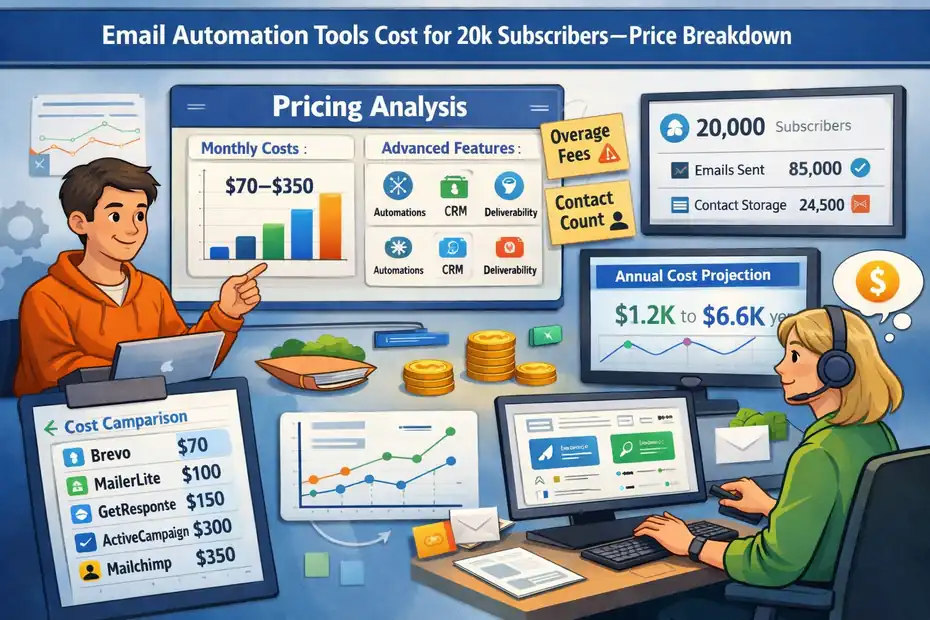
Monthly Pricing Table For 20k Subscribers
(Estimated 2026 pricing — actual numbers vary by billing cycle and plan.)
| Platform | Approx. Monthly Cost | Notes |
| Kit | $129–$199 | Great for creators, limited on complex automation. |
| ActiveCampaign | $229–$549 | Deep automation; pricey at scale. |
| Brevo | $70–$200+ | Email volume determines total cost. |
| MailerLite | $100–$140 | Affordable but limited for advanced funnels. |
| GetResponse | $119–$200+ | Strong automation + webinars elevate cost. |
| Mailchimp | $230–$500+ | Most expensive at this subscriber tier. |
This table alone can save someone hours of research.
Cost Per Subscriber Comparison
Here’s the simplified breakdown of cost per subscriber at the 20k level:
- Most affordable: Brevo & MailerLite
- Mid-range: Kit & GetResponse
- Highest cost: ActiveCampaign & Mailchimp
This matters because cost per subscriber is directly tied to profitability. I like using this metric when clients feel stuck between two similar tools.
Automation Depth Vs Monthly Investment
If we map automation depth to cost, the trend usually looks like this:
| Platform | Automation Depth | Cost Efficiency |
| MailerLite | Low | High |
| Kit | Medium | Medium |
| Brevo | Medium | High–Medium (depends on send volume) |
| GetResponse | High | Medium |
| ActiveCampaign | Very High | Low–Medium |
| Mailchimp | Medium | Low |
A quick rule I use:
If your automations generate revenue, invest in depth. If not, invest in simplicity.
Best Value By Business Stage
Here’s how I break things down when advising different types of creators and businesses:
- Beginners / low send volume: MailerLite or Brevo
- Growing creators with digital products: Kit or GetResponse
- Ecommerce or multi-product businesses: GetResponse or ActiveCampaign
- Complex segmentation or sales pipelines: ActiveCampaign
- Avoid at scale: Mailchimp (costs escalate too quickly)
If someone wants the simplest answer possible, I usually say:
Choose based on how much automation you actually use—not the automation you think you’ll use someday.
Hidden Fees That Increase Email Software Costs
Once your list reaches the 20k level, the email automation tools cost for 20k subscribers doesn’t just grow in obvious ways—it grows in sneaky ones. These are the fees that don’t show up in the pricing table but absolutely show up on your invoice.
Contact Counting Methods That Inflate Bills
Every email platform counts contacts differently, and honestly, this is where creators lose the most money without realizing it.
Some tools count:
- Unsubscribed contacts as billable
- Archived or inactive contacts as billable
- Duplicate emails across multiple lists separately
- Engaged and unengaged subscribers the same
Platforms like Mailchimp and others often bill for “stored contacts,” not just “sendable contacts.” A single creator I worked with deleted 6,000 archived contacts and instantly saved $120/month.
If you want to control costs, run a contact audit every 60–90 days. It’s boring, yes—but it’s hands-down one of the simplest ways to lower your software bill.
Migration Costs And Switching Penalties
Switching platforms sounds like a clean reset, but moving 20k subscribers is rarely cheap—or easy.
Costs usually show up in three forms:
- Time: It can take 5–30 hours to move automations, segments, and tags.
- Money: Some tools charge setup or import fees at higher tiers.
- Revenue disruption: Automations often go offline temporarily, and that can impact sales.
I once helped a client migrate from ActiveCampaign to GetResponse, and we discovered 41 automations running behind the scenes. Rebuilding them took two weeks—and during that window, their funnel revenue dipped by 22%.
Migration is not just about cost. It’s about momentum.
Add-Ons That Quietly Raise Your Invoice
Many platforms bundle irresistible extras that seem cheap individually but compound fast at scale:
- Transactional email credits
- Additional team seats
- SMS credits
- Dedicated IPs
- AI content tools
- List verification services
Tools like Brevo or Kit often start inexpensive, but the moment you add SMS or additional users, your monthly cost can jump 20–40%.
My personal rule:
If you didn’t plan for it but you’re paying for it, it’s an add-on problem—not a growth problem.
Overage Charges And Deliverability Tools
When you exceed your monthly email volume or subscriber limit, overage fees kick in automatically. These are usually small but annoying—especially if you send frequent campaigns.
Deliverability tools add additional costs because you might need:
- Dedicated warmup tools
- Domain warmup services
- Bounce monitoring
- Spam testing tools
At 20k subscribers, deliverability is money. Bad inbox placement can cost more in lost revenue than overage fees ever will.
How To Choose Based On Revenue Stage
The right email platform depends far more on your revenue stage than on your subscriber count. I’ve seen creators waste thousands simply because they chose a tool two stages too early.
Under $5k Monthly Revenue Decision Guide
If you’re still building financial stability, keep your costs down. At this stage, simpler is smarter.
I’d recommend tools like:
Both platforms are budget-friendly and handle:
- Welcome sequences
- Basic segmentation
- Newsletters
- Light ecommerce automation
Here’s the mindset shift:
Your goal at this stage is survival, not sophistication.
Choose the tool that keeps your operating costs low while teaching you the fundamentals of automation.
$5k–$20k Revenue Optimization Strategy
At this stage, your email list becomes a revenue engine, not just an audience. Your automations start generating meaningful income, and you need tools that support:
- Multi-branch workflows
- Lead scoring
- Behavioral triggers
- Funnel segmentation
Tools like Kit or GetResponse tend to work well because they balance automation depth with affordability.
If your digital product sales rely heavily on email, upgrading from a simpler system is usually worth it. One client increased LTV by 18% simply by adding a branching logic “interest tag split” to their funnel—something their cheaper tool couldn’t support.
Scaling Past $20k Monthly Without Margin Loss
Once you’re earning real revenue through email, your needs change dramatically. You start to look for:
- Predictable deliverability
- Deep analytics
- Revenue attribution
- CRM-level segmenting
- Multi-channel automation
This is where ActiveCampaign becomes a serious contender.
However, with growth comes margin pressure. A tool that costs $300/month isn’t a big deal when email earns $8k–$15k per month. But a tool that costs $600+/month needs to justify every dollar.
A helpful perspective:
At scale, automation tools don’t cost money—they save or make it. But only if you actually use their advanced features.
When To Upgrade Vs When To Switch
Upgrade your tool when:
- Your automation ideas exceed your platform limitations
- You’re losing revenue due to lack of segmentation
- Manual work is costing you hours weekly
Switch your tool when:
- Your bills increase faster than your revenue
- You’re using less than 30% of your platform
- Deliverability becomes a recurring issue
- Your automation map is more duct tape than system
Every upgrade should come from a place of strategic need—not FOMO.
Total Annual Cost Projection For 20k Lists
To truly understand the email automation tools cost for 20k subscribers, you can’t just look at monthly pricing. You need to look at annual and two-year projections—because that’s where the real money goes.
Monthly Vs Annual Billing Savings
Most platforms offer 10–20% savings for annual billing. Here’s what that typically looks like:
| Platform | Monthly Price | Annual Equivalent | Savings |
| Kit | $129–$199 | ~$1,399–$2,150/year | ~12% |
| MailerLite | $100–$140 | ~$1,080–$1,500/year | ~10% |
| GetResponse | $119–$200 | ~$1,280–$2,160/year | ~15% |
| ActiveCampaign | $229–$549 | ~$2,200–$5,800/year | ~20% |
| Mailchimp | $230–$500 | ~$2,400–$5,400/year | ~10% |
| Brevo | $70–$200 | ~$750–$2,100/year | ~12% |
Creators who switch to annual often save $300–$800 per year. But—this only makes sense if you’re committed to your tool for 12 months.
Two-Year Cost Comparison Scenario
Let’s imagine a realistic two-year journey from 20k subscribers to 35k subscribers.
If we assume moderate growth, here’s a simplified projection:
| Platform | Year 1 Cost | Year 2 Cost | 2-Year Total |
| Kit | ~$1,500–$2,100 | ~$1,900–$2,700 | ~$3,400–$4,800 |
| MailerLite | ~$1,100–$1,500 | ~$1,400–$1,900 | ~$2,500–$3,400 |
| GetResponse | ~$1,300–$2,000 | ~$1,700–$2,600 | ~$3,000–$4,600 |
| ActiveCampaign | ~$2,200–$5,800 | ~$2,800–$6,800 | ~$5,000–$12,600 |
| Mailchimp | ~$2,400–$5,400 | ~$3,000–$7,000 | ~$5,400–$12,400 |
| Brevo | ~$750–$2,100 | ~$1,100–$2,600 | ~$1,850–$4,700 |
ActiveCampaign and Mailchimp clearly scale the fastest in cost, while MailerLite and Brevo stay the most stable.
Break-Even Analysis Based On Email Revenue
Here’s a simple rule I use with clients:
Your email platform should cost no more than 3–7% of your monthly email revenue.
So if your email generates:
- $3k/month → spend $90–$210
- $10k/month → spend $300–$700
- $25k/month → spend $750–$1,750
When your software exceeds those percentages, it’s usually a sign that:
- Your deliverability isn’t optimized
- Your automations aren’t converting
- Your platform is too advanced for your current stage
- Or too limited, causing missed revenue opportunities
Final Cost Reality Check For 2026
Let me share the honest bottom line:
For 20k subscribers, expect to spend anywhere from $1,200 to $12,000 per year depending on the platform and your needs.
The wide range isn’t a trap—it’s flexibility. Email software costs more as your business becomes more capable of earning more.
The best advice I can give you is simple:
- Choose a platform sized for today
- Build with the future in mind
- Avoid tools you’ll outgrow in six months
- And never upgrade features you won’t actively use
Email isn’t expensive when it’s done well. Email is expensive when it’s done accidentally.
FAQ
How much do email automation tools cost for 20k subscribers?
The email automation tools cost for 20k subscribers typically ranges from $70 to $550 per month depending on the platform. Budget tools like Brevo and MailerLite are on the lower end, while advanced platforms like ActiveCampaign and Mailchimp sit at the higher end.
Why does the cost increase so much once you reach 20k subscribers?
Most platforms raise prices at 20k because higher list sizes require more sending volume, more automation capacity, and additional deliverability resources. Some tools also bill for stored contacts, overages, and advanced features needed at larger list sizes.
Which platform is the most cost-effective for 20k subscribers?
Brevo and MailerLite are the most cost-effective options for 20k subscribers if you want simple automation. For deeper automation at a reasonable price, GetResponse offers strong value. ActiveCampaign and Mailchimp are powerful but the most expensive at this list size.

Juxhin B is a digital marketing researcher and founder of JAK Digital Hub, specializing in email marketing software, marketing automation platforms, and digital growth tools. His work focuses on software testing, platform comparisons, and real-world performance analysis to help businesses choose the right marketing technology.
Related posts:
 Moosend Alternatives for Small Business: What Works Better?
 GetResponse vs MailerLite Automation: Which One Actually Converts Better?
 Moosend vs MailerLite Pricing: Which One Saves You More?
 7 GetResponse Alternatives For Small Business Growth
 Best MailerLite Alternatives for Small Business Growth
 Email Leads Not Converting? Fix It With This Framework