Table of Contents
Some links on JAK Digital Hub are affiliate links, meaning we may earn a small commission at no extra cost to you. Read full disclaimer.
When people finally hit the email leads for 100k contacts stage, the first shock usually isn’t the size of the list—it’s the cost that comes with it.
I’ve been there myself, doing the math, comparing platforms, and wondering why no one talks about the real budget you need once your list becomes an actual business asset.
In this outline, we’ll break down the true costs, tool by tool, so you can plan without surprises.
Real Monthly Costs Across Major Email Platforms For 100K Contacts
Once you cross into email leads for 100k contacts, the cost curve changes fast. Most platforms jump tiers, add required features, or quietly shift you into “enterprise” land.
Here’s what that really looks like when you break it down platform by platform.
Pricing Breakdown For Mailchimp At The 100K List Tier
Mailchimp is often the first platform people outgrow because costs escalate quickly once you hit six-figure subscriber volumes.
Mailchimp typically charges based on contact count, not sends—so even dead contacts cost you money. In my experience helping clients migrate, 100K contacts usually pushes businesses into Mailchimp’s upper-tier plans whether they want the “Premium” features or not.
Estimated Monthly Cost for 100K Contacts (2026):
| Plan Level | Approx. Cost | Notes |
| Standard | ~$700–$900/mo | Usually capped before 100K, often forces upgrade. |
| Premium | ~$1,200–$1,500/mo | Realistically required at this list size. |
A quick heads-up: Mailchimp also charges extra for features like multivariate testing, advanced segmentation, and priority support—features most brands at this scale actually need.
If you stay with Mailchimp at 100K, it’s usually because of brand familiarity, not price efficiency.
Actual Cost Structure For Brevo Plans Supporting 100K Contacts
Brevo flips the script by charging primarily based on sending volume rather than list size. That means you can technically store 100K contacts cheaply—but your email frequency will determine your bill.
For brands sending 6–12 campaigns per month, numbers tend to look like this:
Estimated Monthly Cost for 100K Contacts (2026):
| Monthly Sends | Approx. Cost | Notes |
| 300K emails | ~$65–$100/mo | Great for businesses sending very few campaigns. |
| 1M emails | ~$200–$230/mo | The sweet spot for most 100K-list businesses. |
| 3M emails | ~$500–$600/mo | High-frequency senders; still cheaper than others. |
Brevo is the most budget-friendly option if you don’t mind paying for volume instead of list size.
A small trick I often recommend: Use automation instead of blast campaigns. Automation (welcome flows, browse abandonment, upsells) creates higher revenue per send, so you stay under your volume tier longer.
Total Ownership Costs When Using Klaviyo For 100K Subscribers
Klaviyo is built for ecommerce, and the pricing reflects that. It’s powerful, but definitely not cheap once your subscriber count balloons.
Estimated Monthly Cost for 100K Contacts (Email + SMS Optional):
| Tier | Approx. Monthly Cost | Notes |
| Email Only | ~$1,600–$1,900/mo | Advanced automations included. |
| Email + SMS | ~$2,000–$3,000/mo | Depends heavily on SMS volume. |
The real “cost” of Klaviyo is actually send frequency. When ecommerce brands crank up weekly or even daily emails, their bill scales fast.
But here’s the flip side: Klaviyo can 2–4x revenue per contact versus cheaper tools due to its event-level data, predictive analytics, and deep Shopify integrations.
If you’re ecommerce, Klaviyo often pays for itself — but it’s still one of the pricier options.
Enterprise-Level Pricing Considerations For HubSpot Marketing Hub At Large List Volumes
HubSpot is amazing when your email list is tightly integrated with CRM, sales teams, customer service, and automations—but it’s an expensive leap.
Estimated Monthly Cost for 100K Contacts (Marketing Hub Professional):
| Plan | Approx. Cost | Notes |
| Professional | ~$1,600–$2,500/mo | Includes 2K–5K contacts; add-ons required. |
| Additional 95K Contacts | +$600–$1,200/mo | Cost depends on increments. |
| Enterprise | ~$3,600+/mo | Usually where 100K-list businesses land. |
With HubSpot, you’re not paying for “email marketing” anymore—you’re paying for a unified ecosystem.
If your team isn’t using CRM workflows or sales pipelines, HubSpot becomes unnecessarily expensive at 100K subscribers.
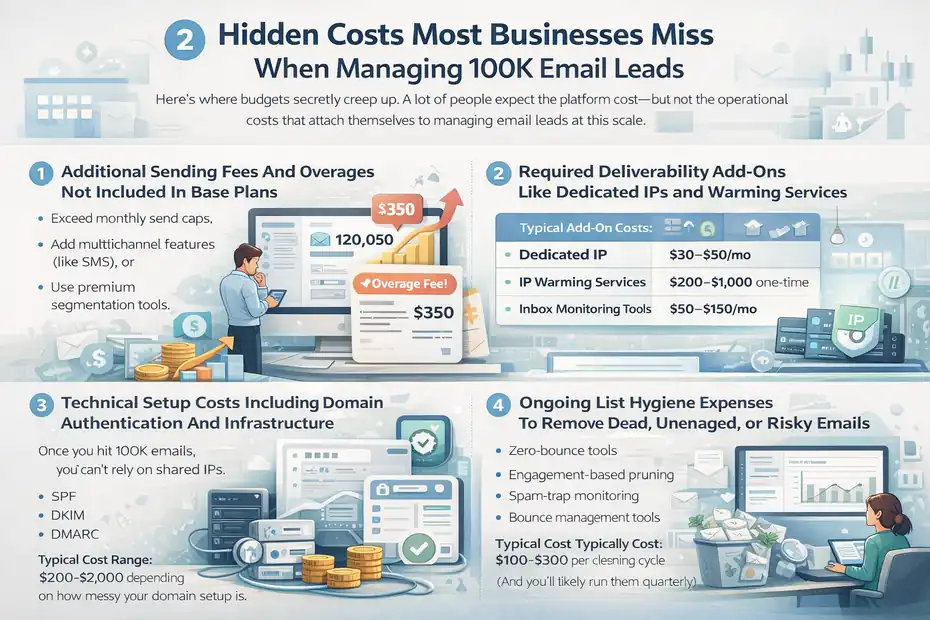
Hidden Costs Most Businesses Miss When Managing 100K Email Leads
Here’s where budgets secretly creep up.
A lot of people expect the platform cost—but not the operational costs that attach themselves to managing email leads at this scale.
Additional Sending Fees And Overages Not Included In Base Plans
Many platforms quietly charge more when you:
- exceed monthly send caps,
- add multichannel features (like SMS), or
- use premium segmentation tools.
For example: Brevo charges per extra send, Klaviyo scales bills based on event-based usage, and Mailchimp penalizes you for unintentional overages.
I’ve seen businesses add 20–40% to their monthly bill from simple mistakes like forgetting to exclude unengaged contacts during promotions.
Required Deliverability Add-Ons Like Dedicated IPs And Warming Services
Once you hit 100K emails, you can’t rely on shared IPs anymore. Your sending reputation becomes too fragile.
Typical Add-On Costs:
| Deliverability Item | Approx. Cost |
| Dedicated IP | $30–$50/mo |
| IP Warming Services | $200–$1,000 one-time |
| Inbox Monitoring Tools | $50–$150/mo |
This part surprises people because it isn’t optional. If your deliverability drops, your revenue drops. At 100K subscribers, a 5% drop in inbox placement can easily mean losing thousands per month.
Technical Setup Costs Including Domain Authentication And Infrastructure
I know this part feels more “technical,” but let me simplify:
To send safely at 100K volume, you need:
- SPF
- DKIM
- DMARC
- BIMI (optional but confidence-boosting)
If you don’t set these up correctly, platforms rate-limit you or block your sends.
You might need:
- A developer
- A deliverability consultant
- A DNS specialist
- A platform onboarding package
Typical Cost Range: $200–$2,000 depending on how messy your domain setup is.
(I’ve personally seen ecommerce brands lose entire holiday weekends over a single misconfigured DNS record.)
Ongoing List Hygiene Expenses To Remove Dead, Unengaged, Or Risky Emails
At 100K contacts, list hygiene is no longer “nice to have.” It’s required to maintain deliverability and control costs.
Most businesses use:
- Zero-bounce tools
- Engagement-based pruning
- Spam-trap monitoring
- Bounce management tools
Cleaning Tools Typically Cost: $100–$300 per cleaning cycle (And you’ll likely run them quarterly.)
It feels counterintuitive to pay to delete subscribers, but keeping them actually costs more in the long run—both in platform fees and deliverability issues.
Cost Differences Between Engaged vs. Unengaged Lists At The 100K Level
This is the part that almost no one talks about, but it’s where the biggest savings usually come from.
Keeping unengaged subscribers is one of the most expensive mistakes businesses make with email leads at 100K scale.
How Engagement Levels Directly Influence Platform Pricing And Sending Volume
Platforms price differently, but they all punish large inactive lists one way or another.
- Mailchimp charges for every contact, even cold ones.
- Klaviyo increases cost as your sending and event tracking scales.
- Brevo charges for send volume—cold subscribers drain your budget every time you email them.
- HubSpot charges for contact storage—even if they haven’t opened an email in 18 months.
Here’s the simple math I often show clients: If 40% of your 100K list hasn’t opened an email in 6 months… You’re overpaying for 40,000 people every month. At Klaviyo or HubSpot pricing, this can mean $400–$800 in pure waste. Every. Single. Month.
Why Keeping Cold Subscribers Increases Costs And Hurts ROI
Cold subscribers tank:
- Deliverability
- Inbox placement
- Open rates
- Revenue per send
And when inbox placement drops, Gmail and Outlook start sending more emails to promotions or spam—hurting the performance of engaged subscribers too.
You end up paying more while making less.
One ecommerce brand I worked with pruned 28K cold contacts and saw:
- A 22% increase in inbox placement
- A 14% lift in open rates
- A 38% reduction in monthly Klaviyo costs
Sometimes saving money and making more money happen at the exact same moment.
Financial Impact Of Regular List Pruning On Your Annual Spending
Let me show you a simple scenario.
Scenario:
100K subscribers
30% unengaged (30,000 people)
If your platform charges ~$15 per 1,000 contacts (Mailchimp/Klaviyo ballpark), the math looks like:
30,000 / 1,000 × $15 = $450/mo in wasted spend
$450 × 12 months = $5,400/year burned
And that’s before:
- deliverability impact
- lower revenue per send
- reduced campaign performance
In other words: Cleaning your list is one of the easiest ways to cut costs without sacrificing results.
Data Storage, CRM, And Automation Costs That Push Budgets Higher
Once you hit 100K contacts, the email bill is only part of the story. CRM storage, automation workflows, and tracking tools start adding their own line items — and honestly, this is where people are most surprised.
I’ve seen budgets jump 20–40% from these “supporting” costs alone.
CRM Contact Storage Fees Beyond Email Sending Costs
One thing I learned the hard way is that CRM storage fees start stacking quickly once you grow past “small business” size.
Platforms treat CRM contacts separately from email subscribers — meaning even people who never opted into marketing emails still count toward your total CRM cost.
A few patterns I see again and again:
- CRM tools often charge per 1,000 stored contacts, not just active email subscribers.
- Deleted contacts sometimes remain billable unless you permanently purge them.
- Contacts synced from ecommerce platforms (like Shopify) bloat your CRM faster than expected.
Typical CRM Storage Pricing (For 100K Contacts)
| Platform | Approx. Storage Cost | Notes |
| Mailchimp CRM | Included, but charged per contact | You pay whether they’re engaged or not. |
| Brevo CRM | Free storage; pay for sends | Great for cost control. |
| Klaviyo CRM | Included, but scales with list size | Automatically rises as subscriber count grows. |
| HubSpot CRM | Free core CRM but Marketing contacts cost extra | Storage balloons fast past 50K. |
Pro tip from personal experience: If your CRM lets you separate marketing contacts from non-marketing contacts, do it. It can shave thousands off your annual bill.
Workflow Automation Charges That Scale With Subscriber Count
Automations look small at first — a welcome flow here, an abandoned cart reminder there — but when they’re firing thousands of times a day, they quietly consume your send volume and event tracking budget.
The bigger your list, the more expensive your automations become, because:
- More people enter flows each day.
- More events get tracked (clicks, views, revenue).
- More branching logic = more system load and billable actions.
A Quick Example
If 2% of your 100K contacts enter your welcome sequence daily:
- That’s 2,000 new automation triggers per day.
- Across 30 days, that’s 60,000 automated sends per month.
- Most platforms charge for those just like regular campaigns.
This is where brands accidentally double their sending volume without noticing.
Automation is still worth it — the ROI is huge — but it does add cost.
Additional Tracking, Segmentation, And Analytics Costs
As your list grows, your analytics footprint expands right along with it.
Things like:
- Predictive analytics
- Revenue attribution
- Behavioral segmentation
- A/B and multivariate testing
- Real-time dashboards
… all sound fancy (and they are), but they also trigger extra fees on higher-tier plans.
Cost Ranges I See Most Often
| Feature | Typical Additional Cost | Why It Matters |
| Predictive insights | +$50–$200/mo | Helps forecast LTV + churn. |
| Advanced segmentation | Often locked behind premium tiers | Required once you have 100K+ variations. |
| Revenue attribution | +$100–$300/mo | Must-have for ecommerce accuracy. |
| Multivariate testing | Premium-only | Improves performance but adds cost. |
The real challenge isn’t the price — it’s that these upgrades become essential at 100K, not optional.
Comparing The Total Annual Cost Of 100K Contacts Across Top Platforms
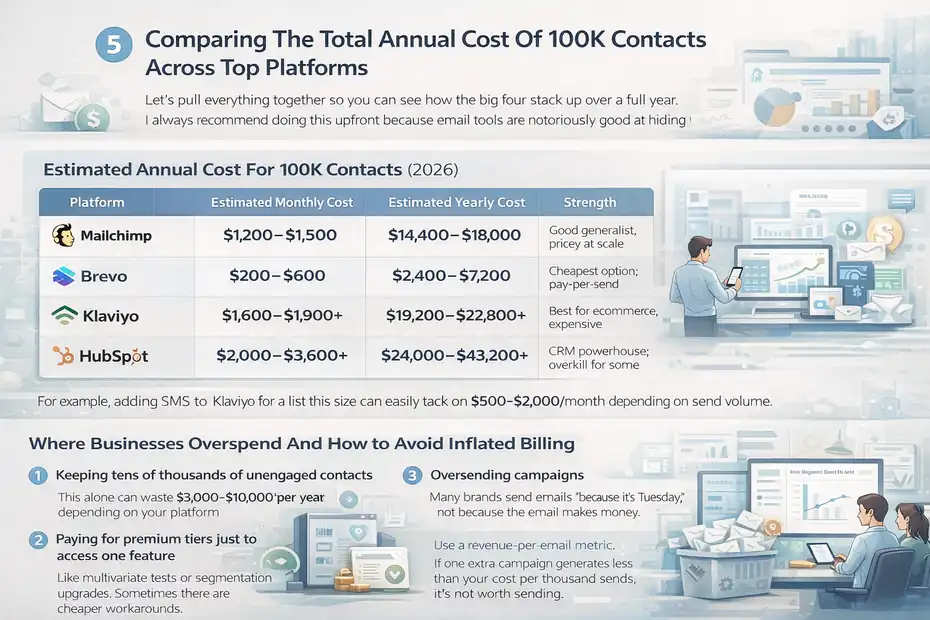
Let’s pull everything together so you can see how the big four stack up over a full year.
I always recommend doing this upfront because email tools are notoriously good at hiding the “true total.”
Summary Cost Model For Mailchimp, Brevo, Klaviyo, And HubSpot
Below is a simplified but realistic estimate based on what I’ve seen working with clients.
Estimated Annual Cost For 100K Contacts (2026)
| Platform | Estimated Monthly Cost | Estimated Yearly Cost | Strength |
| Mailchimp | $1,200–$1,500 | $14,400–$18,000 | Good generalist, pricey at scale |
| Brevo | $200–$600 | $2,400–$7,200 | Cheapest option; pay-per-send |
| Klaviyo | $1,600–$1,900+ | $19,200–$22,800+ | Best for ecommerce, expensive |
| HubSpot | $2,000–$3,600+ | $24,000–$43,200+ | CRM powerhouse; overkill for some |
If you ever wondered why people start talking about “email migrations” at the 100K point… well, this table explains it.
How Pricing Changes When Adding SMS, Multichannel, Or Advanced Automation
Costs don’t just go up — they compound.
Here’s what usually triggers unexpected price jumps:
- SMS (high CPC rates; costs can exceed email 10–20x per contact)
- WhatsApp or multichannel add-ons
- Priority or advanced deliverability support
- Higher automation throughput
- Advanced segmentation capabilities
For example, adding SMS to Klaviyo for a list this size can easily tack on $500–$2,000/month depending on send volume.
Multichannel sounds shiny, but you should only add what you’ll truly use.
Where Businesses Overspend And How To Avoid Inflated Billing
After auditing dozens of accounts, here are the three biggest money leaks I see:
1. Keeping tens of thousands of unengaged contacts
This alone can waste $3,000–$10,000 per year depending on your platform.
2. Paying for premium tiers just to access one feature
Like multivariate tests or segmentation upgrades. Sometimes there are cheaper workarounds.
3. Oversending campaigns
Many brands send emails “because it’s Tuesday,” not because the email makes money.
Personal tip: Use a revenue-per-email metric. If one extra campaign generates less than your cost per thousand sends, it’s not worth sending.
What Influences Cost The Most When Scaling To 100K Email Leads
Not all cost increases come from your platform. Some come from decisions you make day to day — especially how often you send, how you collect leads, and how you structure your list.
How Send Frequency Multiplies Monthly Costs
Sending more isn’t always better — especially when every send is billable.
Here’s a quick example:
- 100K contacts
- 4 emails per month = 400,000 sends
- 12 emails per month = 1,200,000 sends
- 20 emails per month = 2,000,000 sends
Your cost can triple without adding a single new subscriber.
Some brands increase frequency because they think they “should,” but if increased send volume inflates your bill faster than it increases revenue, it’s working against you.
Try running a simple test:
- Reduce send frequency by 20–30%.
- Watch if engagement rates improve.
- Compare revenue per send before and after.
You might be surprised — most brands make more by sending less.
Impact Of Buying vs. Organically Acquiring Large Email Lists
I’ll say this gently but firmly: buying lists is a cost trap.
Here’s why:
- Purchased emails rarely engage.
- They trigger spam complaints (which are costly to fix).
- They inflate your list, which inflates your bill.
- They hurt trust with your ESP, damaging deliverability.
Even worse, you end up paying for:
- compliance tools
- list cleaning
- deliverability repair
- additional sending costs
Organic growth (content, lead magnets, opt-in forms) is slower, but your cost per high-quality subscriber is dramatically lower over time.
Think long-term health, not short-term vanity metrics.
The Cost Difference Between Single-List And Multi-Segment Strategy
A lot of platforms let you split your list into multiple audiences — but doing this wrong can literally double your bill.
Single List (With Smart Segments)
- You store one master list.
- Use segmentation to personalize messaging.
- You avoid paying for the same contact multiple times.
Multiple Lists (Duplicated Contacts)
- Some platforms charge per list, even if the same person exists in two places.
- I’ve seen companies unknowingly pay for 20K–50K extra “contacts” this way.
Quick example from a client:
They had:
- 30K contacts in List A
- 30K contacts in List B
- 15K duplicates
Their platform counted it as 45K extra contacts, adding ~$600/month in unnecessary billing.
After merging lists and segmenting properly, their annual costs fell by $7,200 — instantly.
How To Reduce Your 100K-Contact Email Marketing Costs Strategically
Once you’re managing email leads at the 100K mark, cost optimization becomes a real part of your strategy. The good news? You don’t have to sacrifice revenue to spend less.
In fact, many teams accidentally boost performance when they clean up their systems.
Reducing Sending Volume Without Losing Revenue
I used to think “sending more emails = more money.” But the deeper I got into managing large lists, the more I realized that smarter sending beats frequent sending every time.
Here’s the truth: Once your list hits 100K, every unnecessary send is a line on your credit card bill.
A simple way to cut costs without hurting results is to focus on high-intent messaging, like:
- Product recommendations based on browsing behavior
- Cart abandon flows
- Personalized win-back sequences
- VIP-only campaigns
These emails convert significantly better than “newsletter for everyone, every Tuesday.”
A Real Example
One ecommerce client reduced weekly campaigns from 4 down to 2 and added one new automation. Their monthly send volume dropped by 47%, but revenue held steady because the emails they did send were more targeted.
I always tell people this: Let your data tell you when to send — not your calendar.
Choosing The Right Platform Based On Business Size And Growth Stage
Not all email platforms are priced for every kind of business, and choosing the wrong one at the 100K mark can cost thousands per year.
Here’s a quick decision guide based on what I’ve seen actually work:
Best Platform By Business Stage
| Business Size / Stage | Platform Fit | Why It Works |
| Lean teams, low sending volume | Brevo | Pay-per-send keeps costs predictable. |
| Established or content-first businesses | Mailchimp | Familiar workflows; better for newsletters. |
| Ecommerce brands | Klaviyo | Deep revenue tracking + high ROI automations. |
| Multi-department teams needing CRM | HubSpot Marketing Hub | Full ecosystem; not just email. |
Switching platforms is scary, I know. But the right fit saves money instantly.
The wrong fit… well… costs you every single month.
Using Automation To Replace High-Volume Manual Campaign Costs
If you aren’t using automation aggressively at 100K contacts, you’re paying to work harder.
Automations don’t just save time — they save sending volume because they target only the people who need them.
Some of the highest-ROI automations include:
- Welcome sequences
- Post-purchase flows
- Product review requests
- Birthday or anniversary offers
- “Viewed product but didn’t buy” reminders
These emails convert 3–5x higher than normal broadcasts because they’re contextual.
You spend less and earn more — a rare win-win in email marketing.
Personal Tip
Start with the automations that run forever with no maintenance. A welcome flow is the easiest cost-saving win: one setup, years of returns.
When Upgrading To Enterprise Email Plans Actually Makes Financial Sense
I know this part sounds intimidating. “Enterprise plan” feels like a phrase reserved for companies with marble lobbies and 40-person marketing teams.
But for email leads at 100K scale, upgrading isn’t always a luxury — sometimes it’s damage control.
Why Some Businesses Benefit From Enterprise Pricing Earlier Than Expected
Some companies get pushed into enterprise-level tools before they feel “big enough,” but it’s usually because:
- They’re managing complex segmentation
- They need multiple permissions or departments
- They require stronger deliverability support
- They rely heavily on automation or omnichannel communication
If you’re running a messy tech stack with lots of integrations, enterprise plans can actually reduce the total cost of all the separate tools you’ve stitched together.
I’ve seen teams save $800–$1,500/month simply by consolidating.
When A Cheaper Platform Becomes More Expensive At Scale
This is the part no one warns you about: sometimes the “affordable” tool becomes the most expensive once all the hidden operational costs kick in.
Here are the biggest red flags:
- You need multiple add-ons to accomplish basic tasks
- Your automation volume is exploding
- You’ve outgrown the segmentation limits
- Deliverability is suffering on shared IPs
- Support is too slow for high-stakes campaigns
Platforms like Klaviyo and HubSpot look pricey up front, but they often replace several smaller tools. Meanwhile, cheaper tools can cost thousands in lost ROI, poor analytics, or weak segmentation.
Evaluation Checklist Before Committing To An Enterprise Contract
Before you jump into a long-term agreement, run through this ultra-honest checklist:
Enterprise Plan Readiness Checklist
- Do you run campaigns across multiple departments?
- Are you sending more than 1 million emails per month?
- Do you need built-in CRM or sales tools?
- Are you running advanced segmentation with dozens of conditions?
- Do you rely heavily on multichannel automation (email + SMS + CRM + ads)?
- Would downtime or poor deliverability cost you thousands?
If you check three or more, you’re probably ready for enterprise-level support — not because you want it, but because your business model now depends on it.
Realistic Budget Expectations For Running Email Leads At 100K Scale
This is where I like to bring everything together. When people finally ask, “Okay… what should I actually expect to spend each month?” — this is the framework I share.
Total Expected Monthly vs. Annual Costs For Most Businesses
Your budget depends heavily on:
- Platform choice
- Send volume
- Automation complexity
- List hygiene habits
- Multichannel add-ons
But based on real-world numbers, here’s a fair expectation:
Estimated Total Cost Range For 100K Contacts (Including All Extras)
| Cost Level | Monthly Total | Annual Total | Notes |
| Lean Setup | $300–$700 | $3,600–$8,400 | Brevo or minimal Mailchimp use. |
| Moderate Setup | $1,200–$2,000 | $14,400–$24,000 | Most businesses fall here. |
| Advanced Setup | $3,000–$6,000+ | $36,000–$72,000 | Ecommerce, heavy automation, enterprise tools. |
If you ever feel like your costs are high… trust me, you’re not alone. But the goal is ROI, not minimizing spend at all costs.
Budget Ranges For Lean, Moderate, And Advanced Email Operations
Here’s how I’d personally classify the three levels in a more human way:
Lean Operation
- Simple automations
- Monthly newsletters
- No SMS
- Minimal segmentation
- Often using Brevo or lower-tier Mailchimp
Perfect for content creators, solopreneurs, and early-stage businesses.
Moderate Operation
- Full automation suite
- Weekly campaigns
- Some advanced segmentation
- Occasional SMS or retargeting
Great for established businesses with a steady marketing cadence.
Advanced Operation
- High-frequency campaigns
- Robust automation
- SMS at scale
- Attribution modeling
- Multiple departments using the platform
This is the world where Klaviyo Enterprise or HubSpot becomes normal.
Cost Forecasting For Scaling Beyond 100K Subscribers
Once you hit 100K contacts, the next milestones come faster than you expect:
- 150K subscribers
- 250K subscribers
- 500K subscribers
Each jump affects:
- Storage
- Send volume
- Automation triggers
- Deliverability requirements
- CRM usage
- Support needs
A good rule of thumb I use with clients:
Every additional 50K subscribers increases costs by 20–35% depending on your platform.You don’t need perfect forecasting, but you do need awareness.
Scaling your list should be a celebration — not a surprise expense.
FAQ
How much does it cost to manage email leads for 100K contacts?
Managing email leads for 100K contacts typically costs $300–$2,000 per month depending on your platform, sending frequency, and automation setup. Ecommerce or enterprise teams may spend $3,000+ monthly when adding CRM, SMS, and advanced tracking tools.
Which email platforms are most affordable for 100K contacts?
The most affordable option for 100K contacts is usually Brevo, because it charges based on send volume instead of list size. Mailchimp and Klaviyo become more expensive at this scale, while HubSpot is typically the highest due to CRM features.
What affects the total cost of running a 100K-contact email list?
The biggest cost drivers are send volume, automation activity, inactive subscribers, and platform tier. Cleaning your list, reducing unnecessary broadcasts, and choosing the right tool can lower the cost of email leads for 100K contacts by 20–40% without hurting revenue.

Juxhin B is a digital marketing researcher and founder of JAK Digital Hub, specializing in email marketing software, marketing automation platforms, and digital growth tools. His work focuses on software testing, platform comparisons, and real-world performance analysis to help businesses choose the right marketing technology.
Related posts:
 Email Automation Tools Cost for 20k Subscribers—Price Breakdown
 Email Leads Cost For 20K Contacts: What Should You Pay?
 Email Leads Not Converting? Fix It With This Framework
 Email Leads Software Comparison: Which One Wins?
 How To Convert Email Leads Into Customers Using Psychology
 Best Email Marketing Jobs For Freelancers That Scale