Table of Contents
Some links on JAK Digital Hub are affiliate links, meaning we may earn a small commission at no extra cost to you. Read full disclaimer.
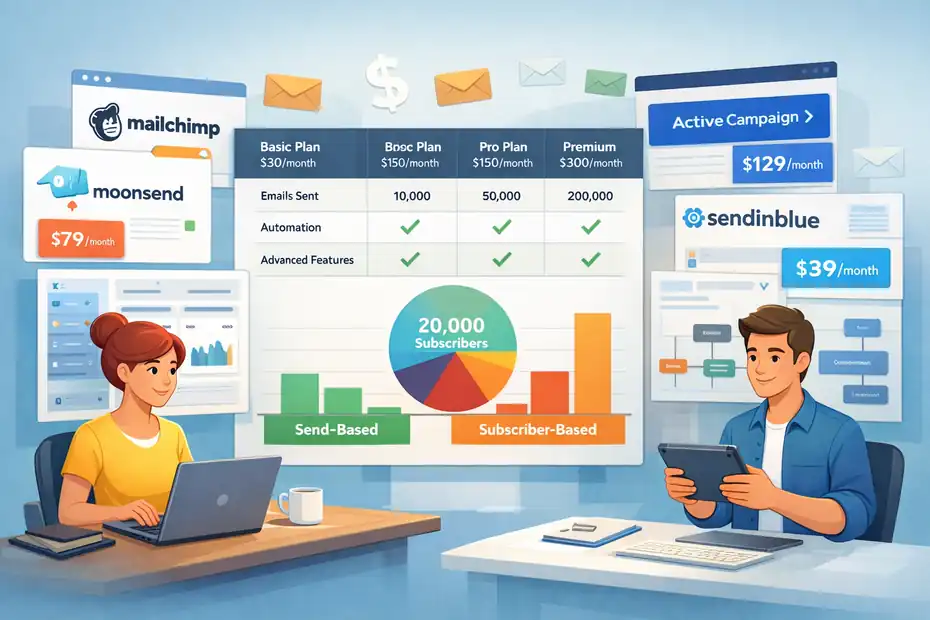
Email marketing tools cost for 20k subscribers is where a lot of businesses get surprised. At 1,000 subscribers, almost every platform looks affordable.
At 20,000, pricing models start separating into two very different worlds: tools that charge for audience size, and tools that charge for email volume. I’ve seen this be the point where a “cheap” platform suddenly turns into a real budget line item.
So in this guide, I’m going to break down what 20k actually costs, why prices jump so fast, and which tools usually make sense depending on how often you send.
What 20K Subscribers Really Costs In 2026
Once your list reaches 20,000 subscribers, email software stops being a minor app expense and starts acting more like infrastructure.
This is the point where the difference between “newsletter tool,” “automation platform,” and “ecommerce retention engine” becomes expensive in a very real way.
What The Typical Price Range Looks Like
At 20,000 subscribers, the market spreads out fast. Budget-friendly list-based tools can stay around the low hundreds per month, while ecommerce-heavy platforms can push into the mid-$200s and beyond.
In current 2026 pricing references, MailerLite is around $139 per month for 20,000 subscribers, EmailOctopus is about $178, Mailchimp Essentials lands roughly in the $230 to $300 range depending on source and billing context, Omnisend sits around $230 to $265, and GetResponse is often cited around $79 on its email-focused plan at this size.
Brevo is the major outlier because it charges by sends rather than list size, with 20,000 emails per month commonly cited around $29 to $39.
That range tells you something important right away: “email marketing tools cost for 20k subscribers” is not a single number. It’s a pricing model question first, and a software question second.
If you only send one or two campaigns a month, a send-based tool can undercut subscriber-based tools by a huge margin. If you send daily campaigns and run a lot of automation, the math flips.
Why 20K Is The First Serious Pricing Inflection Point
Most tools look friendly at smaller list sizes because they want to reduce friction early. You’ll see $10, $15, or $20 entry points everywhere. But those starter prices are usually anchored to 500 to 1,000 contacts, not 20,000.
For example, ActiveCampaign starts at $19 for 1,000 contacts, MailerLite starts at $10 for 500 subscribers, GetResponse starts at $19 for 1,000, and Omnisend starts at $20 for 1,000. That sounds manageable until the list grows tenfold or twentyfold.
In my experience, this is where founders make one of two mistakes. Either they stay on a platform that no longer matches how they send, or they panic-switch based on the sticker price alone. Both mistakes are expensive.
A platform that looks cheap but lacks segmentation, reporting, or automation can cost more in lost revenue than a pricier tool with better retention workflows. On the other hand, paying enterprise-style rates for a simple weekly newsletter is just lighting money on fire.
Why Subscriber Count Alone Is A Bad Budget Metric
A 20,000-person list sounds like one business stage, but it’s actually several different realities. One company might have 20,000 engaged subscribers opening weekly campaigns at healthy rates.
Another might have 20,000 contacts, but only 7,000 are active, 4,000 should have been suppressed months ago, and the rest are drifting. That difference matters because some tools bill all contacts, while others only bill active profiles or monthly send volume.
Benchmarks make this even clearer. MailerLite reports an average 2025 open rate of 43.46%, a click rate of 2.09%, and an unsubscribe rate of 0.22%. Klaviyo’s 2026 benchmarks put average campaign open rates at 31% and average campaign click rates at 1.69%, while automated flow click rates average 5.58%.
That means value is driven by engagement and automation quality, not raw list size. I’d rather have 20,000 engaged readers on a tool that fits my sending pattern than 20,000 bloated contacts on a platform that punishes me for inactive records.
How Pricing Models Change Your Total Spend
Before you compare vendors, you need to know how they bill. This is the piece most roundup articles skip, and honestly, it’s the part that matters most once your list is large enough to hurt your wallet.
Subscriber-Based Pricing: Predictable But Often More Expensive
Subscriber-based pricing is the classic model. You pay based on how many contacts or subscribers are stored in the account.
MailerLite, Mailchimp, GetResponse, and many others still use some version of this. The upside is predictability. If you know your list size, you roughly know the bill. The downside is obvious: if you keep inactive contacts too long, you’re paying rent on dead weight.
For a business with 20,000 subscribers and regular weekly sends, this model can work well because unlimited or high-volume email sending is often bundled into the plan.
MailerLite, for example, is widely cited at about $139 for 20,000 subscribers with unlimited sends, while Flodesk also leans into unlimited sending on its tiers. That can be a good trade when your cadence is high and you do not want to watch send caps every month.
The catch is that “20,000 subscribers” is rarely as clean as it sounds. Some tools count unsubscribed or inactive records differently, some separate active from non-active profiles, and some make you pay for audience storage plus add-ons. So even with a simple pricing model, your real bill can drift upward if your hygiene is sloppy.
Send-Based Pricing: Often The Cheapest Option For Infrequent Senders
Send-based pricing charges you based on how many emails you actually send in a month, not how many contacts you store. Brevo is the best-known example here. Official and independent comparisons in 2026 commonly cite about $29 to $39 for 20,000 monthly emails, with unlimited contacts on paid plans.
This model is almost unfairly good for businesses with large but lightly mailed lists. Imagine you have 20,000 subscribers but you only send one newsletter a month and a simple welcome sequence.
On a subscriber-based tool, you might be paying $139, $178, $230, or more just to hold the list. On a send-based tool, you could be far closer to $29 to $39 if your volume stays modest. That difference adds up fast over a year.
The tradeoff is that your cost rises with campaign frequency. Send more broadcasts, add automations, increase transactional email volume, and the savings narrow. I usually recommend this model for local businesses, B2B firms with lower campaign volume, and publishers who have a bigger list than their actual monthly send appetite.
Active-Profile Pricing: Smarter For Ecommerce, Not Always Cheaper
Active-profile pricing looks more nuanced, and it usually is. Klaviyo is the obvious example. Instead of charging purely on stored subscribers, it centers billing around active profiles and send allowances.
That can be smarter for ecommerce brands because it aligns cost more closely with who you’re really marketing to, not just who exists in your database.
But smarter does not always mean cheaper. Klaviyo is rarely the bargain option at scale.
Independent 2025 to 2026 comparisons show it pricing above more budget-oriented platforms at higher contact counts, and even alternative reviews position it as expensive but feature-rich for revenue-focused retail brands.
That’s why I don’t put Klaviyo in the “best cheap 20k tool” bucket. I put it in the “best 20k tool if email directly drives store revenue and you’ll use the data” bucket.
Real Cost Comparison For Popular Email Platforms
Let me make this practical. These are the numbers and patterns that matter when you’re budgeting for a 20k list, not just admiring feature grids.
Budget-Friendly Picks For 20K Subscribers
If your main goal is to control cost, three names usually stay near the top: Brevo, MailerLite, and GetResponse. Brevo is the cheapest when your sending volume is low, with about $29 to $39 for 20,000 monthly emails and unlimited contacts in 2026 pricing references.
MailerLite is one of the strongest low-cost list-based options at about $139 for 20,000 subscribers. GetResponse is often cited around $79 for 20,000 contacts on its email-focused plan, which makes it unusually competitive at this list size.
If I were helping a small SaaS company, consultant, or education brand with a 20k list and moderate complexity, I’d probably start the conversation with those three. Not because they’re universally “best,” but because they cover the three big cost scenarios: send-based cheap, list-based cheap, and balanced feature-to-price.
Here’s the key insight: cheap tools are only truly cheap when your workflow matches their strengths. A list-based budget tool gets more attractive if you send often. A send-based tool gets more attractive if you mail less often. That sounds simple, but it’s exactly where a lot of overpayment happens.
Mid-Range And Premium Options That Climb Fast
Mailchimp, Omnisend, and ActiveCampaign tend to move you into a more serious spend category as the list grows. Mailchimp’s Essentials pricing for 20,000 subscribers is commonly cited around $230 to $300 depending on plan context, comparison source, and discounts. Omnisend comparisons place 20,000 contacts around $230 to $265.
ActiveCampaign starts affordably at low list sizes, but multiple 2026 comparisons show that it scales steeply, hitting $189 at 10,000 subscribers on Starter and climbing dramatically by 50,000.
That doesn’t make these tools bad deals. It just means you should be paying for a reason. Omnisend can make sense when you need stronger ecommerce automation.
ActiveCampaign can make sense when you’ll actually use deeper automation, segmentation, and CRM-style workflows. Mailchimp can still work if you value its usability, reporting, and broader SMB ecosystem. But none of them are the “lowest-cost 20k” answer anymore.
Personally, I think this is where many teams overbuy. They pay for sophisticated automation because it feels mature, then end up sending the same weekly campaign they could have sent from a much cheaper tool. That’s not a software problem. That’s a planning problem.
A Simple Comparison Table You Can Actually Use
Below is the kind of table I’d use before I even open a free trial:
| Tool | 20K Cost Signal | Pricing Model | Best Fit |
|---|---|---|---|
| Brevo | about $29 to $39 for 20k emails | send-based | Large lists, lighter sending |
| GetResponse | about $79 | subscriber-based | Balanced value for SMBs |
| MailerLite | about $139 | subscriber-based | Cost-conscious creators and small businesses |
| EmailOctopus | about $178 | subscriber-based | Basic newsletter-focused sending |
| Mailchimp Essentials | about $230 to $300 | subscriber-based | Familiar SMB platform, broader ecosystem |
| Omnisend | about $230 to $265 | subscriber-based | Ecommerce brands |
| ActiveCampaign | rises steeply after 10k | subscriber-based/contact band | Advanced automation users |
These figures come from current 2025 to 2026 pricing reviews and official comparisons, and they’re most useful as directional budgeting numbers, not a substitute for your own final quote.
I recommend treating them as a shortlist filter: who is obviously in budget, who is borderline, and who only makes sense if their extra features produce revenue.
What You’re Actually Paying For Beyond Subscriber Count
The monthly fee is only the visible cost. At 20k subscribers, hidden cost comes from complexity, contact quality, and whether the platform is helping you make money or just helping you send emails.
Automation Depth Is Usually The Real Price Driver
The platforms that cost more at 20k almost always justify it with automation. ActiveCampaign emphasizes multi-step marketing automation, segmentation layers, and CRM/ecommerce integrations across its pricing tiers. Omnisend and Klaviyo lean heavily into flows, triggers, and revenue attribution for ecommerce teams.
That matters because automated flows usually outperform one-off campaigns on click behavior. Klaviyo’s 2026 benchmarks show average automated flow click rates at 5.58%, compared with 1.69% for campaign email click rates. That gap is enormous.
So when a tool costs more but helps you run better welcome flows, abandoned cart reminders, browse abandonment, replenishment campaigns, or reactivation journeys, the higher subscription fee can be rational.
I believe this is the cleanest way to think about premium pricing: are you buying software, or are you buying better odds of turning subscriber activity into revenue? If it’s the second one, the price conversation changes completely.
Reporting And Revenue Attribution Matter More Than Most Teams Expect
A lot of people ignore analytics during the buying stage, then regret it later. At 20k subscribers, you’re large enough that performance swings can cost real money.
Basic opens and clicks are fine, but they’re not enough if you’re optimizing flows, segmentation, and campaign sequencing. Klaviyo highlights revenue per recipient, order rates, and benchmark comparisons. Mailchimp emphasizes conversion funnels and broader reporting resources.
A realistic scenario: imagine your list generates even $0.50 in revenue per recipient during a major promotion. On 20,000 subscribers, that’s $10,000. If better attribution helps you find the segment, send time, or flow variant that lifts results by even 10%, that’s another $1,000.
Suddenly a tool that costs $80 more per month doesn’t look expensive at all. Klaviyo’s benchmark pages explicitly center revenue per recipient and placed order rates for exactly this reason.
Deliverability And List Quality Quietly Control Your True Cost
The cheapest tool on paper is never the cheapest if poor list hygiene drags performance down. Email metrics still hinge on opens, clicks, unsubscribes, engagement windows, and who should be suppressed.
Mailchimp and other providers stress using open and click reporting as a starting point for optimization, while benchmark data shows that unsubscribe rates and click-to-open rates move enough year to year to matter.
This is where I usually get opinionated: many teams should spend less time shopping for a cheaper ESP and more time cleaning their 20k list. If 20% of the database is cold, removing or sunsetting those contacts can improve deliverability, reduce cost on subscriber-based tools, and often improve campaign metrics at the same time.
That is one of the few email marketing wins that lowers spend and raises performance together.
How To Choose The Right Tool At 20K Subscribers
A good choice at 20k is less about “best overall” and more about “best for the way you send.” I’d make the decision with a simple framework.
If You Send Infrequently, Prioritize Send-Based Pricing
Let’s say you run a B2B company, a local service business, or a brand that sends one newsletter and a few automations each month. In that case, subscriber-based pricing can punish you for audience size you are not fully using.
Brevo’s send-based model exists for exactly this kind of business. With public comparisons citing roughly $29 to $39 for 20,000 emails and unlimited contacts, it can be dramatically cheaper than a traditional 20k contact plan.
I suggest doing one fast calculation before choosing anything: monthly sends = campaigns × average recipients + automation volume. If your total is modest, don’t let a shiny feature set push you into a bloated subscriber-based plan. This is one of the easiest ways to cut annual software spend without sacrificing output.
If You Send Frequently, Prioritize Unlimited Or High-Cap Value
If you mail weekly or more, list-based tools with generous send limits often become the better value. MailerLite’s 20,000-subscriber pricing at about $139 is attractive here because the send side is less restrictive.
The same logic applies to tools like Flodesk for design-heavy newsletters or GetResponse if you want a middle ground between price and capability.
A simple example: a weekly newsletter to 20,000 subscribers is already roughly 80,000 sends per month before onboarding emails, promotional sequences, or triggered messages.
In that situation, a send-based plan can stop looking cheap very quickly, while a subscriber-based plan with broad sending allowances gets easier to justify.
I’ve seen businesses choose a platform based on month-one volume and then regret it three months later when their send frequency normalizes.
If You’re Ecommerce, Choose Based On Revenue Features, Not Sticker Price
For ecommerce brands, I would not choose on price alone. Omnisend and Klaviyo tend to cost more because they’re built around flows, segmentation, and revenue-centric retention.
Public comparisons put Omnisend around $230 to $265 at 20,000 contacts, and Klaviyo is consistently positioned as a higher-cost option at larger list sizes.
That sounds expensive until you compare it to cart abandonment revenue, replenishment revenue, or win-back campaign revenue.
Klaviyo’s 2026 benchmark data is useful here because it separates campaign performance from flow performance. If your store depends on lifecycle automation, then an extra $100 or $150 a month can be tiny compared with the upside of stronger flows.
I’d rather pay more for the right ecommerce engine than save money on the platform and lose revenue in the funnel.
Common Cost Traps That Make 20K More Expensive
This is the part that stings, because most overspending at 20k is self-inflicted. The tool matters, but the operating habits matter just as much.
Keeping Too Many Dead Contacts
Dead contacts are one of the quietest budget leaks in email marketing. On subscriber-based plans, every inactive subscriber can become part of your monthly bill.
And even on tools with smarter billing models, cold audiences can hurt results enough to muddy decision-making. That means you’re not just paying financially. You’re paying analytically too.
I recommend setting a re-engagement rule long before your list hits 20,000.
Example: if someone has not opened or clicked in 90 to 180 days, move them into a reactivation segment. If they still do nothing, suppress them. Tools differ on how they count these contacts, but the principle is universal.
A tighter 16k list can be more profitable than a bloated 20k list, and in some cases cheaper too.
Paying For Automation You Never Build
This is incredibly common. A company buys an advanced platform because it promises segmentation, branching logic, predictive content, or CRM syncing. Six months later, they’re still using it like a basic broadcast tool.
ActiveCampaign and higher-tier Mailchimp plans can absolutely be worth the money, but only if those features are part of your operating system.
My advice is blunt here: Do not buy future ambition. Buy current use plus one clear next step. If all you need today is newsletter delivery, a welcome series, and basic segmentation, you do not need to pay like a 12-person lifecycle team. You need a platform you will actually use well.
Ignoring Annual Discounts, Contact Rules, And Send Caps
Pricing pages are messy on purpose. Mailchimp promotes 15% savings for businesses with 10,000+ contacts in some contexts. Brevo and other providers reference annual discounts.
Some plans cap sends, some limit workflows, some restrict branding removal, and some change how contacts are counted.
This is why I always suggest comparing three numbers before committing: monthly billing, annual billing, and real-world monthly send needs.
The cheapest advertised plan is often not the one you’ll actually need once forms, automations, branded templates, or ecommerce triggers are switched on.
How To Lower Your Email Marketing Cost Without Hurting Revenue
You do not always need a cheaper platform. Sometimes you need a better setup. That distinction saves a lot of bad migrations.
Audit Your Real Sending Pattern First
Before switching tools, pull 90 days of data and answer three questions: how many emails do you send per month, how many contacts are truly active, and how much revenue or lead volume comes from automation versus broadcasts.
That tells you whether you’re a send-based candidate, a list-based candidate, or a premium automation candidate.
A simple scenario: if you have 20,000 subscribers but only 25,000 to 40,000 total monthly sends, there’s a very good chance you’re overpaying on a contact-based platform. If you have 20,000 subscribers and 150,000+ monthly sends, then the opposite may be true.
Clean The List Before You Shop
This is the fastest savings lever I know. Remove hard bounces, suppress long-term inactive contacts, and run a re-engagement sequence before you compare pricing.
You may find that your “20k subscriber” problem is really a 15k active subscriber problem. On many tools, that moves you into a lower pricing band immediately.
And even when it doesn’t lower the software bill right away, it usually improves engagement. Better engagement can mean stronger inbox placement, more reliable testing data, and more revenue from the subscribers who still care. That’s a much healthier way to save money than simply downgrading software.
Match The Tool To The Business Model, Not The Hype
Here’s the simplest version of my recommendation.
- Choose Brevo if you have a large list and relatively low send volume, because send-based pricing can dramatically reduce cost at 20k.
- Choose MailerLite or GetResponse if you want a practical, cost-conscious balance for a general business or creator list at 20k.
- Choose Omnisend or Klaviyo if you run ecommerce and plan to use revenue-driving flows, not just newsletters.
- Choose ActiveCampaign if deep automation is central to how you sell, qualify, and nurture leads.
- Be cautious with Mailchimp at 20k unless you specifically value its ecosystem, because cost tends to climb into territory where more specialized alternatives become easier to justify.
The main takeaway is simple: Email marketing tools cost for 20k subscribers can be as low as roughly $29 to $39 per month in a send-based setup, around $79 to $178 in more budget-friendly subscriber-based tools, and well above $230 when you move into more mature SMB or ecommerce platforms.
The “best” price is the one that matches your real sending behavior, list quality, and revenue model. Pay for the workflow you run now, not the one you hope to build someday.
FAQ
How much do email marketing tools cost for 20k subscribers?
Email marketing tools cost for 20k subscribers typically ranges from $30 to $300 per month depending on pricing model, features, and send volume. Send-based tools are cheaper for low-frequency campaigns, while subscriber-based tools become more cost-effective when you send emails frequently or run automation sequences.
Why is pricing so different between email marketing platforms at 20k subscribers?
Pricing varies because platforms use different billing models such as subscriber-based, send-based, or active-profile pricing. Some tools include unlimited sends, while others charge based on volume. Features like automation, segmentation, and analytics also significantly increase costs at higher subscriber levels.
Is a send-based email tool better for 20k subscribers?
A send-based email tool is better if you have 20k subscribers but send emails infrequently. It allows you to pay only for the emails you send rather than the size of your list. However, if you send campaigns often, subscriber-based pricing may be more economical.
What is the cheapest email marketing tool for 20k subscribers?
The cheapest option for 20k subscribers is usually a send-based platform, which can cost around $30 to $40 per month for limited sends. Budget subscriber-based tools typically start around $70 to $150, depending on included features and automation capabilities.
How can I reduce email marketing costs with 20k subscribers?
You can reduce costs by cleaning inactive subscribers, choosing the right pricing model, and aligning your tool with your sending frequency. Removing unengaged contacts and optimizing automation workflows can lower your monthly bill while improving performance and deliverability.

Juxhin B is a digital marketing researcher and founder of JAK Digital Hub, specializing in email marketing software, marketing automation platforms, and digital growth tools. His work focuses on software testing, platform comparisons, and real-world performance analysis to help businesses choose the right marketing technology.
Related posts:
 Email Automation Tools Cost for 20k Subscribers—Price Breakdown
 Email Marketing Tools For 100K Subscribers That Scale
 Best Email Tools Compared: 7 That Actually Convert
 AWeber For New Bloggers: Is It The Easiest Starter Email Tool?
 Cheaper Email Automation System For Growing List Fast
 7 Better Email Marketing Tools For Ecommerce Growth