Table of Contents
Some links on JAK Digital Hub are affiliate links, meaning we may earn a small commission at no extra cost to you. Read full disclaimer.
Managing email automation for multiple brands quickly becomes complicated once you move beyond a single audience. Lists grow, campaigns overlap, and suddenly you’re juggling different customer journeys, brand voices, and analytics dashboards.
If you run multiple businesses, manage client brands, or operate several niche websites, the right automation system can save hundreds of hours while keeping every brand organized. The challenge is choosing a structure and platform that won’t collapse as you scale.
In this guide, I’ll walk you through how email automation for multiple brands actually works, the best platforms to manage it, and the strategies experienced marketers use to keep everything clean, scalable, and profitable.
Understanding Email Automation For Multiple Brands
Running automation across several brands isn’t just about sending more emails. It’s about structuring your system so each brand keeps its own identity while still being manageable from a central workflow.
What Email Automation For Multiple Brands Actually Means
When people hear email automation, they usually imagine a single brand sending welcome sequences or promotions.
But email automation for multiple brands is different.
You’re managing separate audiences, messaging styles, offers, and automation flows within the same infrastructure.
Let me break it down.
Imagine you run:
- A fitness blog
- A SaaS product
- A digital marketing newsletter
Each brand has:
- Different subscribers
- Different email tone
- Different offers
- Different funnels
If everything lives in one messy list, problems appear quickly.
You’ll start seeing issues like:
- Subscribers receiving the wrong emails
- Confusing analytics
- Automation triggers firing incorrectly
- Compliance risks (GDPR, CAN-SPAM segmentation)
Email automation for multiple brands solves this by organizing subscribers and automations in structured ways.
Common structures include:
- Separate email lists per brand
- Single list with advanced segmentation
- Multiple workspaces or sub-accounts
Which one works best depends heavily on the platform you choose.
Why Managing Multiple Brands Requires a Different Automation Strategy
Many marketers initially try to run several brands from a single simple automation setup.
It usually fails for three reasons.
Brand voice conflicts: Each brand should communicate differently. A casual lifestyle brand email looks very different from a SaaS onboarding email.
Subscriber segmentation complexity: One person might subscribe to two of your brands. If your system isn’t organized, they’ll receive duplicate or conflicting campaigns.
Automation overlap: Triggers like downloads, purchases, or lead magnets may activate incorrect sequences if brands share automation logic.
In my experience, the biggest mistake happens when marketers try to keep everything inside a single generic email list.
A better approach is to build clear brand boundaries inside your automation system.
This usually involves:
- Separate audiences or lists
- Brand-specific automation flows
- Independent analytics tracking
Once structured correctly, managing five brands can feel nearly as simple as managing one.
How Email Automation Systems Handle Multiple Brands
Before choosing a platform, it’s important to understand the structural models most email systems use to manage multiple brands.
Single Account With Multiple Lists
This is the simplest setup.
One email account contains multiple subscriber lists, each representing a different brand.
Example structure:
| Brand | List | Automation |
|---|---|---|
| Fitness Brand | Fitness Subscribers | Workout funnels |
| Marketing Blog | Marketing List | Lead magnet sequence |
| SaaS Tool | SaaS Users | Product onboarding |
Advantages:
- Simple setup
- Easy to manage inside one dashboard
- Lower cost for smaller businesses
Limitations:
- Lists can become messy
- Subscriber duplication across brands
- Reporting sometimes mixes audiences
This approach works best for:
- Small creators
- Affiliate sites
- Bloggers managing multiple niches
Single List With Segmentation
More advanced email marketers often use one master list with segmentation tags.
Instead of multiple lists, every subscriber lives in one database.
They’re separated using:
- Tags
- Custom fields
- behavior triggers
- brand identifiers
Example:
| Subscriber | Tags |
|---|---|
| John | fitness, newsletter |
| Emma | SaaS, free trial |
| Alex | marketing blog |
Advantages:
- No duplicate subscribers
- More flexible targeting
- Powerful behavioral automation
But there’s a learning curve.
If segmentation rules become messy, automation can break quickly.
This model is usually best for:
- SaaS companies
- advanced marketers
- agencies managing complex funnels
Multi-Workspace Or Sub-Account Structure
Some email platforms offer completely separate environments for each brand.
Think of it like running multiple accounts inside one master dashboard.
Benefits include:
- Full brand isolation
- separate analytics
- separate domains
- separate automations
This is common for:
- agencies
- businesses with several large brands
- ecommerce companies with multiple stores
The downside is usually cost and complexity.
Best Email Platforms For Managing Multiple Brands
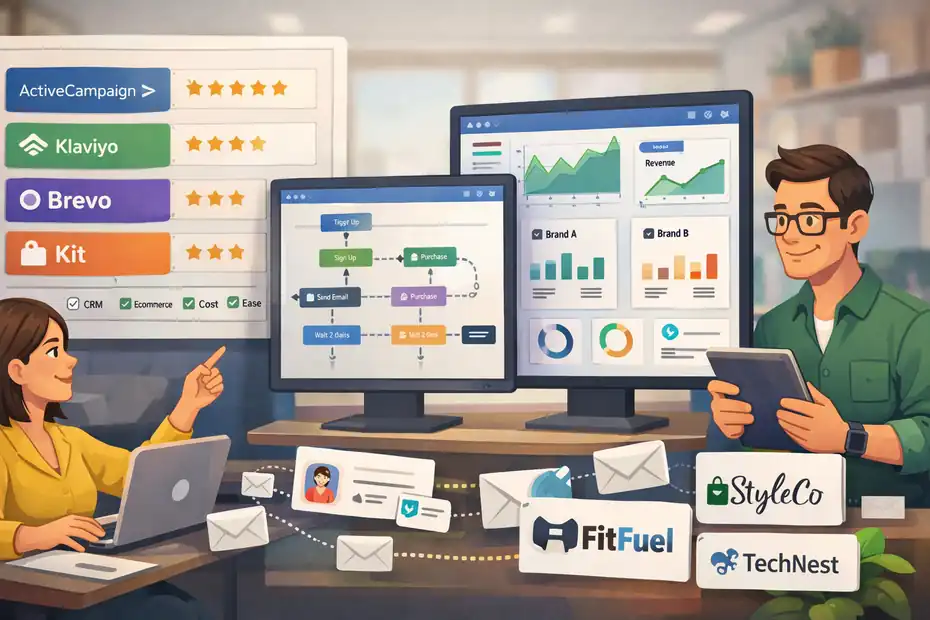
Choosing the right platform determines whether email automation becomes smooth or chaotic. The tools below handle multi-brand setups particularly well.
Kit (formerly ConvertKit)
Kit (email marketing platform)
Kit is widely used by creators and bloggers running multiple projects or brands.
In my experience, it strikes a good balance between simplicity and powerful segmentation.
Key features that help with multi-brand automation:
- Tag-based subscriber management
- Visual automation builder
- multiple lead magnets
- creator-friendly interface
How multi-brand setups usually work in Kit:
- One main subscriber database
- Brand segmentation using tags
- brand-specific automation sequences
- custom email templates per brand
For example:
- Tag: FitnessBrand
- Tag: MarketingBrand
- Tag: SaaSBrand
Automations then trigger based on tags.
Typical pricing (2026 range):
| Plan | Monthly Cost | Subscriber Limit |
|---|---|---|
| Free | $0 | 1,000 |
| Creator | ~$29 | 1,000+ |
| Creator Pro | ~$59 | Advanced features |
Best for:
- bloggers
- affiliate marketers
- creators with multiple niche sites
Brevo (formerly Sendinblue)
Brevo
Brevo is extremely strong for businesses managing multiple brands or clients.
Its architecture makes it easy to separate projects.
Important multi-brand features:
- multiple sub-accounts
- separate sending domains
- independent email templates
- advanced automation workflows
For agencies, this becomes powerful.
Each brand can have:
- its own sender domain
- its own audience database
- separate analytics
Pricing is based on emails sent, not subscribers.
| Plan | Monthly Cost | Emails |
|---|---|---|
| Free | $0 | 300/day |
| Starter | ~$25 | 20k/month |
| Business | ~$65 | automation features |
Best for:
- agencies
- ecommerce stores
- businesses with several brands
Mailchimp
Mailchimp
Mailchimp is one of the oldest email marketing platforms and still widely used for multi-brand operations.
Its structure revolves around audiences and segments.
Each brand can be handled using:
- separate audiences
- separate templates
- brand-specific automation journeys
Advantages include:
- strong integrations
- robust reporting
- ecommerce features
However, one drawback is subscriber duplication.
If someone subscribes to two brand audiences, they count twice toward your billing.
Typical pricing range:
| Plan | Monthly Cost |
|---|---|
| Free | limited features |
| Essentials | ~$13+ |
| Standard | ~$20+ |
| Premium | enterprise level |
Best for:
- ecommerce businesses
- retail brands
- small companies managing product lines
ActiveCampaign
ActiveCampaign
ActiveCampaign is arguably the most powerful automation platform in this comparison.
It combines:
- email marketing
- CRM
- sales automation
- advanced behavioral triggers
Multi-brand setups usually use:
- tagging systems
- pipelines
- separate automation maps
For example:
- BrandTag: CourseBrand
- BrandTag: EcommerceBrand
- BrandTag: NewsletterBrand
Automations run only when the correct brand tag exists.
Pricing example:
| Plan | Monthly Cost |
|---|---|
| Starter | ~$29 |
| Plus | ~$49 |
| Pro | ~$79 |
| Enterprise | custom |
Best for:
- agencies
- SaaS businesses
- advanced marketing teams
Step-By-Step Setup For Email Automation Across Multiple Brands
If you’re starting from scratch, building the structure correctly from day one will save huge headaches later.
Step 1: Define Clear Brand Boundaries
Before creating any automation, decide how your brands are separated.
I suggest defining three things.
- Audience: Who subscribes to this brand?
- Messaging style: Formal, casual, educational, promotional.
- Offers: Products, services, or affiliate promotions.
Example:
| Brand | Audience | Offer |
|---|---|---|
| SEO Blog | marketers | courses |
| Fitness Brand | beginners | workout programs |
| SaaS Tool | founders | subscriptions |
This step prevents one of the most common mistakes: blending audiences together.
Step 2: Design Brand-Specific Email Sequences
Each brand should have its own automation journey.
Typical core sequences include:
- Welcome sequence
- Lead magnet delivery
- education series
- product pitch
- re-engagement sequence
Example welcome flow:
- Email 1: Welcome + lead magnet
- Email 2: Brand story
- Email 3: Educational content
- Email 4: Offer introduction
If multiple brands share the same sequence structure, you can still customize:
- subject lines
- tone
- call-to-action
Consistency matters more than complexity.
Step 3: Build Automation Triggers
Triggers activate email sequences automatically.
Common triggers include:
- subscriber joins list
- lead magnet download
- purchase completed
- tag added
- link clicked
Example workflow: Subscriber downloads SEO checklist → Tag: SEOLead → Start SEO welcome sequence.
This ensures the correct brand automation activates.
Step 4: Connect Analytics And Tracking
Tracking is where multi-brand systems often break.
You should monitor metrics separately for each brand:
- open rates
- click-through rates
- conversion rates
- revenue per subscriber
Typical benchmarks (2025–2026 averages):
| Metric | Average |
|---|---|
| Open rate | 30–45% |
| Click rate | 2–5% |
| Conversion | 1–3% |
Separating analytics by brand reveals which audience generates the most revenue.
Common Mistakes When Automating Emails Across Multiple Brands
Even experienced marketers run into problems here.
These mistakes usually appear once brands start scaling.
Mixing Brand Messaging
One of the fastest ways to lose subscribers is confusing your brand voice.
Imagine subscribing to a productivity newsletter and suddenly receiving promotions for weight loss programs.
That disconnect hurts trust.
A simple rule I follow: Each brand should feel like its own company.
Even if the backend system is shared.
Poor Tagging Or Segmentation Structure
Tags and segments can become messy quickly.
Example of bad tagging:
- Brand1
- Brand2
- Brand-1
- Brand_A
Small inconsistencies create automation errors.
Instead, use standardized naming.
Example:
- Brand_Fitness
- Brand_SEO
- Brand_SaaS
Consistency keeps automation reliable.
Overlapping Automation Triggers
Another issue occurs when triggers fire multiple automations.
Example:
Subscriber downloads two lead magnets from different brands.
Without clear rules, they might receive two welcome sequences simultaneously.
Solutions include:
- automation delays
- priority triggers
- conditional logic
These rules ensure subscribers experience one coherent journey.
Advanced Strategies For Scaling Email Automation Across Brands
Once your system works, optimization becomes the next priority.
Centralized Content Repurposing
One advanced tactic I use often is content repurposing across brands.
Example workflow:
1 article → multiple email variations.
Example:
| Source Content | Brand Variation |
|---|---|
| SEO guide | marketing newsletter |
| same guide | entrepreneur newsletter |
| same guide | SaaS user education |
Each brand gets tailored messaging while the core content remains the same.
This dramatically reduces content workload.
Cross-Promotion Between Brands
If someone subscribes to one brand, they might also be interested in another.
Example strategy:
- Fitness subscriber receives optional newsletter recommendation for nutrition brand.
But it must be subtle.
Instead of aggressive promotions, try:
- newsletter recommendations
- optional upgrade emails
- cross-brand lead magnets
This works especially well for creators running several niche sites.
Automation Health Audits
Large automation systems degrade over time.
Every few months, I recommend auditing:
- inactive subscribers
- broken triggers
- outdated offers
- duplicate tags
A simple quarterly audit can significantly improve performance.
Choosing The Right Email Automation Platform For Multiple Brands
The best platform ultimately depends on your business model.
Here’s a simplified comparison.
| Platform | Best For | Strength |
|---|---|---|
| Kit | creators | simplicity |
| Brevo | agencies | multi-account management |
| Mailchimp | ecommerce | integrations |
| ActiveCampaign | advanced marketers | automation power |
If you run several niche blogs or creator brands, simplicity often wins.
If you manage client brands or large ecommerce catalogs, stronger automation tools become necessary.
I suggest thinking long-term.
Switching email platforms later can be painful, especially with complex automation structures.
Final Thoughts On Email Automation For Multiple Brands
Email automation for multiple brands can either become a messy tangle of lists and sequences—or a clean, scalable system that runs quietly in the background while your businesses grow.
The difference comes down to three things:
- clear brand separation
- structured automation logic
- choosing the right platform early
If you build your system thoughtfully from the start, managing five brands doesn’t feel five times harder.
In fact, many marketers eventually discover something surprising.
Once automation is properly structured, adding a new brand often takes only a few hours.
FAQ
What is email automation for multiple brands?
Email automation for multiple brands is the process of managing automated email campaigns for different brands within one structured system. It separates audiences, messaging, and automation workflows so each brand maintains its identity while marketers manage everything efficiently from a centralized platform.
How do you manage email automation for multiple brands effectively?
To manage email automation for multiple brands effectively, marketers typically separate audiences using lists, tags, or sub-accounts. Each brand should have its own automation sequences, messaging style, and analytics tracking to prevent overlap and maintain clear communication with subscribers.
Can one email platform manage multiple brands?
Yes, many email marketing platforms support managing multiple brands. They allow separate lists, segmentation tags, or multiple workspaces so marketers can run brand-specific campaigns, automations, and analytics while maintaining centralized control from a single dashboard.
What is the best structure for email automation across multiple brands?
The best structure depends on the complexity of your business. Small creators often use a single account with segmented tags, while agencies or businesses with larger audiences may prefer separate workspaces or sub-accounts to keep brand data, automations, and analytics fully isolated.
Why is segmentation important for multi-brand email automation?
Segmentation ensures subscribers receive emails relevant to the brand they joined. Without proper segmentation, subscribers may receive unrelated campaigns, which reduces engagement and increases unsubscribe rates. A clear segmentation structure keeps automation organized and improves overall email performance.

Juxhin B is a digital marketing researcher and founder of JAK Digital Hub, specializing in email marketing software, marketing automation platforms, and digital growth tools. His work focuses on software testing, platform comparisons, and real-world performance analysis to help businesses choose the right marketing technology.
Related posts:
 Best Email Automation System That Scales Affordably
 Should You Upgrade Email Automation Platform For Scaling?
 Email Automation Tool With CRM Built In Ranked
 Email Automation Tool With Advanced Workflows: Top Picks
 Cheaper Email Automation System For Growing List Fast
 Best Email Automation Tool For Affiliate Marketers