Table of Contents
Some links on JAK Digital Hub are affiliate links, meaning we may earn a small commission at no extra cost to you. Read full disclaimer.
If you sell courses, templates, ebooks, or any kind of downloadable product, choosing the best email automation solution for digital products can completely change how your business runs. Instead of manually sending onboarding emails, delivery links, and promotions, automation lets your email system do the work for you.
I’ve seen creators lose sales simply because their email setup was messy — links weren’t delivered instantly, follow-ups never happened, or new customers received the wrong emails. The right automation platform fixes all of that. It sends the right message at the right time, tracks behavior, and helps you turn subscribers into paying customers automatically.
In this guide, I’ll walk you through the best email automation platforms for digital products, how they actually work behind the scenes, how to set them up step-by-step, and how to optimize them so your email system becomes a reliable sales engine.
Why Email Automation Is Critical for Selling Digital Products
Digital product businesses rely heavily on automation because customers expect instant delivery, onboarding, and follow-ups. Email automation handles all of this without manual work.
When someone buys a product, they expect three things immediately:
- Delivery of the product
- Instructions on how to use it
- Support or onboarding guidance
Without automation, this becomes chaotic quickly.
Email automation creates systems like:
- Product delivery emails: Automatically send download links or login instructions.
- Onboarding sequences: Teach customers how to use your product over several days.
- Upsell funnels: Recommend advanced products after purchase.
- Abandoned checkout emails: Recover potential buyers who didn’t complete the purchase.
According to Campaign Monitor, automated emails generate 320% more revenue than non-automated emails. That statistic alone explains why most successful digital product businesses rely on automation heavily.
In my experience, the biggest difference between beginners and profitable creators is simple: profitable creators build systems early.
What Makes a Good Email Automation Solution for Digital Products
Not every email marketing platform is built for selling digital products. Some are great for newsletters but weak when it comes to automation and product delivery.
Let’s break down the features that actually matter.
Automation Workflows That Trigger Based on Customer Actions
A strong automation system allows emails to trigger based on behavior.
For example:
- A user downloads a free template
- They join a specific email sequence
- They receive a sales pitch 3 days later
Platforms like Kit, ActiveCampaign, and GetResponse allow visual workflow builders where you can create these sequences.
Example workflow:
- User downloads free guide
- Email 1 delivers the guide
- Wait 1 day
- Email 2 shares a helpful tutorial
- Wait 2 days
- Email 3 promotes the paid product
The automation runs 24/7 once created.
Built-In Digital Product Delivery
Some email platforms integrate directly with digital product sales systems.
This allows automatic delivery of:
- Course login details
- Download links
- Membership access
- Product updates
For example:
- Kit integrates directly with digital product tools and checkout systems.
- GetResponse includes built-in ecommerce tools.
- ActiveCampaign integrates with platforms like ThriveCart and Gumroad.
Instant delivery matters because delays reduce trust.
Subscriber Tagging and Segmentation
Tagging allows you to label subscribers based on actions or interests.
Example tags:
- Purchased Course
- Downloaded Free Ebook
- Interested in SEO
- Affiliate Partner
Segmentation allows targeted campaigns.
Instead of sending the same email to everyone, you send:
- Beginner emails to beginners
- Advanced strategies to experienced users
- Promotions only to interested segments
This dramatically increases open rates and conversions.
Analytics and Conversion Tracking
Automation without tracking is guesswork.
Strong platforms track:
- Email open rates
- Click rates
- Sales conversions
- Funnel performance
For example, you can see which email in a sequence generated the most sales.
That insight allows you to optimize your automation system over time.
Best Email Automation Platforms for Digital Product Businesses
Let’s look at the platforms that actually perform well for creators selling digital products.
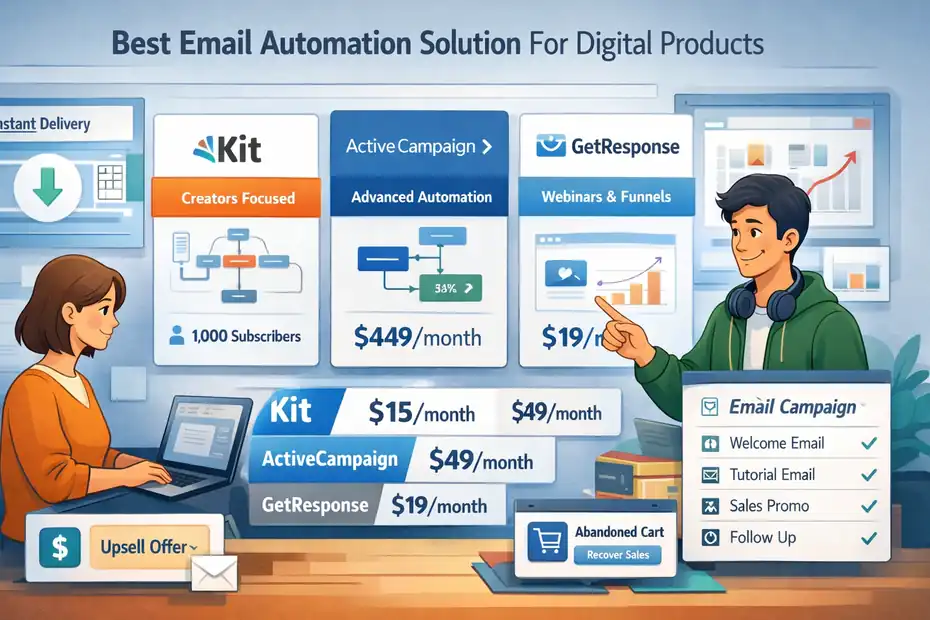
Kit (Best for Creators and Digital Products)
Kit is built specifically for creators selling digital products.
What I personally like about Kit is how simple the automation system is compared to many email platforms.
Key features:
- Visual automation builder
- Digital product sales tools
- Tag-based subscriber management
- Landing pages and forms
- Creator-focused integrations
Pricing overview:
| Plan | Monthly Price | Features |
|---|---|---|
| Free | $0 | Up to 1,000 subscribers |
| Creator | ~$15/month | Automation features |
| Creator Pro | ~$29/month | Advanced analytics |
Why many creators choose Kit:
- Extremely beginner friendly
- Designed for digital product businesses
- Easy automation setup
If you sell ebooks, courses, or templates, this platform is often the simplest starting point.
ActiveCampaign (Best for Advanced Automation)
ActiveCampaign is one of the most powerful email automation platforms available.
It is more complex than Kit but offers extremely advanced automation.
Key features:
- Advanced behavioral automation
- CRM integration
- Predictive sending
- Sales pipeline automation
- Deep segmentation tools
Example advanced automation:
- Send different emails depending on which product someone viewed.
- Trigger upsells based on purchase value.
- Automatically score leads.
Pricing overview:
| Plan | Monthly Price |
|---|---|
| Starter | ~$29 |
| Plus | ~$49 |
| Pro | ~$79 |
ActiveCampaign is excellent if your digital product business is scaling.
GetResponse (Best All-in-One Marketing Platform)
GetResponse combines email marketing, automation, landing pages, and webinars in one platform.
This is useful if you run:
- Course launches
- Online workshops
- Lead magnet funnels
Key features:
- Visual automation builder
- Webinar hosting
- Landing page builder
- Conversion funnels
- Ecommerce integrations
Pricing overview:
| Plan | Monthly Price |
|---|---|
| Starter | ~$19 |
| Marketer | ~$59 |
| Creator | ~$69 |
For creators running live launches or webinars, this platform can simplify your stack.
How to Set Up an Email Automation System for Digital Products
Let me break this down in a simple workflow that many successful creators use.
Step 1: Create a Lead Magnet
A lead magnet attracts subscribers into your email system.
Examples:
- Free ebook
- Checklist
- Mini course
- Template
- Resource guide
Example scenario:
You sell a $49 SEO course.
Lead magnet idea: “Free SEO Keyword Research Checklist.”
Once users download it, they enter your email automation system.
This starts your email funnel.
Step 2: Build the Email Delivery Automation
Your first automation should deliver the lead magnet.
Example structure:
- Email 1: Deliver the free resource
- Email 2: Provide a tutorial or helpful tip
- Email 3: Share a case study
- Email 4: Introduce your paid product
- Email 5: Offer a limited-time discount
This sequence builds trust before selling.
Automation platforms allow you to schedule delays between emails.
Example:
- Day 0: Email 1
- Day 1: Email 2
- Day 3: Email 3
- Day 5: Email 4
- Day 7: Email 5
Step 3: Connect Your Checkout System
Digital product businesses typically use checkout tools such as:
These systems connect to your email platform.
Once someone purchases:
- They receive the product email
- They are tagged as a customer
- They exit the sales sequence
- They enter the onboarding sequence
This prevents customers from receiving sales emails for products they already purchased.
Step 4: Build an Onboarding Automation
After purchase, onboarding emails improve product satisfaction.
Example onboarding sequence:
Email 1: Welcome + product access
Email 2: How to use the product
Email 3: Common mistakes
Email 4: Advanced tips
Email 5: Upsell or referral program
This increases customer success and future sales.
Common Email Automation Mistakes Digital Product Sellers Make
Even experienced creators make automation mistakes.
Mistake 1: Sending Too Many Sales Emails
When every email is a sales pitch, subscribers disengage quickly.
I suggest using a value-first ratio:
- 70% value
- 30% promotion
This keeps your audience engaged.
Mistake 2: Not Tagging Customers Properly
If customers continue receiving promotional emails for products they already bought, trust drops.
Always create automation rules such as:
“If customer purchases Product A → Remove from Sales Funnel A.”
Mistake 3: Ignoring Email Deliverability
Email deliverability determines whether your emails reach inboxes or spam folders.
Ways to improve deliverability:
- Use verified sending domains
- Clean inactive subscribers
- Avoid spam trigger words
- Maintain consistent sending frequency
Many platforms provide deliverability dashboards.
Advanced Automation Strategies That Increase Digital Product Sales
Once your automation system is working, you can optimize it.
Behavioral Upsell Automation
Behavior-based automation increases revenue.
Example:
If someone buys a beginner course → automatically recommend an advanced course.
This can be triggered by:
- purchase activity
- link clicks
- product usage
These upsells convert well because the audience is already engaged.
Abandoned Checkout Recovery
Many potential buyers leave before completing a purchase.
Abandoned cart automation sends reminders.
Example sequence:
- Email 1: Reminder after 1 hour
- Email 2: Benefit explanation after 24 hours
- Email 3: Discount after 48 hours
Some creators recover 10–20% of abandoned purchases using this automation.
Launch Automation for Product Releases
When launching new digital products, automation helps manage large audiences.
Launch automation may include:
- Early access emails
- Countdown reminders
- Last-chance offers
Platforms like GetResponse and ActiveCampaign are particularly useful for launch campaigns.
How to Choose the Best Email Automation Solution for Digital Products
If you’re unsure where to start, here’s a simple guideline I recommend.
| Situation | Recommended Platform |
|---|---|
| Beginner creator | Kit |
| Advanced automation needs | ActiveCampaign |
| Webinar and launch funnels | GetResponse |
For most creators selling digital downloads, Kit is usually the easiest starting point.
As your business grows, you can move to more advanced automation tools if needed.
Final Thoughts
The best email automation solution for digital products is the one that turns your audience into a reliable sales system.
Instead of manually managing every customer interaction, automation allows your business to run continuously.
When set up correctly, email automation can:
- Deliver products instantly
- Nurture leads automatically
- Recover lost sales
- Upsell additional products
- Scale revenue without extra work
If you’re just starting, focus on building a simple automation funnel first: lead magnet → email sequence → product offer.
From there, you can layer in advanced automation strategies as your audience grows.
FAQ
What is an email automation solution for digital products?
An email automation solution for digital products automatically sends emails when users take actions like subscribing, purchasing, or downloading. It delivers products instantly, nurtures leads with scheduled sequences, and helps creators increase sales without manually sending emails.
Why do digital product sellers need email automation?
Digital product sellers need email automation to instantly deliver products, nurture leads, and promote offers automatically. It saves time, improves customer experience, and increases conversions by sending the right message based on subscriber behavior.
What is the best email automation solution for digital products?
The best email automation solution for digital products depends on your needs. Kit is popular for creators, ActiveCampaign offers advanced automation, and GetResponse works well for webinars and marketing funnels.
How does email automation increase digital product sales?
Email automation increases digital product sales by sending targeted follow-up emails, onboarding sequences, and promotional campaigns automatically. These automated messages build trust, educate customers, and guide subscribers toward purchasing your products.
Can beginners set up email automation for digital products easily?
Yes, beginners can set up email automation easily using platforms like Kit or GetResponse. Most tools provide visual automation builders that allow you to create email sequences, deliver digital products, and manage subscribers without coding skills.

Juxhin B is a digital marketing researcher and founder of JAK Digital Hub, specializing in email marketing software, marketing automation platforms, and digital growth tools. His work focuses on software testing, platform comparisons, and real-world performance analysis to help businesses choose the right marketing technology.
Related posts:
 Email Automation Systems That Drive Revenue
 Email Automation Tools for New Ecommerce Store: What to Start With
 Email Automation Tools for 100k Subscribers: Best Value Picks
 Email Automation Tools Not Triggering? Fix the Issue Fast
 Best Email Automation Platform For Scaling Business Fast
 Cheaper Email Automation System For Growing List Fast