Table of Contents
Some links on JAK Digital Hub are affiliate links, meaning we may earn a small commission at no extra cost to you. Read full disclaimer.
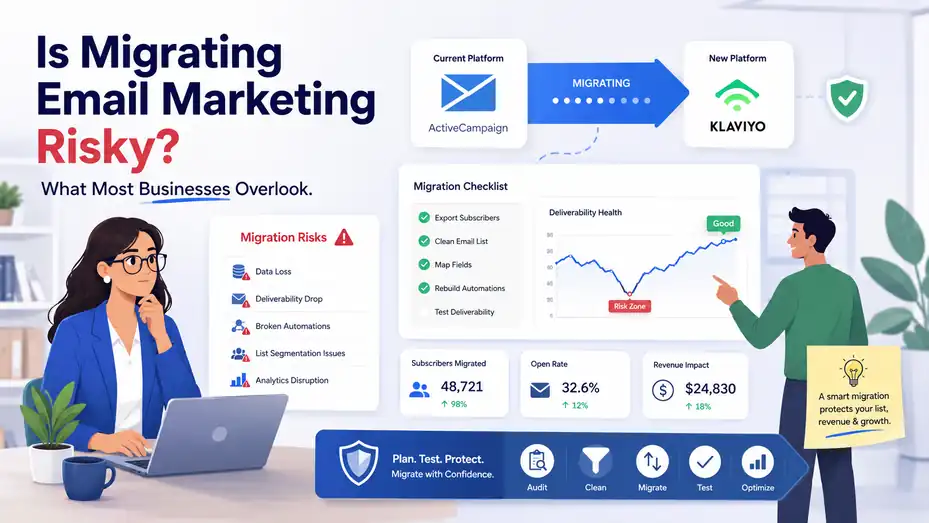
Is migrating email marketing risky? It can be, but not for the reason most people think. The real danger usually is not the platform switch itself. It is the quiet stuff around it: broken automations, missing consent data, poor domain authentication, and sending too much too fast on a fresh setup.
I have seen businesses treat migration like a simple export-import job, then wonder why opens drop and revenue gets shaky.
When you handle it like an operational project instead of a software swap, the risk drops fast and the upside becomes much clearer.
What Email Marketing Migration Actually Means
A migration is bigger than moving a list from one dashboard to another. In most cases, you are also moving forms, tags, segments, automation logic, templates, reporting habits, and parts of your customer data model.
What Counts As A Real Migration
A lot of businesses assume migration means exporting contacts from one email platform and importing them into another. That is only the surface layer. A real migration usually includes subscriber fields, suppression lists, tags, engagement history, signup sources, automations, transactional flows, templates, and domain settings.
That is why the risk feels sneaky. You can move the list and still break the system.
For example, imagine you leave Mailchimp for ActiveCampaign. Your contacts may import just fine, but if your welcome sequence loses its timing, your abandoned checkout emails stop firing, and your custom fields map incorrectly, the migration is not successful. It is only partially finished.
I suggest thinking about migration in three layers:
- Data layer: Contacts, fields, tags, consent status, exclusions, and historical structure.
- Infrastructure layer: Sending domain, SPF, DKIM, DMARC, dedicated IP decisions, tracking, and DNS records.
- Revenue layer: Automations, campaigns, segmentation rules, attribution, and reporting.
Once you see those three layers clearly, the project gets easier to manage. You stop asking, “Did the import work?” and start asking, “Did the business system survive the move?”
Why Businesses Decide To Move In The First Place
Most companies do not migrate because they are bored. They migrate because the current setup is costing them money, speed, or visibility.
Sometimes the issue is pricing. A business outgrows a starter platform and the monthly bill jumps faster than the revenue gain. Other times the issue is capability. A brand might need stronger automation, deeper ecommerce segmentation, or better CRM syncing than a lightweight tool can offer.
You also see migrations happen when teams want cleaner workflows. A store running on Klaviyo may need advanced revenue attribution and product-driven segmentation. A service business may prefer the sales pipeline connection inside Brevo or a CRM-led setup tied into HubSpot CRM. The point is rarely “new tool equals better.” The real question is whether the new setup fits the business model better.
I believe this is where many migrations go wrong. The team gets excited about features before defining the operational reason for switching. When that happens, they underestimate the cost of rebuilding the system behind the campaigns.
A good migration starts with a business case. Lower cost, better automation, improved deliverability controls, stronger segmentation, easier reporting, or tighter sales alignment are all valid reasons. “Everybody is moving there” is not.
Where The Real Risk Comes From
The platform itself is usually not the biggest threat. The real risk is losing trust with inbox providers, losing data quality, or interrupting revenue-generating journeys.
Deliverability Risk Is Usually A Reputation Problem
Most people think migration risk means “emails may go to spam.” That is true, but spam placement is usually a downstream symptom. The deeper issue is sender reputation.
Inbox providers do not just look at your content. They look at how consistently you send, how many people ignore you, how many addresses bounce, how often recipients complain, and whether your authentication is set up correctly. If you suddenly move to a new sending environment and blast your entire database, you can create a reputation shock.
This is especially important when your migration changes one or more of these variables:
- Sending infrastructure: New shared pool, new dedicated IP, or new transactional service.
- Authentication setup: Missing or incomplete SPF, DKIM, or DMARC.
- Cadence: Big volume spikes after a quiet period.
- Audience quality: Old or low-engagement contacts getting mailed again.
I recommend treating the first 30 days after migration as a reputation management window. Your goal is not just to send. Your goal is to prove to inbox providers that this sender is wanted, authenticated, and predictable.
That is why the safest launch pattern often starts with your most engaged subscribers first. If the people most likely to open and click respond well, you create positive engagement signals early. That gives the rest of the migration a much better chance.
Data Risk Is More Common Than Most Teams Expect
Data issues are less dramatic than deliverability problems, but they break performance just as quickly.
A migration can quietly damage your list if fields map incorrectly, tags collapse into one messy bucket, date formats fail, opt-in status gets lost, or unsubscribed contacts are accidentally reintroduced. None of that looks exciting in a project plan, yet this is exactly the kind of thing that causes complaints and revenue leaks later.
Here is a simple example. Let’s say your old system tracks “VIP buyers” with a tag, while your new system expects a custom property based on lifetime spend. If that mapping is skipped, your VIP campaign logic breaks. The wrong people get discounts, high-value customers miss priority messaging, and your reporting becomes harder to trust.
The same problem shows up with automation triggers. A field called “lead_source” in one platform might need a different structure in another. A date field might import as text. A dropdown value might not match the new automation rule exactly. Suddenly, the workflow is technically “on” but functionally dead.
This is why I always advise creating a field-mapping sheet before migration. It sounds boring, but boring saves revenue.
Operational Risk Hurts More Than Software Risk
The biggest overlooked risk is operational drift. The team moves the platform, but nobody fully rebuilds the processes around it.
This shows up when campaign calendars pause, forms stop syncing, customer support loses visibility, ecommerce events stop tracking, and sales teams no longer trust lead activity data. The tool is live, but the business system around it is weaker than before.
Operational risk is especially high when migration happens alongside a rebrand, website redesign, CRM switch, or ecommerce platform change. Each extra moving part multiplies the chance that a small failure gets missed.
I have seen this happen in stores moving from a basic newsletter setup to a more advanced automation stack. They focus heavily on the new builder, but forget to validate signup forms, preference centers, sunset policies, and suppression rules. The result is not a catastrophic crash. It is something more annoying: slow performance decay.
That kind of decay is dangerous because it is easy to normalize. A few points lower on click rate here, a few hundred dollars less from flows there, and suddenly the migration “worked” but the program is weaker.
How To Migrate Safely From The Start
A safe migration is mostly about sequence. Do the right work in the right order and the risk drops a lot.
Audit What You Have Before You Touch Anything
Before exporting a single record, document the current system. This is the stage people skip because they are eager to leave the old platform behind.
Start by listing what actually exists today:
- Core assets: Lists, segments, tags, custom fields, forms, templates, domains, and suppression files.
- Revenue automations: Welcome series, abandoned cart, browse abandonment, post-purchase, reactivation, renewal, and win-back flows.
- Integrations: Ecommerce platform, CRM, landing pages, webinar tools, payment systems, lead forms, and transactional email services.
- Reporting baselines: Open rate trend, click rate, revenue per recipient, unsubscribe rate, complaint rate, and bounce rate.
That last point matters more than it gets credit for. If you do not know your baseline, you cannot tell whether the migration improved anything. You are just guessing.
I also suggest ranking automations by business importance. In many businesses, only a handful of flows drive most of the email revenue. Protect those first. A newsletter template can be fixed later. A broken abandoned cart flow cannot wait.
This is the moment to identify dead weight too. If you have old tags nobody uses, duplicate fields, or automations that should have been retired a year ago, do not carry the clutter into the new platform.
Clean The List Before You Import It
This is one of the most practical ways to reduce migration risk. Do not move a dirty list into a fresh environment and hope things improve.
You want to remove or isolate:
- Hard bounces: Addresses that are permanently invalid.
- Role-based emails: Generic addresses like info@ or support@ when they are not true subscribers.
- Unengaged contacts: People who have not opened or clicked for a long time, depending on your send frequency and business model.
- Questionable consent records: Any contacts without clear permission history.
- Duplicates and malformed records: Broken fields, missing essentials, or multiple versions of the same subscriber.
If you need help validating addresses before import, tools like ZeroBounce can be relevant at this stage. I would only use that kind of tool if list quality is genuinely unclear, not as an excuse to keep weak data.
A common mistake is moving everyone “just in case.” That feels safe, but it often creates the opposite effect. A smaller, healthier list usually performs better in a new environment than a bloated list full of old contacts who no longer remember you.
In my experience, this is one of those painful but profitable decisions. Letting go of low-quality addresses can protect deliverability and make your reporting more honest.
Rebuild Infrastructure Before Your First Big Send
This is the least glamorous part of migration and one of the most important. If the infrastructure is weak, good content will not save you.
Before launch, check the full sending setup:
- Domain authentication: SPF, DKIM, and DMARC should be configured correctly.
- Tracking setup: Click tracking, open tracking, UTM structure, and attribution rules.
- Reply handling: Make sure replies go somewhere monitored.
- Unsubscribe flow: The process must be easy, obvious, and functional.
- Suppression handling: Unsubscribes, bounced contacts, and complaints must remain suppressed.
If your business sends both marketing and transactional email, clarify whether they should run through separate services. Some companies pair a marketing platform with a delivery-focused service such as Mailgun, SendGrid, or Amazon SES for transactional messages. That can make sense, but only when the architecture is deliberate.
I suggest not sending a large campaign until someone has verified the DNS records, test sends, tracking behavior, and unsubscribe flow end to end. This is one of those moments where a 30-minute QA session can prevent a very expensive week.
The Migration Checklist Most Businesses Need
Once your data is clean and your infrastructure is ready, you need a controlled rollout. This is where strategy becomes execution.
Migrate Data With A Mapping Plan, Not Guesswork
Every contact field should have a defined destination before import starts. That includes standard fields like email and name, but also custom values like lead score, purchase count, preferred category, signup source, lifecycle stage, and consent date.
I recommend creating a simple migration sheet with five columns: old field name, new field name, field type, allowed values, and business purpose. That last column matters because it forces you to justify why the field exists at all.
This step helps you catch problems early. For instance, a checkbox field in one platform may need to become a true/false value in another. A text tag may need to become a dropdown. A multi-select field might import badly if the delimiter changes. These are not technical trivia problems. They directly affect automation rules and segmentation later.
Also protect suppression data. Unsubscribed, cleaned, and bounced contacts should stay excluded. This is not optional. Re-mailing people who already opted out is one of the fastest ways to create complaints and lose trust.
The same care applies to consent history. If your old system stores opt-in date, source URL, IP, or signup method, preserve that information where possible. You may not use it every day, but you will be glad it exists when deliverability or compliance questions come up.
Rebuild Automations In Order Of Revenue Importance
Not every automation deserves the same urgency. Start with the journeys that make or save the most money.
For many businesses, the priority order looks something like this:
- Welcome sequence.
- Cart or checkout recovery.
- Post-purchase sequence.
- Lead nurture or demo follow-up.
- Re-engagement or sunset flow.
- Lower-priority content automations.
A common trap is rebuilding everything at once. That creates complexity fast and makes testing harder. I prefer a phased approach. Get the high-impact flows live first, validate them, then bring over the nice-to-have sequences.
Imagine you run a small ecommerce brand. Your weekly newsletter drives some revenue, but your welcome flow and abandoned cart flow probably drive a disproportionate share. If migration week arrives and only two things are perfect, those should be the two.
This is also where platform fit starts to matter. A store moving to Klaviyo may rebuild around product events and customer value segments. A creator business choosing MailerLite may focus more on simple subscriber journeys and landing page capture. The concept stays the same: rebuild based on business impact, not interface excitement.
Warm Up Sending Instead Of Hitting The Full List At Once
I know the temptation. The platform is ready, the team is tired, and everyone wants to announce the switch with one big campaign. That is exactly when caution matters most.
A safer launch uses segments based on engagement. Start with the subscribers who opened or clicked recently. Then expand gradually if performance stays healthy. This gives inbox providers positive signals and helps you spot issues before they affect the full database.
Your first sends should answer three questions:
- Are emails landing in the inbox?
- Are key segments behaving normally?
- Are complaints, unsubscribes, or bounces rising?
If performance dips, slow down. Do not force volume to match your old platform on day one. A temporary pacing adjustment is much cheaper than reputation damage.
This matters even more if you changed dedicated IPs or moved from one sending environment to another. A good migration launch is steady, measured, and slightly boring. That is a compliment.
Tools, Platforms, And Migration Decisions
Tools matter during migration, but only when they solve a real implementation problem. The goal is not collecting software. The goal is reducing risk and restoring performance faster.
Which Platform Differences Actually Matter
When people compare email platforms, they often get distracted by template editors and surface-level features. During migration, the practical differences that matter more are data flexibility, automation logic, ecommerce depth, CRM integration, reporting clarity, and deliverability controls.
Here is a simple comparison framework:
| Platform Type | Best Fit | Main Strength | Main Watch-Out |
|---|---|---|---|
| Beginner-friendly newsletter tool | Small creators, simple lists | Fast setup and low complexity | Can feel limiting as segmentation grows |
| Ecommerce-focused platform | Stores with product-driven flows | Revenue attribution and event-based automation | May cost more as list and event volume grow |
| CRM-led marketing platform | Sales-driven B2B teams | Closer alignment between pipeline and email activity | Setup can be heavier |
| Budget all-in-one platform | Small businesses needing broad features | Lower cost across forms, email, and automation | Some advanced functions may be shallower |
That is why one business thrives after moving and another regrets it. The “best” platform depends on the job.
For a simple newsletter business, a lightweight system may be enough. For a more advanced lifecycle setup, something like ActiveCampaign or Brevo may support stronger automation logic. For ecommerce depth, Klaviyo often comes up for a reason. But I would always match the tool to the operating model, not to social media hype.
The Supporting Tools That Can Reduce Risk
You do not always need extra tools, but there are cases where they help.
A pre-send QA platform like Litmus can be useful if your team relies on complex templates or wants inbox previews across clients before launch. That is especially helpful when you are rebuilding templates during migration and want to catch rendering issues early.
List validation tools can help when your old database quality is questionable. CRM sync tools or native integrations matter when lead routing, customer stages, or sales visibility are part of the project. Reporting tools matter when attribution is fragile and the team needs clean before-and-after comparisons.
The key is restraint. Do not turn a migration into a software shopping spree. Every added tool introduces another dependency to manage. I believe the smartest stack during migration is often the smallest stack that still lets you validate data, send safely, and monitor performance.
Common Migration Mistakes That Cause Preventable Damage
Most migration failures are not mysterious. They come from a few repeated mistakes.
Treating Migration Like A One-Day Task
This is probably the most common mistake. The team thinks, “We’ll export the list Friday, import Saturday, and send Monday.” That timeline is how hidden problems slip through.
Email migration touches data, DNS, design, automation logic, compliance records, and reporting. Even a relatively simple setup needs room for testing. The bigger the business, the less realistic the “quick swap” fantasy becomes.
I suggest breaking migration into phases: audit, cleanup, infrastructure, import, rebuild, QA, controlled launch, and post-launch review. That structure is not corporate fluff. It protects your results.
When migration is rushed, what usually gets skipped is not the visible stuff. It is the invisible stuff: suppression carryover, consent proof, event tracking, and automation triggers. Those are exactly the things that matter most once you go live.
Re-Mailing Old Contacts To Prove The New Tool Works
This mistake is incredibly tempting. After paying for a new platform, teams want to justify the move with a big send. So they reactivate stale segments and blast people who have not engaged in months or years.
That is not proof of success. It is a fast way to damage reputation.
A new platform does not magically repair old list quality. If a contact ignored you for the last year, changing dashboards does not make that person newly engaged. In fact, a migration is one of the worst times to test old, weak segments because your sending environment may already be under more scrutiny.
If you want to re-engage older subscribers, do it carefully and intentionally. Use a separate plan, a clear message, and smaller segments. Do not hide that experiment inside a migration launch.
Forgetting The Non-Campaign Parts Of Email
Some of the most expensive migration problems happen outside regular broadcasts.
Think about signup forms, preference centers, lead magnets, webinar registrations, abandoned cart triggers, order confirmations, password reset emails, internal alerts, and CRM-based follow-ups. Those are easy to overlook because they live across different systems.
I have seen teams celebrate a successful campaign send while their signup form was still pointed at the old account. That kind of leak quietly costs future growth every day until someone notices.
This is why I advise a “journey test” mindset. Instead of only testing sends, walk through the full customer paths. Subscribe through a form. Make a test purchase. Abandon a checkout. Fill a lead form. Unsubscribe. Reply to a campaign. Follow each path like a real user would.
That is where hidden breakpoints reveal themselves.
How To Measure Whether The Migration Worked
A migration is not successful because the account is live. It is successful when performance stabilizes or improves without breaking trust.
Watch The Right Metrics In The First 30 Days
The first month is the truth window. This is when issues become visible if you know where to look.
The most useful post-migration metrics are usually:
- Deliverability signals: Bounce rate, complaint rate, inbox placement indicators, and unsubscribe rate.
- Engagement signals: Opens, clicks, click-to-open rate, and replies when relevant.
- Business signals: Revenue per campaign, revenue per recipient, lead quality, booked calls, or repeat purchase behavior.
- Operational signals: Form capture volume, automation completion rates, sync accuracy, and attribution continuity.
Do not obsess over one send. Look for patterns across the first few weeks.
For example, a short-term open rate dip may happen because the new system measures differently or because your warm-up is more cautious. That alone is not a disaster. But if open rates dip, clicks soften, unsubscribes rise, and flow revenue falls together, that is a signal worth acting on.
This is where baseline reporting from the old platform becomes priceless. It gives you something real to compare against instead of relying on vague memory.
Build A Post-Migration Fix Loop
No migration is perfect on day one. The businesses that recover fastest are the ones that expect adjustments and plan for them.
I recommend a weekly review loop for the first month:
- Week 1: Check technical issues, DNS, broken flows, form capture, and obvious mapping problems.
- Week 2: Review segment logic, send pacing, and engagement quality.
- Week 3: Compare automation performance to old benchmarks.
- Week 4: Decide what should be optimized, retired, or rebuilt differently.
This gives the project a real finish line. Otherwise migration drifts into a permanent half-finished state where everyone assumes somebody else is still working on it.
Advanced Tips For Lower Risk And Better Results
Once the move is stable, the next goal is to use migration as an upgrade opportunity, not just a rescue mission.
Use The Migration To Simplify Your Email System
This is one of the few upsides of switching platforms: you get a rare excuse to clean house.
Retire dead segments. Merge duplicate fields. Rename confusing tags. Rebuild automations with clearer logic. Standardize naming conventions. Create cleaner reporting categories. Improve your sunset policy for disengaged subscribers.
A migration is painful enough that it should leave you with a better operating system, not just a different login.
I believe this is the smartest mindset shift in the whole process. Do not ask, “How do we recreate every detail exactly?” Ask, “Which parts deserve to be recreated, and which parts should finally be improved?”
That question often turns a stressful migration into a structural upgrade.
Separate Short-Term Stability From Long-Term Optimization
Right after migration, stability matters more than creativity. You want predictable sends, healthy engagement, and clean data flow.
Once that is stable, then optimize:
- Improve segmentation logic.
- Test subject lines and send times.
- Refine template hierarchy.
- Expand lifecycle automations.
- Tighten CRM handoff rules.
- Rework underperforming flows.
This two-stage approach helps prevent a common mistake: trying to redesign the full strategy while also moving the infrastructure. That usually creates too many variables at once.
When I first look at a migrated program, I want to know one thing before anything else: is it stable? Only then do I care whether it is fully optimized.
Verdict: Is Migrating Email Marketing Risky?
Yes, migrating email marketing is risky when businesses treat it like a simple software move. No, it is not especially risky when it is handled like a controlled operational transition.
What most businesses overlook is that email migration is really about trust transfer. You are trying to carry subscriber trust, inbox provider trust, and internal team trust from one system to another without dropping anything important along the way.
The businesses that struggle usually skip the quiet work: list cleanup, field mapping, suppression protection, authentication, flow prioritization, and warm-up. The businesses that do well respect those details.
So if you are asking whether migration is risky, I would phrase it this way instead: migration is unforgiving, not inherently dangerous. When the preparation is weak, it exposes problems fast. When the preparation is strong, it can become the moment your email program gets cleaner, smarter, and more profitable than it was before.

Juxhin B is a digital marketing researcher and founder of JAK Digital Hub, specializing in email marketing software, marketing automation platforms, and digital growth tools. His work focuses on software testing, platform comparisons, and real-world performance analysis to help businesses choose the right marketing technology.
Related posts:
 How To Migrate From GetResponse Without Breaking Your Automations
 How To Migrate From Free Email Marketing Safely
 Email Leads Not Converting? Fix It With This Framework
 How To Migrate From AWeber Without Losing Subscribers Or Automations
 How to Migrate From Moosend Without Losing Your Lists
 Is It Hard To Migrate From GetResponse? The Honest Truth for Marketers