Table of Contents
Some links on JAK Digital Hub are affiliate links, meaning we may earn a small commission at no extra cost to you. Read full disclaimer.
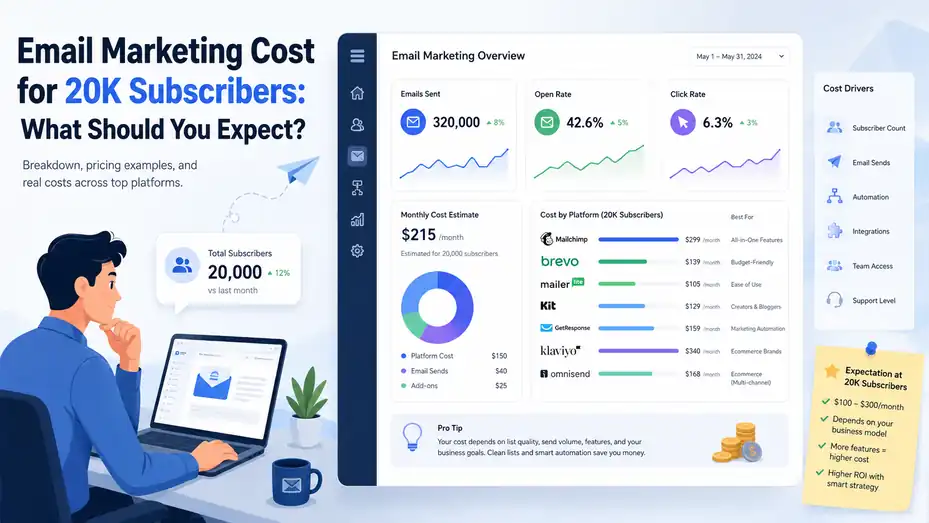
Email marketing cost for 20k subscribers usually lands somewhere between “surprisingly manageable” and “why is this invoice so high?” depending on how you send, how clean your list is, and what kind of business you run. If you are pricing platforms right now, I want to save you from the usual mistake: looking only at the sticker price.
At 20,000 subscribers, your real cost is shaped by contact quality, send volume, automations, ecommerce features, and whether your platform charges by subscribers, emails sent, or both.
What A 20K Subscriber List Really Means For Pricing
Reaching 20,000 subscribers sounds like one clean milestone, but pricing gets messy fast once you look under the hood. Two businesses can both have 20,000 subscribers and pay very different amounts for email marketing.
Why List Size Alone Does Not Tell You The Real Cost
A lot of people assume the bill is tied only to subscriber count. Sometimes that is true, but not always. In practice, your cost depends on three layers at once: how many contacts you store, how many emails you send, and which features you need to make the channel actually perform.
For example, a creator with 20,000 subscribers who sends one newsletter per week may spend far less than an ecommerce store with the same list size running welcome flows, abandoned cart emails, browse abandonment, win-back sequences, and campaign blasts every week. Same list size, very different workload.
What also changes the math is whether the platform charges for all stored contacts or only active contacts. That detail matters more than most people realize. If you have 20,000 subscribers on paper but 4,000 of them have not opened or clicked anything in a year, you may be paying premium pricing for people who are functionally gone.
Here is the bigger truth: Once your list hits 20k, you are no longer shopping as a beginner. You are shopping for operational fit. That means the cheapest plan is not automatically the best deal, and the expensive plan is not automatically overpriced.
The Monthly Cost Range Most Businesses Should Budget For
In my experience, a reasonable monthly budget for 20,000 subscribers usually falls into one of these bands:
| Business Type | Typical Monthly Software Spend | What Usually Drives The Price |
|---|---|---|
| Basic newsletter or creator business | $80 to $200 | Subscriber-based pricing, simple automations, low team needs |
| Small service business or B2B brand | $120 to $300 | Better segmentation, CRM links, lead scoring, more users |
| Ecommerce brand | $150 to $500+ | Revenue tracking, behavioral automations, SMS add-ons, product data sync |
| Advanced or high-send operation | $300 to $800+ | Heavy automation, advanced reporting, premium support, larger send volumes |
That range covers software only. It does not include migration help, template design, copywriting, list cleanup, deliverability consulting, or agency support. If you outsource any of those, the real monthly email marketing budget can rise quickly.
I suggest treating platform cost as just the base layer. The moment your list reaches 20k, the hidden costs start becoming more important than the advertised plan price.
How Email Platforms Usually Price A 20K List
Most email tools use one of a few pricing models. Once you understand the model, you can predict your cost much more accurately and avoid choosing a platform that gets expensive the second you grow.
Subscriber-Based Pricing Is The Most Common Model
Many email platforms price you based on contact count. That means your monthly cost rises as your list grows, even if your sending frequency stays the same. This is common across general email marketing platforms and creator-focused tools.
This model is easy to understand, which is why a lot of businesses start here. Platforms like Mailchimp, MailerLite, KIT (ConvertKit), GetResponse, and Constant Contact all fit this style in some form. The logic is simple: more subscribers means more value from the tool, so you pay more.
The upside is predictability. If your list is steady and your sending habits are normal, your bill is not too hard to forecast. The downside is that bad list hygiene becomes expensive. Old, inactive, or duplicate contacts can quietly inflate your costs month after month.
Here is where I think people slip up: they store everyone forever. They keep unsubscribed contacts in weird segments, hold outdated leads “just in case,” or never suppress cold subscribers. At 20k, that laziness starts costing real money.
If your list is healthy and engaged, subscriber-based pricing can be very fair. If your database is bloated, it becomes one of the fastest ways to overspend.
Send-Volume Pricing Can Be Cheaper For Infrequent Senders
Some platforms lean more heavily on email volume than contact count. Brevo is a well-known example of this model, and it often works best for businesses with bigger lists that do not email constantly.
This can be a great fit if you have 20,000 subscribers but only send one or two campaigns per week. In that scenario, paying for sends instead of stored contacts may lower your bill substantially. You are not penalized just for having a large list sitting in your account.
The catch is that this model can flip on you if you send a lot. Weekly newsletters, frequent promos, product launches, automated sequences, and transactional messages can pile up quickly. A list of 20,000 becomes expensive when you are sending to large segments multiple times every week.
I usually tell people to calculate their likely monthly send count before getting excited about volume-based pricing. A rough formula works well:
Monthly sends = campaign sends + automation sends + resend campaigns + test sends
That gives you a more honest picture. A business that thinks it sends 80,000 emails a month may actually be closer to 140,000 once automations and resends are included.
Ecommerce, Creator, And B2B Tools Price Value Differently
The same 20k list costs more on some platforms because those tools are built for higher-value use cases. That is not always a bad thing. It just means you should pay for the business model you actually run.
For ecommerce, Klaviyo and Omnisend often justify higher pricing because they include deep store integrations, revenue tracking, product-triggered automations, and stronger segmentation for buyers. If email directly drives store revenue, those features can pay for themselves.
For B2B and service businesses, ActiveCampaign tends to sit in the “more expensive, more powerful” category because it layers automation, CRM logic, and lead management into the platform. If your sales cycle is longer, that extra control can matter.
For creators and simpler newsletters, tools like MailerLite or Kit often feel more cost-efficient because they focus on forms, sequences, broadcasts, landing pages, and audience growth without as much complexity.
This is where I believe a lot of advice online gets sloppy. People compare platforms by headline price instead of revenue model. That is the wrong comparison. A cheap platform that misses abandoned cart revenue may be more expensive than a pricier tool that recovers thousands each month.
Real Cost Scenarios For 20K Subscribers
The easiest way to understand pricing is to picture real situations. Let me break it down by business type, because your use case affects your cost as much as your list size does.
Scenario 1: A Creator Or Newsletter Business
Imagine you run a weekly newsletter, a course business, or a personal brand. You have 20,000 subscribers, send one to three campaigns each week, and use a welcome sequence plus a few lead magnet automations.
In that case, your software cost is usually on the lower end of the 20k spectrum. You do not need deep ecommerce triggers, advanced sales pipelines, or heavy team collaboration. What you need is reliable deliverability, clean forms, simple automation, and decent reporting.
A creator in this situation often does well with a lean platform that prioritizes list growth and sequence building over enterprise complexity. Your bill may stay relatively controlled if your sends are predictable and your list is engaged.
Where costs rise is when you start stacking extras: paid recommendations, premium templates, extra users, custom domains, complex tagging structures, or unnecessary automation paths. None of those are inherently bad, but many newsletter businesses buy them before they actually need them.
I recommend focusing on one question here: does the platform help you publish, grow, and sell without friction? If yes, you probably do not need the most advanced plan on the market.
Scenario 2: An Ecommerce Store With Regular Campaigns And Flows
Now imagine you run a Shopify or WooCommerce store with 20,000 subscribers. You send two campaigns a week, plus welcome emails, abandoned cart emails, browse abandonment, back-in-stock alerts, post-purchase flows, and seasonal promotions.
This business usually pays more, and honestly, that makes sense. Ecommerce email programs are heavier systems. They rely on product sync, event tracking, segmentation by purchase behavior, dynamic content, coupon logic, and revenue attribution.
Your email software in this setup is not just a sender. It is part sales engine, part customer retention tool, and part reporting layer. That added value is why ecommerce-focused platforms often look more expensive upfront.
The important thing is not the monthly fee alone. It is the relationship between cost and recovered revenue. If your abandoned cart flow alone brings back enough sales to cover the platform fee several times over, the “expensive” platform may actually be the cheap one.
Where stores overspend is by buying advanced functionality before they have the traffic, product depth, or lifecycle strategy to use it well. A store doing basic campaigns may not need every premium feature on day one.
Scenario 3: A B2B, SaaS, Or Service Business
A B2B or SaaS company with 20,000 subscribers usually has a different cost structure again. The list may include leads, trials, demo requests, webinar signups, customers, and old pipeline contacts. Email is often tied to lead nurturing rather than direct transactions.
That usually pushes the business toward stronger automation and CRM-connected workflows. You may want lead scoring, stage-based nurturing, internal alerts, conditional sequences, and integration with your sales process. Those needs push you into mid-tier or higher-priced plans faster.
But there is also a hidden opportunity here. B2B lists often contain a lot of inactive or stale contacts. If you clean aggressively, your actual paid audience can shrink without hurting performance. I have seen businesses trim 20 to 30 percent of their database and improve results because they stop mailing people who were never going to engage anyway.
So yes, B2B platforms can cost more at 20k. But they also give you more room to reduce waste if you manage the list well.
How To Estimate Your True Email Marketing Cost Step By Step
If you are trying to budget properly, do not start with the pricing page. Start with your own numbers. That gives you a much more honest estimate.
Step 1: Audit Your Real Payable Contacts
Before comparing tools, count the people you would realistically keep on an active marketing list. Not every contact in your database deserves a paid seat.
Start with these groups:
- Active subscribers: Opened, clicked, purchased, or signed up recently.
- Cold subscribers: No engagement for 90, 180, or 365 days.
- Suppressed contacts: Unsubscribed, bounced, or clearly inactive.
- Duplicates or junk records: Old imports, fake signups, and role-based emails.
This one step can completely change your budget. You may think you need pricing for 20,000 contacts, but after cleanup you might only need to pay for 16,500 truly marketable subscribers. That difference can reduce your monthly cost in a very real way.
I suggest doing this before migration too. Do not pay a new platform to store a mess you should have cleaned before moving.
A simple rule helps here: if a contact has not engaged in a long time and there is no strong business reason to keep mailing them, treat them as a cost center until they prove otherwise.
Step 2: Estimate How Many Emails You Actually Send Each Month
The next step is figuring out your real send volume. This matters even on subscriber-based platforms, because send caps, overages, and plan jumps often appear once your monthly volume rises.
Use a simple planning grid like this:
| Email Type | Monthly Frequency | Approximate Audience | Estimated Monthly Sends |
|---|---|---|---|
| Newsletter campaigns | 4 | 20,000 | 80,000 |
| Promo campaigns | 4 | 10,000 | 40,000 |
| Welcome series | Ongoing | 1,500 | 4,500 to 7,500 |
| Abandoned cart or lead nurture | Ongoing | 2,000 | 3,000 to 8,000 |
| Resends to non-openers | 2 to 4 | 5,000 to 8,000 | 10,000 to 32,000 |
Now you are no longer guessing. You can see whether you are a light sender, a moderate sender, or a heavy sender. That alone tells you whether subscriber-based or volume-based pricing is likely to fit better.
A lot of businesses underestimate automation sends because those emails happen quietly in the background. But they count, and they add up.
Step 3: Add The Extra Costs Most People Forget
This is the part that surprises people. Your platform fee is only part of the total.
Here are the extras that commonly show up at 20k subscribers:
- Migration costs: Moving forms, templates, tags, and automations.
- Design work: Building or rebuilding templates that match your brand.
- Integrations: Ecommerce, CRM, webinar, or landing page tools.
- SMS add-ons: Especially common for retail brands.
- Premium support or onboarding: Helpful, but rarely free.
- Deliverability tools: List validation or inbox placement testing.
- Additional users: Needed once email becomes a team function.
In my experience, this is where a “$149 per month platform” can quietly become a $400 to $1,000 setup month. That is not a reason to panic. It is just a reason to budget honestly.
If you want a cleaner planning model, split costs into three categories: software, setup, and optimization. That keeps you from mixing one-time migration costs with recurring monthly costs.
Which Platforms Tend To Fit Best At 20K Subscribers
There is no perfect platform for everyone, but there are definitely better fits depending on how you use email. I would rather help you narrow the field than pretend there is one universal winner.
Best Fits For Simple Newsletters And Lean Businesses
If your email strategy is straightforward, you usually want ease, sane pricing, and enough automation to grow without overcomplicating your life.
MailerLite is often attractive because it keeps the workflow simple and generally feels built for small businesses that want practical functionality without too much overhead. Kit tends to make sense for creators, educators, and newsletter-first brands that care about forms, sequences, monetization, and audience-building workflows.
Mailchimp can still work for businesses that want a familiar interface and broad ecosystem support, though its costs can climb as the list grows and feature needs expand. Constant Contact is usually better suited to smaller organizations that value ease of use over deep automation complexity.
I suggest these platforms when the main job is clear communication, lead capture, and consistent broadcasting. If that sounds like your business, you probably do not need to pay for enterprise-style logic.
Best Fits For Automation-Heavy B2B And Service Businesses
When your list is 20k and your funnel is more complicated, automation becomes the main reason you are paying for the software. This is where a platform with stronger workflow depth starts earning its price.
ActiveCampaign is one of the more natural fits here because it supports more advanced branching, lead nurturing, and lifecycle automation than many lighter tools. That matters when your email program is tied to demos, consultations, trial activations, or longer sales cycles.
GetResponse can also be worth a look for businesses that want email plus landing pages, webinars, and broader funnel tools in one stack. That kind of bundle is not ideal for everyone, but it can reduce tool sprawl if you are currently patching together too many systems.
The core question is simple: Are you just sending emails, or are you orchestrating a buyer journey? If it is the second one, paying more for stronger automation can be justified very quickly.
Best Fits For Ecommerce Brands Focused On Revenue
For online stores, email platform selection should revolve around revenue generation, not just cost control. That is why ecommerce tools can look pricier but still be smarter purchases.
Klaviyo is often chosen by brands that want strong segmentation, purchase-based triggers, and detailed revenue attribution. Omnisend is appealing for stores that want email and SMS built around retail automations without needing a massive setup process.
Brevo can also be useful for businesses that send strategically and want more flexible pricing tied to volume rather than a strict contact-based climb. It is not always the top ecommerce pick, but it can be budget-friendly in the right sending pattern.
Here is a practical way to compare them:
| Platform Type | Best For | Cost Pattern At 20K | Main Trade-Off |
|---|---|---|---|
| General email platform | Newsletters, simple campaigns | Usually lower to mid-range | Less deep commerce logic |
| Creator platform | Personal brands, educators | Lower to mid-range | Fewer advanced B2B features |
| Automation-focused platform | B2B, SaaS, services | Mid to high | Steeper learning curve |
| Ecommerce platform | Stores with flows and revenue tracking | Mid to high | Higher cost if underused |
| Volume-based platform | Large list, lighter sending | Can be very cost-efficient | Gets pricier with heavy send volume |
Common Mistakes That Make Email Marketing More Expensive
At 20k subscribers, bad habits become expensive. The good news is that most of them are fixable.
Paying For Subscribers Who Should Have Been Removed Months Ago
This is the easiest mistake to fix and one of the most common. Businesses keep cold subscribers on the list because it feels safer than deleting them. I get the instinct, but keeping them forever is usually a bad trade.
You pay to store them. You hurt engagement averages. You create more deliverability risk. And you make reporting less honest because your list looks bigger than your reachable audience really is.
I recommend setting clear re-engagement rules. Try a win-back sequence, give subscribers a reason to stay, and suppress the people who still do nothing. That protects both your budget and your sender reputation.
A smaller, engaged list is usually more profitable than a larger, sleepy one.
Buying Advanced Plans Before You Have A Real Use For Them
Another expensive mistake is upgrading because a feature sounds impressive rather than because your strategy needs it. Many businesses buy advanced automations, predictive features, or extra seats long before they have the traffic, team, or segmentation strategy to benefit from them.
This usually happens during growth phases. You hit 20k subscribers, assume you have become a “big” business, and start shopping for a platform that looks enterprise-ready. But if you are still sending one newsletter and one promo a week, you may be paying for horsepower you never use.
I believe software should solve today’s real bottleneck first. Not tomorrow’s imagined one.
That does not mean cheap out. It means match complexity to maturity. A platform should stretch with you, but it should not outpace your strategy by two years.
Ignoring Deliverability, Which Quietly Raises Cost Per Result
Deliverability is easy to ignore because it is invisible until it hurts. But once engagement drops and more emails start landing in spam or promotions, your effective cost rises even if the platform fee stays the same.
Think about it this way: if you pay $200 a month and strong inbox placement helps you generate 200 meaningful visits, your cost per engaged visit is very different than if poor inbox placement gives you only 80 meaningful visits.
That is why list cleaning, smart segmentation, domain authentication, and cadence control matter. They do not just improve performance. They reduce wasted spend.
When I look at email costs, I never ask only, “What does the platform charge?” I also ask, “How much am I paying for each useful result this platform helps me create?”
How To Lower Your Email Marketing Cost Without Hurting Growth
You do not need to cut corners to lower spend. Usually, you need to tighten operations.
Clean Your List And Use Suppression Strategically
This is the highest-leverage move for most 20k lists. Remove duplicates. Suppress deadweight. Re-engage the maybe-still-interested group. Keep the people who matter.
A simple maintenance rhythm works well:
- Monthly: Review bounces, unsubscribes, and obvious junk.
- Quarterly: Segment non-engagers and run a reactivation campaign.
- Twice a year: Do a full database audit and remove stale records.
This does two things at once. It can reduce your bill, and it can improve your performance metrics. That combination is rare, which is why I push it so hard.
Send Smarter Instead Of Sending More
More email is not always more revenue. At 20k subscribers, lazy batching gets expensive fast.
Segmenting better often beats sending more often. If one campaign to 8,000 relevant subscribers performs better than one blast to 20,000 loosely related contacts, you save sends and often make more money. That is a better business outcome on both sides.
I suggest reviewing your campaigns with one question: did this message need to go to everyone? In many cases, the honest answer is no.
This is especially true for ecommerce promotions and B2B lead nurture campaigns. Better targeting can hold your costs down while improving engagement.
Time Your Migration Or Annual Billing Carefully
If you already know you are outgrowing your current tool, it is usually cheaper to move before your next contact-tier jump rather than after it. Waiting until the bill spikes often means paying a higher month, then paying migration costs on top of it.
Annual billing can also save real money when you are confident in the platform fit. I would only do this after testing the workflow, migration path, and support quality, but once those are validated, annual discounts can meaningfully reduce the average monthly cost.
Just be honest with yourself before locking in. Savings only count if the platform is still the right fit six months from now.
Final Verdict: What Should You Expect To Pay?
If you want the practical answer, email marketing cost for 20k subscribers usually lands around $100 to $300 per month for many newsletter, creator, and service businesses, and closer to $150 to $500 or more for ecommerce brands or automation-heavy setups.
That said, I would not choose a platform based on price alone. At 20,000 subscribers, the right question is not “what is the cheapest tool?” It is “which platform gives me the best return for the way I actually send email?”
For many businesses, the biggest savings do not come from finding a cheaper platform. They come from cleaning the list, reducing waste, choosing the right pricing model, and refusing to pay for complexity they are not using yet.
If you are budgeting right now, my advice is simple: audit your active contacts, estimate your true monthly send volume, and match the platform to your business model before you look at the sticker price. That is how you avoid overpaying and still set yourself up to grow.

Juxhin B is a digital marketing researcher and founder of JAK Digital Hub, specializing in email marketing software, marketing automation platforms, and digital growth tools. His work focuses on software testing, platform comparisons, and real-world performance analysis to help businesses choose the right marketing technology.
Related posts:
 Should I Leave AWeber? The Signs Your Email Platform Is Holding You Back
 Why Are Your GetResponse Emails Going to Spam—and How Do You Stop It Fast?
 Should I Leave Moosend or Stick With It? Clear Criteria
 How To Migrate From GetResponse Without Breaking Your Automations
 Cheaper Email Automation System For Growing List Fast
 Free Email Marketing For 10K Subscribers: Is It Enough?