Table of Contents
Some links on JAK Digital Hub are affiliate links, meaning we may earn a small commission at no extra cost to you. Read full disclaimer.
If you’re wondering whether it’s time to upgrade email automation platform for scaling, you’re not alone.
Many creators, bloggers, and ecommerce founders reach a point where their current email tool starts to feel… limiting. Automations break, segmentation becomes messy, deliverability drops, or pricing suddenly jumps when your list grows.
I’ve seen this happen countless times. What worked perfectly when you had 1,000 subscribers can quickly become frustrating at 20,000 or 100,000. The question isn’t just “Should I switch tools?” — it’s whether your current platform can actually support the next stage of your business.
In this guide, I’ll walk you through how to evaluate whether you should upgrade your email automation platform for scaling, the warning signs that your system is holding you back, and how to migrate without destroying your deliverability or automations.
Why Email Automation Platforms Stop Scaling With Your Business
Email automation platforms often work well at the beginning, but they can become restrictive as your subscriber base, automation complexity, and revenue grow.
List Growth Changes the Economics of Your Platform
Most email platforms charge based on the number of subscribers. That sounds reasonable until your list begins growing rapidly.
For example:
| Subscribers | Typical Monthly Cost (Entry Tools) |
|---|---|
| 1,000 | $15–$30 |
| 10,000 | $90–$150 |
| 50,000 | $300–$600 |
| 100,000+ | $800–$2,000 |
What many people don’t realize is that pricing scales differently depending on the platform architecture.
Some platforms charge for all contacts, even inactive ones. Others charge only for active subscribers.
Imagine this scenario:
You run a blog with 80,000 subscribers, but only 40,000 regularly open emails. If your platform charges for every contact, you’re paying for 40,000 inactive emails every month.
When I help businesses audit their stack, this is one of the first cost leaks we uncover.
Scaling businesses often switch platforms specifically to optimize pricing as their list grows.
Automation Complexity Increases Over Time
When you’re starting out, your automation might look simple:
- Welcome sequence
- Lead magnet delivery
- Weekly newsletter
But once your business matures, automation becomes much more complex.
You may need:
- Behavior-based segmentation
- Multiple funnels
- Product launch sequences
- Sales pipelines
- Conditional email logic
- Multi-branch automations
At that point, some tools begin to feel restrictive.
For instance, visual automation builders with limited branching logic or weak segmentation rules make it difficult to personalize campaigns.
According to Campaign Monitor, segmented email campaigns generate 760% more revenue than non-segmented campaigns.
If your platform limits segmentation or automation depth, it’s directly impacting revenue.
Deliverability Risks Increase as You Scale
Deliverability becomes significantly more important when your list grows.
A small creator sending emails to 2,000 subscribers might not notice deliverability issues.
But when you’re sending to:
- 50,000 subscribers
- 100,000 subscribers
- or multiple segments daily
Inbox placement becomes critical.
Deliverability depends on several factors:
- IP reputation
- engagement signals
- bounce rate
- spam complaints
- authentication setup (SPF, DKIM, DMARC)
Advanced platforms provide stronger tools for managing these signals.
From what I’ve seen, large senders often upgrade platforms purely to improve deliverability control.
Signs You Should Upgrade Email Automation Platform For Scaling
Many businesses wait too long before switching platforms. Recognizing the warning signs early can save time, money, and lost revenue.
Your Automations Are Becoming Difficult to Manage
If your automation workflows look like a tangled mess of sequences, it’s a sign your platform may not be designed for scaling.
Common problems include:
- duplicate workflows
- manual subscriber tagging
- automations triggering incorrectly
- difficulty editing workflows
Imagine managing 20+ automation sequences with overlapping triggers. One small mistake can send the wrong email to thousands of people.
Modern automation systems rely on visual workflow builders with clear logic and conditional paths.
If editing automations feels stressful or risky, that’s usually a signal it’s time to upgrade.
Your Email Tool Limits Segmentation or Personalization
Segmentation is the backbone of scalable email marketing. The more your list grows, the more important it becomes to target the right people.
Without strong segmentation, you end up blasting the entire list.
Better segmentation allows targeting based on:
- purchase behavior
- engagement level
- content interests
- funnel stage
- website actions
For example:
A fitness brand might send:
- weight-loss content to one segment
- strength training content to another
- supplement promotions to customers only
If your platform restricts segmentation rules or tagging systems, scaling becomes difficult.
Pricing Is Increasing Faster Than Revenue
This is one of the most practical reasons businesses upgrade. Many platforms price aggressively once you cross certain subscriber thresholds.
If email platform costs grow faster than the revenue email generates, your margins shrink.
For example:
| Metric | Value |
|---|---|
| Email revenue | $8,000/month |
| Platform cost | $900/month |
| Revenue share | 11% |
Most profitable email programs keep platform costs between 2% and 6% of email revenue.
When costs exceed that range, it may be time to reevaluate your platform.
You Need Advanced Automation Features
As your business grows, your marketing becomes more data-driven.
Advanced automation capabilities may include:
- event-triggered emails
- behavioral tracking
- predictive segmentation
- lifecycle automation
- dynamic content personalization
These features allow you to move from simple newsletters to fully automated revenue systems.
When your current platform lacks these features, scaling becomes inefficient.
How to Evaluate Whether Your Email Platform Can Scale
Before upgrading, it’s important to evaluate whether your current platform can actually support your future growth.
Assess Your Current Automation Infrastructure
Start by mapping your entire email automation system.
This includes:
- all active automations
- triggered sequences
- segmentation rules
- lead magnets
- newsletter campaigns
You might discover things like:
- duplicate funnels
- outdated automations
- broken triggers
In many cases, businesses upgrade platforms simply because their automation structure became chaotic.
Auditing first can clarify whether the issue is the platform or the strategy.
Calculate Email Revenue per Subscriber
One useful metric is revenue per subscriber.
The formula is simple: Revenue per subscriber = total email revenue ÷ total subscribers
Example:
| Metric | Value |
|---|---|
| Email revenue | $12,000/month |
| Subscribers | 40,000 |
| Revenue per subscriber | $0.30 |
If your revenue per subscriber is low, the issue may be strategy rather than platform limitations.
But if strong campaigns still underperform because segmentation or automation is limited, upgrading may unlock growth.
Evaluate Automation Flexibility
Ask yourself a few honest questions:
- Can I easily build complex automation workflows?
- Can I segment users based on behavior?
- Can I personalize campaigns without workarounds?
- Can I run multiple funnels simultaneously?
If the answer to several of these is no, your platform may not support scaling.
Best Email Automation Platforms for Scaling Businesses
When upgrading, the goal is to choose a platform designed for your next stage of growth, not just your current size.
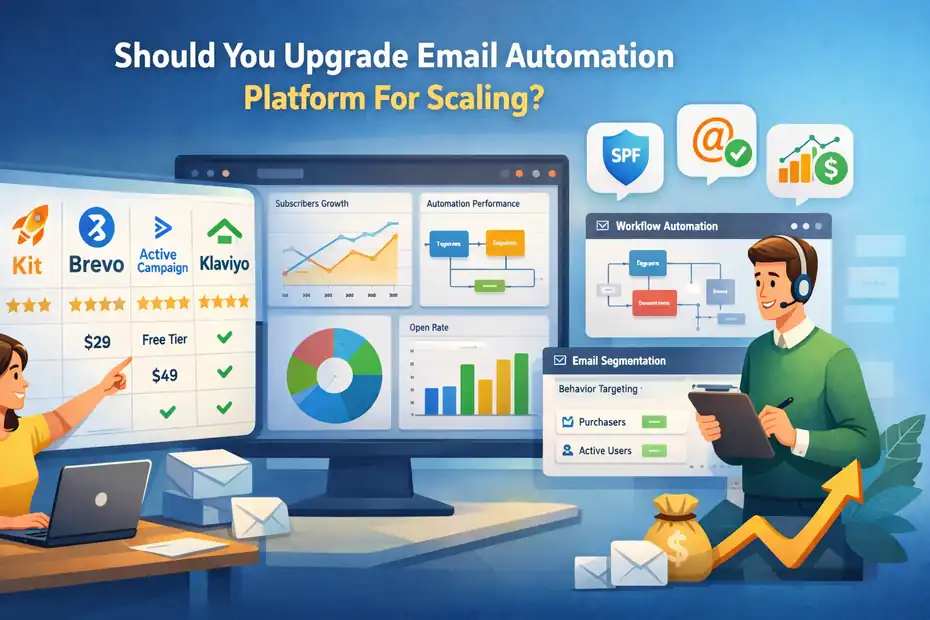
Below is a comparison of commonly used platforms for scaling businesses.
| Platform | Best For | Starting Price | Key Strength |
|---|---|---|---|
| Kit | Creators & bloggers | ~$29/month | Simple but powerful automation |
| Brevo | Ecommerce & SMBs | Free / Paid tiers | Strong CRM integration |
| ActiveCampaign | Advanced automation | ~$49/month | Powerful workflow builder |
| Klaviyo | Ecommerce brands | Free tier available | Deep ecommerce tracking |
| Mailchimp | Beginners transitioning | ~$13/month | Familiar interface |
Each platform has different strengths depending on your business model.
For example:
- Ecommerce brands often move toward behavioral automation platforms.
- Bloggers often prioritize creator-focused tools with clean automation flows.
Choosing the right platform requires thinking about your next growth stage, not just today’s features.
How to Upgrade Email Automation Platform Without Breaking Your System
One of the biggest fears around upgrading is breaking your existing email system.
This is a valid concern. Migration mistakes can affect deliverability and automation reliability.
Here’s how to do it safely.
Step 1: Audit Your Existing Automations
Before migrating anything, document every automation in your current platform.
List:
- triggers
- sequences
- tags
- segmentation rules
- funnels
This ensures nothing important gets lost during migration.
Step 2: Clean Your Email List
Migration is the perfect time to remove inactive subscribers.
Cleaning your list improves:
- deliverability
- open rates
- sender reputation
A good rule many marketers follow:
Remove subscribers who haven’t opened emails in 6–12 months.
This alone can improve inbox placement significantly.
Step 3: Rebuild Automations Strategically
Rather than copying every automation exactly, rebuild them with a cleaner structure.
This is often the moment when businesses simplify workflows.
For example:
Instead of 10 overlapping funnels, you may build:
- one onboarding system
- one nurture funnel
- one promotional system
Cleaner automation architecture makes scaling much easier.
Step 4: Warm Up Your Sending Domain
If you migrate platforms, avoid sending large campaigns immediately.
Gradually increase sending volume.
Example warm-up schedule:
| Day | Emails Sent |
|---|---|
| Day 1 | 500 |
| Day 3 | 1,500 |
| Day 5 | 3,000 |
| Day 7 | 6,000+ |
This protects your sender reputation.
Common Mistakes When Upgrading Email Platforms
Upgrading tools can solve problems, but it can also create new ones if done incorrectly.
Migrating Without Cleaning Your List
Migrating inactive subscribers damages deliverability on the new platform.
Many businesses unknowingly carry years of inactive contacts.
List hygiene should always come before migration.
Recreating Broken Automation Systems
If your old system was messy, copying it exactly will recreate the same problems.
Migration should be treated as a system redesign, not just a tool change.
Choosing a Platform Based Only on Price
Cheap tools can become expensive if they limit growth.
I’ve seen companies switch platforms three times in two years because they focused only on price instead of scalability.
It’s usually better to choose a platform designed for the next stage of growth.
Advanced Strategies After You Upgrade
Once you upgrade your email automation platform for scaling, new optimization opportunities open up.
Build Lifecycle Email Automation
Lifecycle email marketing targets subscribers based on their stage in the customer journey.
Examples include:
- onboarding emails
- engagement recovery sequences
- customer upsell campaigns
- loyalty programs
These automations often generate consistent revenue with minimal manual work.
Use Behavioral Email Triggers
Behavioral triggers respond to subscriber actions.
Examples:
- downloading a resource
- clicking a product link
- abandoning a cart
- visiting pricing pages
Behavioral emails typically achieve 2–5x higher conversion rates compared to generic newsletters.
Track Revenue Attribution From Email
Scaling businesses track exactly how much revenue email generates.
This allows you to measure:
- automation performance
- campaign ROI
- subscriber lifetime value
When email becomes a measurable revenue channel, optimization becomes much easier.
Final Thoughts
Deciding whether to upgrade email automation platform for scaling ultimately comes down to one question:
Is your current tool helping your business grow, or slowing it down?
If you’re experiencing:
- automation limitations
- rising costs
- segmentation restrictions
- deliverability concerns
then upgrading your email platform may unlock the next level of growth.
The key is approaching migration strategically — auditing your system, cleaning your list, and rebuilding automations with scalability in mind.
Done correctly, upgrading your email automation platform isn’t just a technical change.
It’s often the moment when email marketing evolves from a simple newsletter tool into a fully automated revenue engine for your business.
FAQ
When should you upgrade an email automation platform for scaling?
You should upgrade your email automation platform for scaling when subscriber growth, automation complexity, or pricing limits start restricting performance. If your platform cannot handle advanced segmentation, large lists, or reliable deliverability, upgrading helps support business growth.
What problems happen if you don’t upgrade your email automation platform while scaling?
If you don’t upgrade your email automation platform while scaling, you may face automation limits, poor segmentation, rising costs, and lower deliverability. These issues can reduce engagement and revenue as your subscriber list and marketing complexity grow.
How does upgrading an email automation platform improve scalability?
Upgrading an email automation platform improves scalability by enabling advanced workflows, better segmentation, stronger deliverability controls, and improved performance tracking. These capabilities allow businesses to manage larger lists and automate more complex marketing campaigns.
Is migrating to a new email automation platform risky for deliverability?
Migrating to a new email automation platform can affect deliverability if done incorrectly. Gradually warming up your sending domain, cleaning inactive subscribers, and rebuilding automations properly helps maintain inbox placement and protects your sender reputation.
What features should a scalable email automation platform include?
A scalable email automation platform should include advanced segmentation, behavioral automation triggers, reliable deliverability infrastructure, flexible workflow builders, and strong analytics. These features allow businesses to automate campaigns efficiently as subscriber lists grow.

Juxhin B is a digital marketing researcher and founder of JAK Digital Hub, specializing in email marketing software, marketing automation platforms, and digital growth tools. His work focuses on software testing, platform comparisons, and real-world performance analysis to help businesses choose the right marketing technology.
Related posts:
 Best Email Automation System That Scales Affordably
 Cheaper Email Automation System For Growing List Fast
 Best Email Automation Tool For Affiliate Marketers
 Email Automation Systems That Drive Revenue
 Email Automation Tools for New Ecommerce Store: What to Start With
 Email Automation Tools Not Triggering? Fix the Issue Fast