Table of Contents
Some links on JAK Digital Hub are affiliate links, meaning we may earn a small commission at no extra cost to you. Read full disclaimer.
Starting with the right email automation tools for new ecommerce store owners can feel overwhelming.
When you’re launching a store, you’re already juggling product sourcing, website setup, and traffic generation—so figuring out which email platform to trust shouldn’t slow you down.
The goal here isn’t to test dozens of tools; it’s to start with platforms that are beginner-friendly, affordable, and powerful enough to grow with your store.
Why Klaviyo Is The Most Popular Starting Point In 2026
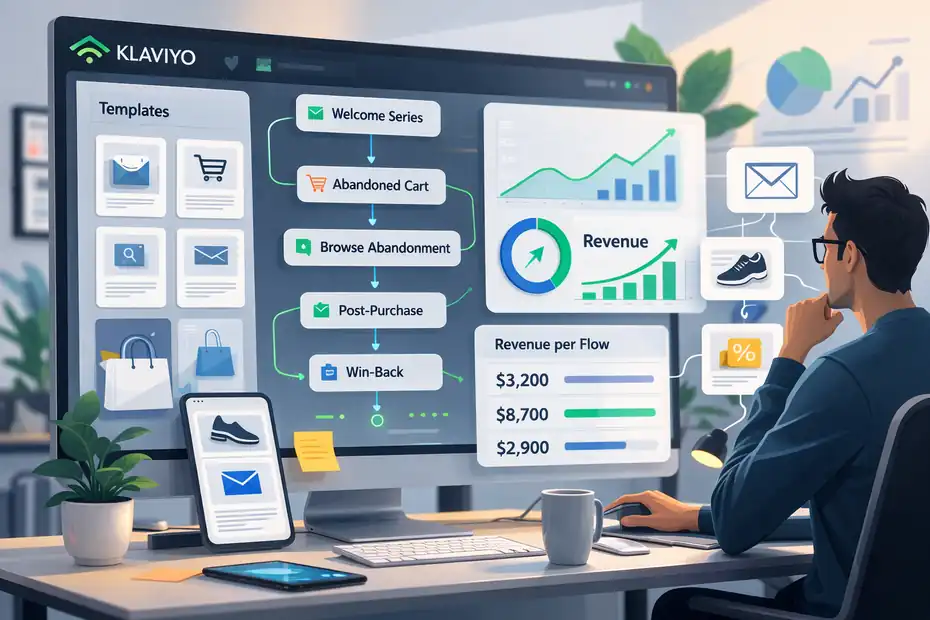
If you ask experienced ecommerce founders which email automation tools for new ecommerce store owners should start with, one name comes up constantly: Klaviyo. The reason is simple—it’s built specifically for ecommerce, not general email marketing.
That means most of the automation, tracking, and segmentation features are already designed around how online stores actually operate: abandoned carts, product browsing, repeat purchases, and customer lifetime value.
For new store owners, this saves a huge amount of setup time.
Easy Shopify And WooCommerce Integration For Fast Setup
One of the biggest reasons beginners start with Klaviyo is how quickly it connects to ecommerce platforms.
If you’re running your store on Shopify or WooCommerce, the integration usually takes less than 10 minutes.
Once connected, the platform automatically syncs:
- Customer profiles
- Order history
- Products purchased
- Cart activity
- Website browsing behavior
That means you don’t need complex setup just to start sending targeted emails.
For example, the moment someone:
- Adds a product to cart
- Views a product page
- Makes a purchase
The system already knows—and can trigger automation based on that behavior.
From what I’ve seen helping ecommerce founders set up their first email flows, this integration alone removes 80% of the technical headache beginners usually face.
Instead of manually importing lists or creating segments, your store data is already flowing into the email platform automatically.
Prebuilt Ecommerce Automation Flows For Beginners
Another reason many beginners choose Klaviyo is the prebuilt automation library.
New store owners often struggle with one big question:
“What emails should I even send first?”
Instead of starting from scratch, Klaviyo provides ready-made automation flows such as:
- Welcome series for new subscribers
- Abandoned cart recovery emails
- Browse abandonment reminders
- Post-purchase follow-ups
- Customer win-back campaigns
These flows already include:
- Suggested email timing
- Example copy
- Trigger conditions
- Recommended segmentation
You can activate them quickly and customize later.
Here’s a simple real-world example.
Imagine someone visits your store and subscribes for a 10% discount code.
A typical automation might look like this:
- Email 1: Deliver the discount code immediately
- Email 2 (24 hours later): Introduce your best-selling products
- Email 3 (48 hours later): Share customer reviews or social proof
Even basic flows like this can dramatically improve conversions.
According to ecommerce benchmarks published by Klaviyo, automated flows generate up to 30x more revenue per recipient than regular campaigns.
For new stores with limited traffic, automation is often where the first meaningful email revenue comes from.
Advanced Segmentation Without Complex Configuration
Segmentation is where most email platforms start getting complicated—but Klaviyo keeps it surprisingly simple.
Instead of building complex filters manually, you can create segments using behavior-based conditions.
For example:
- Customers who bought in the last 30 days
- Subscribers who viewed a product but didn’t purchase
- VIP customers who spent more than $200
- Subscribers who opened emails but never bought
These segments update automatically.
Why does this matter?
Because targeted emails convert significantly better than generic blasts.
A quick example.
Instead of sending one promotion to your entire list, you could send:
- A new product announcement only to repeat customers
- A discount reminder only to cart abandoners
- A product restock alert only to people who viewed that item
From what I’ve seen, even small segmentation changes like this can double email conversion rates.
And the best part is that you don’t need advanced marketing knowledge to start using it.
Built-In Revenue Tracking And Customer Data Insights
One feature that new store owners often underestimate is revenue attribution.
Many email tools show open rates and click rates, but Klaviyo goes further by tracking actual sales generated from each email and automation flow.
Inside the dashboard you can see metrics like:
- Revenue generated by each flow
- Revenue per recipient
- Average order value from email campaigns
- Customer lifetime value
This data helps you answer an important question early:
“Is email actually making money for my store?”
For example, a typical abandoned cart flow might show results like:
| Metric | Example Result |
| Emails Sent | 3,000 |
| Open Rate | 48% |
| Click Rate | 12% |
| Revenue Generated | $5,400 |
That kind of visibility helps new ecommerce founders make smarter decisions about:
- Promotions
- Product launches
- Campaign timing
- Customer retention strategies
Instead of guessing what works, you can see exactly which emails drive sales.
Free Plan Limits And When To Upgrade
For many new store owners, the good news is that Klaviyo does offer a free starting plan.
As of 2026, the free tier typically includes:
- Up to 250 contacts
- Up to 500 email sends per month
- Basic automation features
This is enough for many early-stage ecommerce stores to test their first flows.
But there is an important reality check here.
Email lists grow quickly once your store starts generating traffic.
For example:
| Subscriber Count | Estimated Monthly Cost |
| 250 | Free |
| 500 | ~$20/month |
| 1,000 | ~$30/month |
| 5,000 | ~$100/month |
That’s why some founders feel pricing pressure as they scale.
However, there’s another side to this.
If your automation is set up properly, email should generate 20–30% of ecommerce revenue over time. Many Shopify brands report even higher percentages once flows mature.
In other words, when email automation is working well, the platform often pays for itself many times over.
Why Brevo Works Well For Budget-Friendly Automation
While Klaviyo is extremely powerful, it’s not always the cheapest option for beginners. That’s where Brevo comes in.
Brevo (formerly Sendinblue) is often recommended for new ecommerce founders who want solid automation without high monthly costs.
It’s especially appealing for stores that are just starting to build their subscriber list.
Free Automation Workflows For Small Subscriber Lists
One of the biggest advantages Brevo offers is its generous free plan structure.
Unlike many email platforms that limit the number of subscribers, Brevo limits daily email sends instead.
The free plan typically includes:
- Unlimited contacts
- Up to 300 emails per day
- Marketing automation features
- Email templates and campaigns
For a brand-new ecommerce store, that can be more than enough.
For example, if you have:
- 200 subscribers
- A welcome automation
- An abandoned cart email
You can easily run those flows without hitting the daily send limit.
This makes Brevo a strong choice if you want to start automation early without worrying about subscriber pricing tiers.
Built-In CRM Features For Customer Relationship Tracking
Another feature that makes Brevo stand out is the built-in CRM functionality.
Most email platforms focus only on sending emails, but Brevo also helps you organize customer relationships and interactions.
For example, inside the CRM you can track:
- Customer purchase activity
- Email engagement history
- Notes about customers
- Sales pipeline stages
For ecommerce businesses, this can be useful if you:
- Offer higher-priced products
- Run a small team handling customer inquiries
- Sell both B2C and B2B
Instead of juggling multiple systems, you can manage contacts and email marketing from one dashboard.
It’s not as advanced as dedicated CRM platforms, but for small stores it’s surprisingly practical.
Transactional Email Support For Order Notifications
Another area where Brevo shines is transactional email support.
Transactional emails include messages such as:
- Order confirmations
- Shipping updates
- Password resets
- Account notifications
These emails are different from marketing campaigns because they’re triggered by system actions, not marketing schedules.
Many ecommerce platforms handle these automatically, but Brevo allows you to manage them with greater flexibility.
For example, you can customize:
- Order confirmation templates
- Shipping notification branding
- Post-purchase follow-up sequences
This gives new ecommerce brands more control over the entire customer email experience, not just promotions.
In practice, this means every email your customer receives—from order receipt to product recommendations—can feel consistent with your brand.
Visual Workflow Builder For First-Time Automation Users
Automation can feel intimidating if you’ve never built one before.
Brevo solves this with a visual automation builder that makes flows easy to understand.
Instead of writing rules or code, you simply build automation using blocks.
For example: Trigger → Condition → Action
A simple abandoned cart flow might look like this:
- Trigger: Customer adds item to cart
- Condition: No purchase within 1 hour
- Action: Send reminder email
You can then expand the flow with additional steps like:
- Send a second reminder after 24 hours
- Add a discount code after 48 hours
- Stop automation if purchase happens
Even beginners can understand the logic quickly because it’s displayed visually.
In my experience, visual builders dramatically reduce the learning curve for people who are new to email automation.
Pricing Advantages Compared To Klaviyo For New Stores
Cost is one of the biggest reasons new ecommerce founders consider Brevo.
Here’s a simplified comparison many beginners look at when choosing between the two platforms.
| Feature | Klaviyo | Brevo |
| Free Plan | Up to ~250 contacts | Unlimited contacts |
| Email Limit | Limited monthly sends | 300 emails/day |
| Automation | Strong ecommerce focus | Good basic automation |
| CRM | Limited | Built-in CRM |
| Pricing Model | Based on contacts | Based on email volume |
For small stores, this pricing model can make a big difference.
For example:
If your store grows to 2,000 subscribers, Klaviyo costs can increase significantly. With Brevo, you may still remain on a lower plan if your daily email volume stays moderate.
That’s why many founders start with Brevo while validating their store idea and later consider switching tools once email revenue becomes a major growth channel.
The important takeaway is this: The best email automation tool isn’t always the most powerful one—it’s the one that fits your stage of business.
Why Omnisend Is Built Specifically For Ecommerce Stores
When people search for email automation tools for new ecommerce store owners, one platform often flies under the radar: Omnisend.
The reason many ecommerce founders like it is simple. Omnisend was designed from the ground up for online stores, not general newsletters or corporate email marketing.
That means features like product recommendations, cart recovery, and SMS promotions are already baked into the system.
For a new store owner, this saves time and reduces technical setup.
Ecommerce-Focused Automation Templates That Save Time
One of the most practical things about Omnisend is its automation template library designed specifically for ecommerce behavior.
Instead of creating every workflow from scratch, you can activate templates built around common online shopping patterns.
Some of the most useful templates include:
- Welcome series for new subscribers
- First purchase follow-up
- Cart abandonment reminders
- Product browse abandonment
- Order confirmation follow-ups
These templates already include:
- Suggested timing between emails
- Recommended triggers
- Basic message structure
For example, a welcome automation might already contain three steps:
- Immediate welcome email with discount code
- Brand introduction email after 24 hours
- Best-selling product showcase after 48 hours
What I personally like about this setup is that beginners can launch their first automation in under an hour.
You’re not staring at a blank automation builder wondering where to start.
Combined Email And SMS Automation For Higher Conversions
Another reason Omnisend stands out among email automation tools for new ecommerce store setups is built-in SMS automation.
This means you can combine email and text messaging inside the same workflow.
For example, a cart recovery sequence could look like this:
| Step | Channel | Timing |
| Cart Reminder | 1 hour | |
| Second Reminder | 12 hours | |
| Last Chance | SMS | 24 hours |
Why does this matter?
Because SMS messages often have open rates above 90%, while email averages closer to 20–40%.
That doesn’t mean you should spam customers with texts, but used carefully, SMS can dramatically increase recovery rates.
A simple example scenario:
A customer adds a $75 product to their cart but leaves the store.
The email reminder gets opened but ignored.
Twenty-four hours later, a short SMS message appears:
“Hey Sarah, your cart is still waiting. Complete your order today and get free shipping.”
That small nudge can often bring customers back.
For ecommerce stores selling higher-margin products, this combination can significantly increase conversion rates.
Prebuilt Abandoned Cart And Product Recommendation Flows
Cart abandonment is one of the biggest problems in ecommerce.
Industry data shows that around 70% of shopping carts are abandoned before checkout.
That means automation flows targeting these customers are extremely valuable.
Omnisend includes prebuilt flows designed specifically to recover lost sales.
A typical cart recovery flow may include:
- Email reminder after 1 hour
- Second reminder with product benefits after 12 hours
- Discount offer after 24 hours
Another powerful feature is product recommendation automation.
This system automatically suggests products based on customer behavior, such as:
- Items viewed
- Products previously purchased
- Popular products in your store
Imagine a customer buys running shoes from your store.
A week later, the system automatically sends an email recommending:
- Running socks
- Sports hydration bottles
- Training accessories
This kind of cross-selling can increase average order value without requiring constant manual marketing.
Integration With Shopify, WooCommerce, And BigCommerce
For automation to work properly, your email platform must understand what customers do inside your store.
That’s why Omnisend integrates directly with major ecommerce platforms like:
Once connected, the platform automatically syncs:
- Customer purchase data
- Product catalog information
- Shopping cart activity
- Customer profiles
This allows automations to trigger based on real behavior.
For example:
- Customer browses a product → browse reminder email
- Customer purchases item → post-purchase automation
- Customer abandons cart → recovery workflow
The key benefit here is automation accuracy.
Instead of sending generic emails, messages are triggered by real shopping actions.
When Omnisend Makes More Sense Than Klaviyo
Both Omnisend and Klaviyo are strong options for ecommerce email automation, but they tend to appeal to slightly different users.
Here’s a quick comparison.
| Feature | Omnisend | Klaviyo |
| SMS + Email Automation | Built-in | Separate setup |
| Ecommerce Templates | Very strong | Strong |
| Learning Curve | Beginner friendly | Slightly steeper |
| Pricing Structure | Competitive | Higher as list grows |
| Data Segmentation | Good | More advanced |
From what I’ve seen, Omnisend often makes more sense for:
- New ecommerce stores with limited marketing experience
- Brands wanting email + SMS automation together
- Small teams needing simple automation workflows
- Founders who want fast setup without complexity
Klaviyo still leads when it comes to advanced segmentation and analytics, but Omnisend can be easier for beginners who want powerful ecommerce automation without spending weeks learning the system.
Why Mailchimp Still Appeals To Beginner Store Owners
Even though newer ecommerce-focused tools have entered the market, Mailchimp remains one of the most recognized email marketing platforms in the world.
And surprisingly, many beginners still start there.
The reason is simple: it’s extremely beginner-friendly.
For someone launching their first online store, ease of use often matters more than advanced marketing features.
Simple Automation Setup For First Ecommerce Campaigns
Mailchimp has always focused on making email marketing approachable for beginners.
Setting up your first automation is fairly straightforward.
Common beginner automations include:
- Welcome emails for new subscribers
- Simple abandoned cart reminders
- Post-purchase follow-up emails
These automations usually rely on basic triggers, meaning actions that start the workflow.
Examples include:
- Subscriber joins email list
- Customer makes a purchase
- Customer abandons cart
For new ecommerce founders, this simplicity can be refreshing.
Instead of configuring complicated rules, you can launch a basic automation quickly and refine it later.
Built-In Audience Segmentation For Product Promotions
Audience segmentation helps you send emails to the right customers instead of your entire list.
Mailchimp offers simple segmentation features based on:
- Purchase history
- Subscriber location
- Email engagement
- Signup source
For example, imagine you sell skincare products.
Instead of sending one email to your entire list, you could create segments such as:
- Customers who purchased moisturizer
- Subscribers interested in skincare tips
- Customers who haven’t purchased yet
Then each segment receives a slightly different message.
This small change can dramatically improve engagement.
In many ecommerce campaigns, segmented emails generate higher click rates and more conversions compared to generic broadcasts.
Ecommerce Integrations For Order And Customer Data
To power ecommerce automation, Mailchimp integrates with major ecommerce platforms.
Common integrations include:
- Shopify
- WooCommerce
- BigCommerce
Once connected, Mailchimp can access key ecommerce data such as:
- Customer purchase activity
- Order value
- Product catalog information
This allows you to run automation based on shopping behavior.
For example:
- Send a follow-up email after someone buys a product
- Promote related products to existing customers
- Send reminders to customers who haven’t purchased recently
These integrations make Mailchimp usable for ecommerce, even though the platform originally started as a general email marketing service.
Email Design Tools For Non-Technical Store Owners
One area where Mailchimp still shines is email design.
Not every store owner has design skills or coding knowledge.
Mailchimp solves this with a drag-and-drop email editor that allows you to build emails visually.
You can easily add elements such as:
- Product images
- Buttons
- Text blocks
- Promotional banners
For example, a typical product promotion email might include:
- Header image featuring the product
- Short product description
- “Shop Now” button linking to product page
- Customer testimonial
This design flexibility makes it easy for beginners to create professional-looking emails without hiring a designer.
Mailchimp Limitations As Your Store Scales
While Mailchimp is beginner-friendly, there are a few limitations that ecommerce brands often encounter as they grow.
The biggest issues usually involve:
- Advanced segmentation limits
- Less powerful automation compared to ecommerce-focused platforms
- Pricing increases as contact lists grow
Here’s a quick comparison many store owners eventually consider.
| Feature | Mailchimp | Ecommerce-Focused Platforms |
| Automation Depth | Basic to moderate | More advanced |
| Ecommerce Segmentation | Limited | More detailed |
| Customer Behavior Tracking | Basic | Deep behavioral tracking |
| Pricing Model | Contact-based | Varies by platform |
In practical terms, this means Mailchimp works well when:
- Your store is new
- Your email list is small
- Your automation needs are simple
But as your store grows and marketing becomes more data-driven, many ecommerce businesses eventually migrate to platforms built specifically for ecommerce automation.
That doesn’t make Mailchimp a bad starting point—it just means it’s often a stepping stone tool for early-stage stores exploring email marketing for the first time.
Why Kit Is Ideal For Content-Led Ecommerce Brands
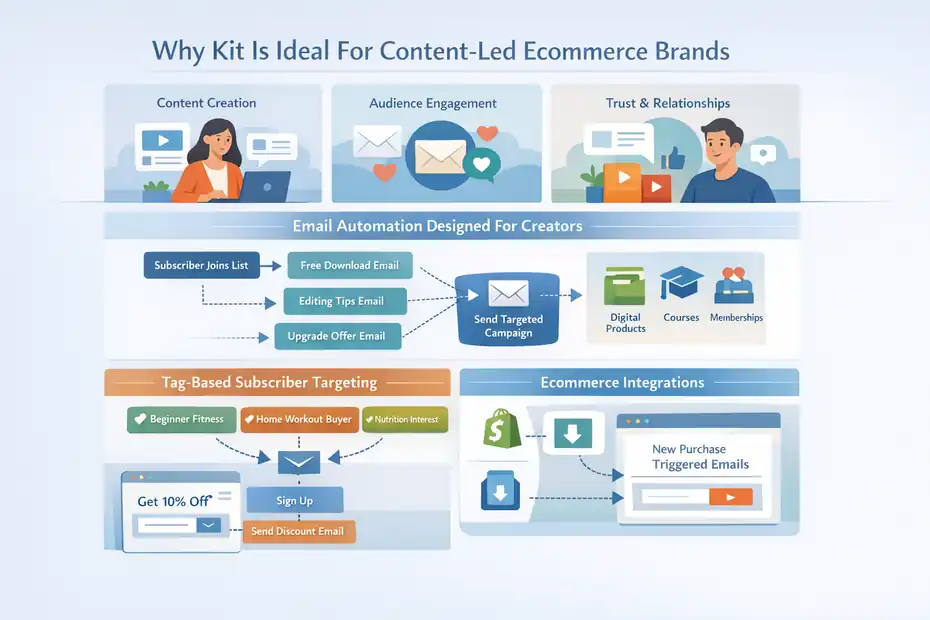
Some ecommerce stores don’t grow purely through ads or product pages. They grow through content, audience building, and personal brand trust. That’s where Kit fits surprisingly well.
Kit was originally designed for creators—bloggers, educators, and digital product sellers. But over time, many ecommerce founders discovered that its automation style works extremely well when your store relies on storytelling, content marketing, and audience relationships.
If your ecommerce strategy includes things like newsletters, educational content, or community building, Kit can feel much more natural than traditional ecommerce email platforms.
Email Automation Designed For Creators And Digital Sellers
Most ecommerce email tools revolve around shopping behavior: carts, purchases, and product views.
Kit approaches automation from a slightly different angle: subscriber journeys and content engagement.
Instead of building complicated ecommerce-style automation flows, Kit focuses on subscriber-based triggers such as:
- Subscriber joins your email list
- Subscriber clicks a link in an email
- Subscriber downloads a lead magnet
- Subscriber purchases a product
This makes it extremely useful for stores selling:
- Digital products
- Courses
- Memberships
- Creator merchandise
Here’s a simple example.
Imagine you run an ecommerce store selling photography presets.
A subscriber downloads a free preset pack from your website. That action triggers a short automation sequence:
- Email 1: Deliver the free preset download
- Email 2: Share editing tips and tutorials
- Email 3: Introduce your premium preset collection
Instead of pushing products aggressively, the automation builds trust first. That approach often works extremely well for content-driven ecommerce brands.
Tag-Based Subscriber Organization For Targeted Campaigns
One of Kit’s biggest strengths is its tag-based subscriber management system.
Instead of organizing contacts into multiple lists, Kit uses tags to track subscriber behavior.
A tag is simply a label attached to a subscriber based on their actions.
Examples might include:
- Downloaded free guide
- Interested in product category A
- Purchased product B
- Webinar attendee
This system makes it easy to send targeted emails without juggling multiple subscriber lists.
For example, imagine you sell fitness products.
Your subscribers could be tagged like this:
| Subscriber Behavior | Tag Applied |
| Downloads workout guide | Beginner fitness |
| Buys resistance bands | Home workout buyer |
| Clicks nutrition article | Interested in nutrition |
Later, you can send highly targeted campaigns.
For example:
- Send a workout challenge to Beginner fitness subscribers
- Promote protein supplements to Interested in nutrition readers
This kind of behavioral targeting can make emails feel more personal instead of promotional.
Landing Pages And Email Funnels In One Platform
Another advantage Kit offers is its built-in landing page and email funnel system.
A landing page is simply a standalone webpage designed to collect email subscribers.
Many ecommerce brands use landing pages for things like:
- Free guides
- Discount offers
- Early product launches
- Waitlists for new products
Kit allows you to create these pages directly inside the platform without needing additional software.
For example, a simple ecommerce lead funnel might look like this:
- Landing page offering 10% off first order
- Visitor submits email address
- Welcome email delivers discount code
- Follow-up email introduces your top products
This setup helps new ecommerce brands build an email list before customers even purchase.
And from what I’ve seen, stores that build an email list early often outperform stores relying only on paid traffic.
Integrating Kit With Shopify And Digital Product Stores
Even though Kit started in the creator space, it integrates with ecommerce platforms so you can track purchases and trigger automations.
Common integrations include:
- Shopify
- Digital product platforms
- Payment systems used by creators
These integrations allow Kit to track actions such as:
- New customer purchases
- Product purchases
- Subscriber signups from checkout
Once connected, you can trigger automations like:
- Thank-you emails after purchases
- Upsell offers for related products
- Educational email series tied to purchased items
For ecommerce brands selling both physical and digital products, this flexibility can be extremely useful.
When Kit Works Better Than Traditional Ecommerce Tools
Kit isn’t always the first recommendation when people search for email automation tools for new ecommerce store setups—but in some cases, it’s actually the better fit.
Kit works especially well when:
- Your brand relies on content marketing or blogging
- You sell digital products or educational content
- Your audience follows you because of your expertise or personality
- Your marketing strategy focuses on email storytelling instead of aggressive promotions
In those situations, the creator-first design of Kit often feels more natural than ecommerce-heavy automation platforms.
Think of it this way.
Traditional ecommerce email tools are optimized for transactions.
Kit is optimized for relationships.
And depending on your brand strategy, that difference can matter a lot.
How To Choose The Right Email Automation Tool Early
Choosing the right platform early can save you from major headaches later. The best email automation tools for new ecommerce store owners are not always the most powerful ones—they’re the ones that match your current stage of growth.
If you’re launching your first store, your goal isn’t to build complicated marketing systems.
Your goal is to start simple and create automation that actually generates revenue.
Let me break down the most important factors to consider.
Match The Tool With Your Ecommerce Platform First
The very first thing you should check is compatibility with your ecommerce platform.
Email automation works best when your email platform can automatically track store activity such as:
- Product views
- Cart additions
- Purchases
- Customer profiles
Without this data connection, automation becomes extremely limited.
For example, if the platform can’t detect cart activity, you won’t be able to run abandoned cart recovery emails.
Before choosing any email tool, verify that it integrates directly with your ecommerce system. This single step prevents hours of manual data work later.
Start With Core Automations Instead Of Complex Funnels
A mistake many new store owners make is trying to build advanced marketing funnels too early.
In reality, most ecommerce email revenue comes from just a few core automations.
Instead of building complex sequences, start with:
- Welcome series
- Cart abandonment reminders
- Post-purchase emails
These simple flows already capture a large percentage of potential revenue.
In my experience, even small stores with just three automation flows running can start generating consistent email sales.
Complex marketing systems can come later once traffic and sales increase.
Evaluate Pricing Based On Subscriber Growth
Email marketing pricing usually increases as your subscriber list grows.
This is something many new founders underestimate.
A platform might feel inexpensive when you have 200 subscribers—but once your list grows to 5,000 or 10,000 subscribers, costs can increase significantly.
Here’s a simplified example of how pricing typically scales across many email platforms:
| Subscriber Count | Typical Monthly Cost Range |
| 250 | Free – $20 |
| 1,000 | $25 – $50 |
| 5,000 | $80 – $150 |
| 10,000 | $150 – $300 |
That’s why it’s important to think about future growth, not just your current list size.
Ideally, your email automation platform should scale comfortably with your store revenue.
Consider Built-In SMS And Multi-Channel Marketing
Email works extremely well for ecommerce, but combining it with additional communication channels can increase conversions even further.
Many ecommerce brands now combine:
- Email marketing
- SMS reminders
- Push notifications
- Customer messaging
For example, a cart recovery sequence could include:
- Email reminder after 1 hour
- Follow-up email after 12 hours
- SMS reminder after 24 hours
Each additional touchpoint increases the chance of bringing the customer back.
The key is to use these channels thoughtfully so communication feels helpful instead of overwhelming.
Choose A Tool That Won’t Force A Painful Migration Later
Switching email platforms later can be surprisingly complicated.
Migration often involves:
- Exporting subscriber lists
- Rebuilding automation workflows
- Reconnecting integrations
- Testing data synchronization
If your email automation becomes a core revenue channel, switching tools can temporarily disrupt your marketing system.
That’s why I usually recommend choosing a platform that can support both early-stage stores and future growth.
Even if the features seem more advanced than you need today, having room to scale can save you from rebuilding everything later.
Essential Automations Every New Ecommerce Store Needs
Once you’ve chosen one of the email automation tools for new ecommerce store setups, the next step is actually building your automation system.
The good news is that you don’t need dozens of complicated flows.
Most ecommerce stores generate the majority of their email revenue from just five key automation sequences.
Let’s break them down.
Welcome Email Series That Introduces Your Brand
The welcome series is usually the first automation every ecommerce store should create.
It starts when someone subscribes to your email list.
These subscribers are often highly interested because they voluntarily joined your list—usually in exchange for something like:
- A discount code
- A free guide
- Early product access
A typical welcome sequence might look like this:
| Purpose | |
| Email 1 | Deliver discount or welcome message |
| Email 2 | Introduce your brand story |
| Email 3 | Highlight best-selling products |
One small tip I’ve seen work extremely well: Include your founder story in the second email.
People love buying from real brands with real stories.
Even a short message explaining why you started your store can dramatically increase trust.
Abandoned Cart Recovery Emails That Bring Back Buyers
Cart abandonment is one of the most important automation opportunities in ecommerce.
As mentioned earlier, roughly 70% of carts are abandoned before checkout.
That means most potential buyers leave without purchasing.
A simple cart recovery sequence usually includes:
- Reminder email after 1 hour
- Follow-up email after 12–24 hours
- Final reminder after 48 hours
These emails often include:
- Product image
- Short benefit reminder
- Call-to-action to return to checkout
Even a small cart recovery system can recover 10–15% of abandoned carts.
For many ecommerce stores, this single automation flow generates a significant portion of email revenue.
Post-Purchase Follow-Up That Encourages Repeat Orders
Once someone buys from your store, the relationship shouldn’t end there.
Post-purchase emails help turn first-time buyers into repeat customers.
These emails may include:
- Order confirmation and thank-you message
- Product usage tips
- Related product recommendations
- Customer support information
For example, if someone buys skincare products, you might send an email explaining:
- How to use the product
- When to apply it
- What results to expect
This kind of helpful content improves customer satisfaction while subtly introducing additional products.
Product Review Requests That Build Social Proof
Customer reviews are one of the most powerful trust signals in ecommerce.
Many shoppers hesitate to buy until they see real customer feedback.
Automating review requests ensures you consistently collect new testimonials.
A simple automation might send a review request 7–10 days after delivery.
The email might include:
- Thank-you message
- Quick review form
- Optional product photo upload
Even a small number of reviews can dramatically improve product page conversion rates.
Customer Win-Back Campaigns For Inactive Subscribers
Over time, some customers stop engaging with your store.
They may stop opening emails or stop purchasing products.
Instead of ignoring them, a win-back automation attempts to reactivate those customers.
Typical triggers include:
- No purchases for 90 days
- No email opens for several months
A win-back email might include:
- A friendly check-in message
- A limited-time discount
- A reminder of your best products
Sometimes customers simply forget about the brand.
A small reminder can bring them back into the buying cycle.
Email Automation Tools For New Ecommerce Store: Platform Comparison
| Platform | Best For | Key Strengths | Automation Power | SMS Marketing | Pricing Model | Ideal For |
| Klaviyo | Ecommerce brands focused on revenue tracking | Deep ecommerce data, powerful segmentation, detailed analytics | Very Advanced | Yes | Based on number of contacts | Stores planning long-term ecommerce growth |
| Omnisend | Ecommerce automation with built-in SMS | Ecommerce templates, combined email + SMS flows | Advanced | Yes | Based on contacts and sends | Shopify or WooCommerce stores wanting simple setup |
| Brevo | Budget-friendly automation | Unlimited contacts, built-in CRM, transactional emails | Moderate | Yes | Based on email volume | Small stores validating their product idea |
| Mailchimp | Beginner-friendly email marketing | Simple interface, strong email design tools | Moderate | Limited | Based on contacts | First-time store owners learning email marketing |
| Kit | Content-driven ecommerce brands | Creator-focused automation, tagging system | Moderate | No | Based on subscribers | Creators selling digital or niche products |
Frequently Asked Questions
What are the best email automation tools for new ecommerce store owners?
The best email automation tools for new ecommerce store owners include Klaviyo, Omnisend, Brevo, Mailchimp, and Kit. These platforms help automate welcome emails, abandoned cart recovery, and post-purchase follow-ups, allowing new ecommerce stores to generate sales and build customer relationships automatically.
What email automations should a new ecommerce store start with?
A new ecommerce store should start with three core automations: a welcome email series for new subscribers, abandoned cart recovery emails to bring shoppers back, and post-purchase follow-ups to encourage repeat orders. These automations target high-intent customers and often generate the majority of early email marketing revenue.
How do email automation tools help new ecommerce stores grow?
Email automation tools help new ecommerce stores grow by sending targeted messages based on customer behavior, such as product views or purchases. This automation builds customer relationships, recovers lost carts, promotes repeat purchases, and turns website visitors into loyal buyers without requiring manual email campaigns.

Juxhin B is a digital marketing researcher and founder of JAK Digital Hub, specializing in email marketing software, marketing automation platforms, and digital growth tools. His work focuses on software testing, platform comparisons, and real-world performance analysis to help businesses choose the right marketing technology.
Related posts:
 Best Email Tools to Turn Subscribers Into Sales
 Best Email Marketing Tools (Tested & Compared)
 Email Automation Systems That Drive Revenue
 How To Build A Better Email Campaign Strategy For Ecommerce
 Cheaper Email Automation System For Growing List Fast
 Email Automation Tools for 100k Subscribers: Best Value Picks