Table of Contents
Some links on JAK Digital Hub are affiliate links, meaning we may earn a small commission at no extra cost to you. Read full disclaimer.
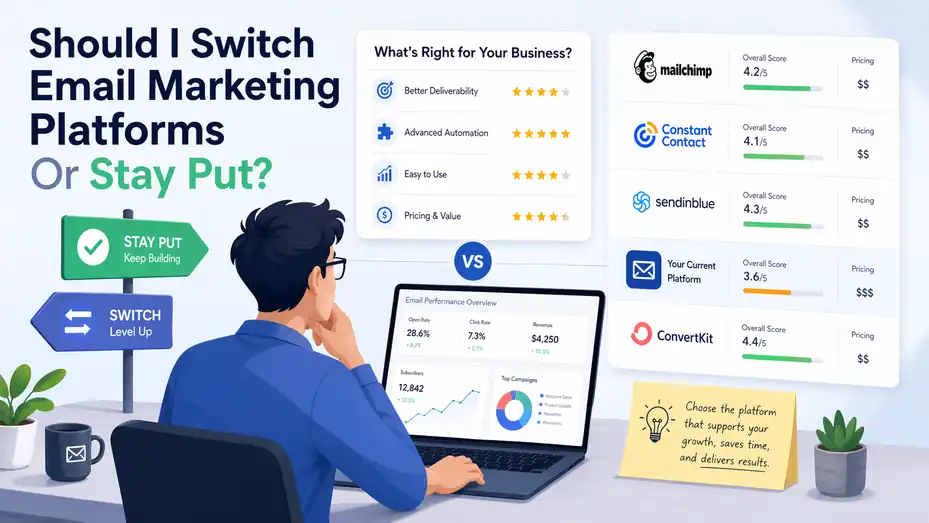
Should I switch email marketing platforms is a bigger question than most teams admit. You are not just choosing software.
You are choosing how your list is stored, how your automations behave, how clearly you can measure revenue, and how expensive growth becomes as your contacts increase.
In my experience, the wrong platform rarely fails all at once. It usually becomes slower, pricier, or more limiting month by month.
This guide will help you decide whether staying put is smarter, or whether switching now will save you money, time, and a lot of hidden frustration.
Understand What You Are Really Deciding
Switching email platforms is not only a software decision. It is an operations decision, a data decision, and often a revenue decision too.
What “Switching Platforms” Actually Means
When people ask, “should i switch email marketing platforms,” they are usually thinking about features. But the real issue is bigger than that. You are not just moving campaign templates. You are potentially moving subscriber data, tags, segments, forms, automation flows, reporting logic, suppression lists, custom fields, and sending reputation.
That matters because email platforms shape how your whole lifecycle marketing system works. Lifecycle marketing simply means the emails people get based on where they are in the customer journey: new subscriber, lead, buyer, repeat buyer, inactive user, or churn risk.
A platform change can improve all of that. It can also create short-term pain if you switch without a clear reason. I suggest treating the decision like a business case, not an emotional reaction to a frustrating dashboard.
Here is the simplest frame I use:
- Stay put when your current platform still supports your growth, segmentation, deliverability, and reporting needs.
- Switch when the cost of staying is now higher than the cost of migration.
That cost is not only monthly subscription fees. It includes lost automation opportunities, weak personalization, poor integrations, inaccurate attribution, and team time wasted on workarounds.
Why This Question Comes Up So Often
Most businesses do not outgrow a platform overnight. They outgrow it in stages. First, the editor feels limiting. Then segmentation gets messy. Then automations need hacks. Then the bill goes up. Then reporting stops answering obvious revenue questions.
That pattern is common because email remains one of the highest-return channels available. Recent reporting shows many businesses that measure email ROI see returns above $10 for every $1 spent, and some report far more. At the same time, many teams still struggle to track that ROI properly, which makes platform fit even more important.
In practical terms, the more important email becomes to your business, the more platform limitations hurt. A creator with a weekly newsletter can often tolerate basic tools for years. An ecommerce brand with abandoned cart, post-purchase, win-back, and cross-sell flows cannot.
I believe that is why this question feels urgent. You are not only evaluating convenience. You are trying to protect future growth before the cracks get wider.
The Difference Between Annoying and Costly
A lot of marketers switch too early because something feels annoying. Others wait too long because they underestimate the hidden cost of staying. The right move sits between those two extremes.
Annoying problems include clunky design tools, a dashboard you dislike, or one missing feature you barely use. Costly problems are different. They affect leads, conversions, retention, or operating efficiency.
Imagine you run a small ecommerce store doing $80,000 a month. Your current platform sends newsletters just fine, but you cannot trigger good product replenishment emails or create segments based on purchase behavior without custom work. That is not a minor annoyance anymore. That is money leaking out of the system.
On the other hand, if you hate the editor but your deliverability is solid, automations work, and your costs are reasonable, you may not need a full migration yet. You may just need a better internal process for campaign creation.
That is why the next step is not “pick a new tool.” The next step is diagnosing whether your pain is cosmetic or commercial.
Diagnose Whether Your Current Platform Is Holding You Back
Before you switch, you need evidence. A smart decision starts with a platform audit, not a competitor comparison.
Audit Your Core Business Needs First
The best way to answer should i switch email marketing platforms is to compare your real needs against your current platform’s actual performance.
Start with five questions:
- Growth: Is your list growing in a way your current pricing can still support?
- Automation: Can you build the flows your business now needs without awkward workarounds?
- Segmentation: Can you target by behavior, purchase history, engagement, and lifecycle stage?
- Reporting: Can you clearly see revenue, clicks, conversions, and drop-off points?
- Integration: Does the platform connect cleanly with your store, CRM, lead forms, and analytics stack?
If three or more of those feel weak, that is usually a real signal. You may already be paying a “complexity tax” every month.
I recommend scoring each one from 1 to 5. This turns vague frustration into something useful. If your current platform averages below 3 across automation, segmentation, and reporting, the odds are high that switching deserves serious consideration.
Identify The Hidden Costs Of Staying
Most teams only compare subscription pricing. That is a mistake. Staying with the wrong platform can be expensive in less obvious ways.
Here are the hidden costs I see most often:
- Manual work: Your team exports lists, rebuilds segments, or duplicates flows by hand.
- Weak targeting: Subscribers get generic campaigns because behavior-based logic is limited.
- Poor attribution: You know email matters, but you cannot prove which flows drive revenue.
- List inefficiency: You pay for inactive contacts because suppression and cleaning are weak.
- Slower testing: A/B testing options are limited, so optimization happens more slowly.
Even deliverability has a cost angle. DMA reporting noted delivery rates around 98% in 2024, with B2C sectors reaching even higher in some cases. If your inbox placement is underperforming because your platform makes list hygiene or authentication harder, that hurts results in a very real way.
In my experience, teams underestimate these costs because they are spread across people, time, and missed opportunities rather than appearing as one obvious invoice.
Know When The Problem Is Process, Not Platform
This part matters. Sometimes the software is not the problem at all.
A business may blame the platform when the real issue is one of these:
- No segmentation strategy
- Weak offers
- Too many broadcasts and too few automated flows
- Dirty list hygiene
- Inconsistent send schedule
- No testing culture
For example, if your open and click performance is weak, that does not automatically mean your tool is wrong. Benchmark data varies by source and industry, but email performance in 2025 commonly showed open rates well above older pre-privacy-era assumptions, while click rates remained much lower and more sensitive to offer quality and audience fit.
That means low results may come from messaging, segmentation, or traffic quality rather than from the software itself.
So be honest. If your team has never built a proper welcome series, never cleaned inactive subscribers, and never tested subject lines, switching platforms will not magically fix performance. It may just give you a new dashboard for the same underlying problems.
Recognize The Signs That It Is Time To Switch
Some frustrations are normal. Some are warning signs. The trick is knowing the difference early enough to act before performance stalls.
Your Automation And Segmentation Have Hit A Ceiling
This is probably the clearest sign. If your business has become more sophisticated, but your platform still forces beginner-level marketing, you are at a ceiling.
A healthy email system should let you build logic around behavior, not just static lists. That includes triggers like browsing activity, purchases, inactivity windows, lead score changes, or funnel progression.
Here is what a ceiling often looks like:
- You cannot create dynamic segments without exporting data
- You cannot branch flows based on behavior
- Your abandoned cart or lead nurture sequences are basic and inflexible
- Personalization is limited to first name and not much else
- Cross-channel messaging is weak or missing
For ecommerce brands, this matters even more. Platforms like Klaviyo emphasize real-time syncing with ecommerce and customer data, precisely because personalization and automation depend on that depth of data.
If your platform cannot support the customer journeys your business now needs, staying put usually becomes a growth constraint.
Pricing Has Stopped Making Sense
A lot of teams ask this question because of cost, and honestly, that is fair. Pricing creep is one of the most valid reasons to reevaluate.
Mailchimp’s official pricing pages show tighter free limits than many users remember, while paid tiers scale based on contacts and sends. Klaviyo also scales with database size and channel usage. As lists grow, cost differences between platforms can become significant, especially if you are paying for inactive contacts or features you barely touch.
That does not mean the cheaper platform is automatically better. A more expensive tool can still be the better value if it generates more revenue, reduces manual work, or improves retention.
I like to ask one simple pricing question: “Is this platform becoming more expensive because it is helping us grow, or more expensive while still slowing us down?” Those are very different situations.
Reporting Is Too Weak To Support Good Decisions
Bad reporting creates slow marketing. You stop knowing what to fix, what to scale, or what deserves credit.
A strong platform should help you answer questions like:
- Which automations produce the most revenue?
- Which segments convert best?
- Which campaigns damage engagement?
- Where do subscribers fall out of the funnel?
- Which subscribers are worth re-engaging versus suppressing?
If your reporting feels shallow, delayed, or disconnected from your store or CRM data, you will make weaker decisions no matter how talented your team is.
This becomes especially painful when leadership wants proof. If you cannot show revenue influence from email, budget discussions get harder. A better platform can sometimes solve that directly by improving attribution and customer-level visibility.
Know When Staying Put Is The Smarter Move
Not every frustration deserves a migration. Sometimes staying is the more profitable, lower-risk decision.
Your Current Platform Still Fits Your Stage
If you are early-stage, you may not need a more advanced system yet. A simple platform that handles newsletters, basic automations, and clean list management can be enough for a long time.
This is especially true if:
- Your list is still small
- You have one main product or offer
- Your automations are straightforward
- Your team is tiny
- You do not need deep CRM or ecommerce syncing yet
I have seen businesses switch too early because they got excited by advanced features they never actually used. That leads to longer setup, more complexity, and no meaningful lift in results.
A platform only becomes “too basic” when your strategy has actually outgrown it. Not when a sales page makes another option look shinier.
Migration Risk Would Outweigh The Benefit
Email migrations are not trivial. They can affect forms, authentication, automations, templates, segmentation logic, tracking, and deliverability.
The biggest short-term risks include:
- Broken automations
- Missing custom fields
- Inaccurate tag mapping
- Temporary drop in inbox placement
- Team confusion during the transition
If your busy season is approaching, for example, switching right before it may be a terrible idea even if the long-term case is strong.
Imagine a brand moving platforms two weeks before Black Friday. On paper, the new platform is better. In reality, the business is now rebuilding flows, testing popups, checking DNS records, and praying nothing breaks. That is not strategic. That is self-inflicted chaos.
So yes, switching can be right. Timing still matters.
You Have Not Yet Used What You Already Pay For
This is more common than people admit. Many teams are only using 30% to 50% of what their current platform can do.
Before migrating, check whether you have fully used:
- Welcome flows
- Re-engagement sequences
- Basic segmentation
- Signup forms
- Preference centers
- A/B testing
- Sunset policies for inactive contacts
If not, I would slow down. You may have unused performance sitting inside your current platform already.
Sometimes the best move is a 60-day optimization sprint, not a migration. Clean the list, tighten automation logic, improve campaign cadence, and review pricing. After that, the answer becomes much clearer.
Compare Platforms The Right Way Before You Move
A platform comparison should be based on fit, not on feature overload or brand familiarity.
Use A Decision Framework Instead Of Feature FOMO
Feature FOMO is real. You see AI subject lines, predictive segments, fancy dashboards, SMS add-ons, landing pages, and dozens of integrations, and suddenly every tool looks necessary.
Most of that noise disappears if you compare platforms against your actual model.
Use these criteria:
| Criteria | What To Check | Why It Matters |
|---|---|---|
| Data Depth | Events, purchases, engagement, custom fields | Better targeting and automation |
| Segmentation | Dynamic filters, behavior logic, exclusions | Cleaner campaigns and less list fatigue |
| Automation | Branching, delays, triggers, goals | More relevant lifecycle messaging |
| Reporting | Revenue tracking, attribution, cohort views | Better decisions and budget defense |
| Deliverability Support | Authentication, suppression, reputation tools | Stronger inbox placement |
| Pricing Model | Contacts, sends, active profiles, add-ons | Prevent surprise cost jumps |
| Integrations | Store, CRM, forms, analytics | Less manual work |
| Ease Of Use | Editor, workflow builder, training needs | Faster team adoption |
This kind of table sounds simple, but it keeps you from making a very expensive emotional decision.
Match The Platform To Your Business Type
Different businesses need different strengths. This is where many migrations go wrong.
Here is a practical way to think about it:
| Business Type | Platform Strengths To Prioritize |
|---|---|
| Ecommerce Brand | Purchase data, product events, abandoned cart, post-purchase flows |
| B2B Lead Gen | CRM sync, lead scoring, nurture flows, sales handoff |
| Creator Or Publisher | Easy publishing, subscriber tagging, monetization simplicity |
| SaaS Business | Event-based triggers, lifecycle onboarding, trial conversion flows |
| Local Service Business | Simplicity, forms, reminders, basic automation, low cost |
For example, Mailchimp often appeals to businesses that want approachable design and broad small-business functionality, while Klaviyo is positioned more heavily around data-rich B2C and ecommerce use cases.
That does not mean one is “best.” It means platform fit depends on what your business actually needs to do every week.
Look Beyond The Demo And Into Real Workflows
Demos make every platform look easy. Real workflows tell the truth.
Before choosing a new platform, test three real scenarios:
- Build a welcome flow with segmentation.
- Create a high-value audience segment.
- Pull a revenue or conversion report your team actually needs.
That process reveals friction faster than any homepage copy ever will.
I also suggest reviewing migration support, template portability, API documentation, and onboarding help. A tool can look perfect until you realize recreating your current setup will take six weeks and half your team’s patience.
Plan The Migration So You Do Not Break Revenue
If you decide to move, the switch should be staged and deliberate. A sloppy migration can turn a good decision into a painful quarter.
Map Everything Before Touching The New Platform
The first rule of migration is this: document before you move.
Create a migration inventory that includes:
- Lists and segments
- Tags and custom fields
- Signup forms and landing pages
- Automations and triggers
- Templates and reusable modules
- Suppression lists
- Integrations
- Authentication settings
- Reporting needs and naming conventions
I recommend using a spreadsheet and mapping old fields to new fields line by line. This sounds boring because it is boring. It is also what prevents broken logic later.
For example, if one system uses “customer_type” and the new one uses “lifecycle_stage,” you need to decide how that mapping works before import, not after a campaign misfires.
This is where many teams get sloppy. They treat migration like export-import. It is really a system redesign.
Protect Deliverability During The Switch
Deliverability deserves special attention. Even the best platform will not help if your authentication, list quality, or sending warm-up is mishandled.
DMA benchmark data showed delivery rates near 98% in 2024, which is a useful reminder that strong inbox placement is achievable when fundamentals are sound.
Here is the practical checklist:
- Authenticate properly: Set up SPF, DKIM, and DMARC correctly.
- Import carefully: Do not dump old inactive contacts into the new system without review.
- Warm up sending: Increase volume gradually if the sending infrastructure changes.
- Protect engagement: Start with your most engaged segments first.
- Monitor closely: Watch bounce, complaint, unsubscribe, and click metrics.
In my experience, the easiest way to damage deliverability during a switch is trying to “start fresh” by emailing everyone at once. That feels efficient. It is usually reckless.
Rebuild, Do Not Blindly Copy
This may be the single best migration tip in the whole article: do not recreate every old automation just because it exists.
Use the switch as a cleanup opportunity.
Ask these questions for each flow:
- Does this flow still support a real business goal?
- Is the logic still relevant?
- Can it be simplified?
- Should segmentation be improved?
- Can timing and copy be upgraded?
You may discover that 20% of your automations generate 80% of the value. Rebuild those first. Archive the rest unless there is a clear reason to keep them.
A platform migration is one of the rare moments when you are forced to look at your system with fresh eyes. Use that to your advantage.
Optimize Your Results After The Switch
Switching platforms is only the start. The gains come from what you do next.
Prioritize Quick Wins In The First 30 Days
Once the migration is stable, resist the urge to build everything at once. Focus on high-impact wins first.
I usually suggest this order:
- Welcome flow: New subscribers are your warmest audience.
- Abandoned cart or lead abandonment flow: Recover intent quickly.
- Post-purchase or onboarding flow: Improve retention and repeat value.
- Re-engagement flow: Cut waste and revive valuable contacts.
- Core campaign segmentation: Stop blasting one message to everyone.
This sequence works because it captures the most obvious revenue opportunities early.
For many businesses, email click rates remain relatively low compared with open rates, which means relevance matters enormously. Better segmentation and more intent-driven flows often create stronger gains than sending more campaigns.
So after a switch, do not celebrate the migration itself. Celebrate the first measurable improvements in engagement, conversion, and efficiency.
Use Better Data, Not More Noise
A stronger platform gives you more data. That can help, but only if you simplify what you track.
I suggest building your post-migration dashboard around these core metrics:
| Metric | Why It Matters |
|---|---|
| Deliverability Rate | Tells you whether messages are reaching inboxes |
| Open Rate | Useful trend signal, though privacy changes limit precision |
| Click Rate | Better measure of real engagement |
| Conversion Rate | Shows whether traffic takes action |
| Revenue Per Recipient | Great for comparing campaigns and flows |
| Unsubscribe Rate | Signals fatigue or mismatch |
| Spam Complaint Rate | Early warning for list and message quality |
This keeps your team focused on business outcomes instead of vanity reporting.
Know What Success Actually Looks Like
A successful platform switch does not always mean dramatic overnight gains. Sometimes success looks quieter than that.
Success might mean:
- Your team builds automations in half the time
- You finally see which emails drive revenue
- Segments update automatically instead of manually
- Costs become more predictable
- Inactive contacts stop inflating your bill
- Your list gets more engaged because targeting improves
Those changes compound. Over six to twelve months, they can matter far more than one flashy feature release.
That is why I believe the right platform earns its value through operational clarity as much as through campaign performance.
Avoid The Biggest Mistakes When Making This Decision
A smart switch can accelerate growth. A rushed one can create expensive distraction.
Mistake 1: Switching Because A Competitor Did
This happens all the time. A founder hears that another brand uses a certain platform and assumes the same move will help them too.
But businesses can look similar from the outside while operating very differently underneath. One brand may need deep product-feed automation. Another may just need simple weekly campaigns and a clean CRM sync.
Copying another company’s stack without understanding your own needs is one of the fastest ways to waste time and budget.
Mistake 2: Overvaluing Features And Undervaluing Migration Work
A platform can win on paper and still lose in practice.
Teams often get excited about advanced segmentation, AI content tools, or fancy analytics, then discover that the migration itself requires weeks of field mapping, QA, retraining, and deliverability monitoring.
That does not mean you should avoid switching. It means you should price the migration honestly. Include team time, consulting help if needed, testing hours, and the temporary slowdown that usually comes with change.
Mistake 3: Treating The Decision As Permanent
This is a smaller mindset issue, but it matters. Many teams freeze because they think a switch must be perfect.
It does not.
You are making the best decision you can with the business you have now. A platform that fits today may not fit three years from now. That is normal.
The goal is not to find the forever tool. The goal is to choose the right operating system for your current stage, growth model, and team capacity.
Final Verdict: Should You Switch Email Marketing Platforms?
The honest answer is this: switch only when staying put costs more than moving.
If your current platform still supports your segmentation, automation, reporting, and budget without creating daily friction, staying put is probably the smarter move. Stability has value. Familiarity has value. Avoiding migration risk has value too.
But if you are hitting real limits around data, automations, reporting, or pricing, the question should i switch email marketing platforms becomes easier to answer. At that point, a migration is not a shiny-object decision. It is an operational upgrade.
Here is the simple rule I would use:
- Stay if your current platform is still helping you grow.
- Switch if your current platform is making growth harder, slower, or more expensive.
That is really the whole decision.
And personally, I would rather switch a little early with a solid plan than stay too long inside a system that forces constant workarounds. The wrong email platform rarely breaks in one dramatic moment. It slowly taxes your growth until you finally notice how much it has been costing you.
FAQ
What are the signs I should switch email marketing platforms?
If your costs keep rising without better results, automations feel limited, or reporting lacks clarity, it may be time to switch. Difficulty with segmentation, slow workflows, and frequent manual workarounds are also strong indicators that your current platform is holding back growth and efficiency.
Is it risky to switch email marketing platforms?
Switching platforms can carry risks like deliverability drops, broken automations, or data errors if not handled carefully. However, with proper planning, list cleaning, and gradual migration, most risks can be minimized. The key is to treat migration as a structured process, not a quick transfer.
How do I know if my current platform is still good enough?
Your platform is still good enough if it supports your automation needs, segmentation strategy, reporting clarity, and pricing expectations. If your team can execute campaigns efficiently and track performance without friction, there is usually no urgent need to switch.
Will switching platforms improve email marketing performance?
Switching can improve performance if your current platform limits segmentation, automation, or data tracking. However, results depend on strategy, not just software. A better platform enables stronger targeting and workflows, but you still need effective campaigns and clean data to see real gains.
What should I check before switching email marketing platforms?
Before switching, audit your automations, subscriber data, segmentation, integrations, and reporting needs. Identify what is missing in your current setup and define clear goals for the new platform. This ensures you switch for real improvements, not just new features.

Juxhin B is a digital marketing researcher and founder of JAK Digital Hub, specializing in email marketing software, marketing automation platforms, and digital growth tools. His work focuses on software testing, platform comparisons, and real-world performance analysis to help businesses choose the right marketing technology.
Related posts:
 Is Email Marketing Strategy Worth It for Real Growth?
 Should I Leave AWeber? The Signs Your Email Platform Is Holding You Back
 Is GetResponse Worth the Price? A No-Fluff Breakdown for Real Users
 Email Marketing Strategy for 100K Subscribers That Scales
 Should I Stop Using Free Email Marketing Right Now?
 How To Migrate Between Email Marketing Platforms Without Loss