Table of Contents
Some links on JAK Digital Hub are affiliate links, meaning we may earn a small commission at no extra cost to you. Read full disclaimer.
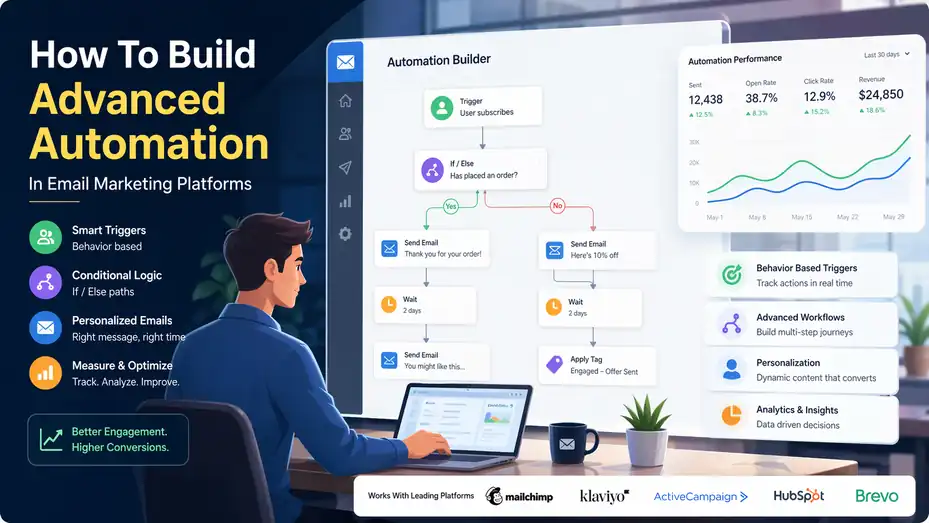
How to build advanced automation in email marketing platforms is really about building a system that responds to what people actually do, not just sending a fixed series of emails because the calendar says so.
If you’ve ever felt like your automations look “set up” but don’t really feel smart, you’re not alone. The gap usually comes from weak triggers, shallow segmentation, and unclear goals.
In this guide, I’ll walk you through how to design automations that feel timely, personal, and revenue-driven without turning your workflow into a tangled mess.
Understand What Advanced Email Automation Actually Means
Before you build anything, it helps to define what “advanced” really means in practice. A lot of teams assume advanced automation means more emails, more branches, or more software.
In my experience, it usually means better logic.
Move From Linear Sequences To Behavior-Based Systems
Basic automation is usually linear. Someone joins your list, gets Email 1 on Monday, Email 2 on Wednesday, and Email 3 on Friday. That works for very simple onboarding, but it breaks down fast when people behave differently.
Advanced automation shifts from time-only logic to behavior-based logic. Instead of asking, “What should everyone receive next?” you ask, “What should this person receive next based on what they just did?” That one mindset change is where most performance gains begin.
For example, imagine you run a SaaS product. One user signs up, logs in immediately, invites teammates, and visits your pricing page twice. Another signs up and never opens the app. Sending both users the same sequence wastes relevance. The first person might need a sales-driven expansion email. The second might need a simple activation email with one clear next step.
What makes this advanced is not complexity for its own sake. It is responsive decision-making. Good automation reacts to signals like:
- Signup source
- Product usage
- Purchase history
- Page visits
- Lead score changes
- Email engagement
- Time since last action
That is also why automation remains so valuable. Litmus reports that marketers continue to see strong returns from email, with many reporting ROI in the 10:1 to 36:1 range, while HubSpot cites email conversion rates around 2.8% for B2C and 2.4% for B2B in its 2026 marketing statistics roundup.
Know The Difference Between Automation And Personalization
These terms get mixed together all the time, but they are not the same thing.
Automation is the delivery logic. It determines when a message goes out, who receives it, and what condition triggers it. Personalization is the message adaptation. It changes the content based on known data, behavior, preferences, or customer stage.
You can automate without personalizing. That is what most beginner setups do. You can also personalize without much automation, like sending a campaign with dynamic product blocks. But the strongest systems combine both.
A simple example looks like this: A cart abandonment workflow sends automatically two hours after someone leaves checkout. That is automation. Inside the email, the product image, item name, discount eligibility, and urgency message change based on cart value or category. That is personalization.
I believe this distinction matters because many teams try to solve weak strategy by stuffing more dynamic fields into emails. But personalization cannot rescue a badly timed workflow. If the trigger is wrong, the email still feels wrong.
The practical lesson is simple. Build the logic first. Then personalize the message. Timing and context usually drive more lifts than decorative personalization tokens.
Start With Revenue Goals Before You Touch The Workflow Builder
This is the part many people skip, and it is usually why automations become messy. If you build first and think later, you end up with a collection of flows instead of an automation system.
Map Each Automation To One Business Goal
Every advanced workflow should have one primary job. Not three. Not five. One.
That goal might be activation, conversion, repeat purchase, retention, re-engagement, upsell, or churn prevention. The clearer the goal, the easier it becomes to choose the right trigger, timing, content, and measurement.
Here is the trap I see often. A team builds a “welcome automation” that tries to introduce the brand, collect preferences, push a sale, explain the product, promote social channels, and ask for a review. That is not a workflow. That is a junk drawer.
A better structure looks like this:
- Welcome automation: Confirm subscription and set expectations.
- Onboarding automation: Help new users reach first value fast.
- Conversion automation: Push the first sale or booked demo.
- Retention automation: Increase usage or repeat purchase frequency.
- Win-back automation: Re-engage inactive subscribers.
Each one has a tighter purpose, which makes optimization easier later.
When you define the goal, also define the success event. For ecommerce, that might be first purchase, second purchase, or average order value lift. For SaaS, it might be account activation, trial-to-paid conversion, or feature adoption. For service businesses, it could be consultation bookings or quote requests.
That success event becomes your north star. Everything else supports it.
Build Around Customer Journey Stages, Not Internal Team Silos
Customers do not think in departments. They do not care that one team owns newsletters and another owns lifecycle email. They just experience one brand.
That is why advanced automation works best when you design from the customer’s point of view. Think in stages:
- Subscriber
- Lead
- First-time buyer
- Active customer
- At-risk customer
- Loyal customer
- Inactive customer
Now ask what friction exists at each stage. A subscriber may not trust you yet. A first-time buyer may need reassurance. An at-risk customer may need a reason to come back. A loyal customer may need a referral or VIP path.
I suggest writing a short sentence for each stage: “At this point, the customer is likely wondering…” That question often reveals the best automation angle. For example:
- “Is this brand worth my attention?”
- “How do I get started?”
- “Did I make the right choice?”
- “Why should I buy again?”
- “Is there anything new I should care about?”
When you frame automations this way, the emails stop sounding like internal marketing tasks. They start sounding useful.
And useful usually performs better than clever.
Set Up The Data Foundation That Makes Smart Automation Possible
Advanced automation is only as good as the data feeding it. If your triggers are weak or your contact records are messy, even great copy cannot save the workflow.
Choose The Right Data Types For Triggering And Branching
You do not need infinite data. You need the right data.
Most advanced automations rely on four categories:
- Demographic data: Role, company size, location, industry.
- Behavioral data: Opens, clicks, page visits, product views, app events.
- Transactional data: Orders, revenue, product type, refund history.
- Lifecycle data: Lead status, customer stage, trial status, plan tier.
The mistake is collecting lots of fields that never influence decisions. If a field will not change who gets what, when they get it, or what message appears, it may not belong in the workflow logic.
Let me give you a simple example. A B2B software company may collect company size during signup. That becomes useful if enterprise leads should get a faster handoff to sales, while small teams should receive self-serve onboarding. In that case, company size affects pathing. It matters.
But if you collect favorite color and never use it, it is just clutter.
Advanced automation gets powerful when each field has a job. Ask this about every field: does it trigger, segment, personalize, suppress, or score? If not, reconsider it.
Clean Your Event Tracking Before Building Complex Logic
This part is not glamorous, but it matters more than people think.
If “started checkout” fires twice, “purchased” comes in late, or “active user” is defined differently across tools, your workflows will misfire. People get duplicate reminders, wrong upsells, or emails for actions they already completed. Nothing kills trust faster than bad timing.
I recommend defining a short event dictionary before you build. It should include:
- Event name
- Exact meaning
- Where it comes from
- When it fires
- Whether it is reliable enough for automation
For example, “Viewed Pricing Page” may be too weak to trigger a sales workflow on its own. But “Viewed Pricing Page Twice In 7 Days” plus “Visited Demo Page” plus “Lead Score Above Threshold” may be a much stronger signal.
This is where advanced automation starts looking more intelligent. Not because the platform is magical, but because the event logic is clean.
In most cases, fewer reliable signals beat dozens of noisy ones.
Design The Core Automation Architecture Before Writing Emails
Once the goals and data are clear, you need an architecture. This is the framework that keeps your automations from colliding with each other.
Use A Modular Workflow Structure Instead Of One Giant Flow
A lot of marketers build one giant automation because it feels efficient. In reality, it becomes impossible to manage.
A better approach is modular architecture. That means building smaller workflows that each do one job well, then connecting them with clean entry and exit rules.
For example, instead of one monster workflow for all new subscribers, you might have:
- Entry workflow for source tagging and expectation setting.
- Intent workflow for high-engagement leads.
- Nurture workflow for lower-intent leads.
- Sales acceleration workflow for pricing-page visitors.
- Exit workflow when purchase or demo booking happens.
This makes troubleshooting much easier. If conversion drops, you can inspect the relevant module instead of untangling an entire automation map.
I believe modular design is one of the biggest differences between “it technically works” automation and automation a team can actually improve over time. It also helps when different people handle strategy, CRM, or content because ownership becomes clearer.
Think of it like building with blocks, not pouring one giant slab of concrete.
Define Entry Rules, Exit Rules, And Suppression Rules Early
These three rule types are what keep advanced automation sane.
Entry rules decide who qualifies for the workflow. Exit rules decide when someone should leave because they completed the goal or moved to another stage. Suppression rules prevent bad experiences, like sending a promo sequence to existing customers or blasting reminders to someone in a support issue.
A simple example helps here.
Imagine a first-purchase conversion automation.
- Entry rule: Joined list in last 7 days and has not purchased.
- Exit rule: Makes first purchase.
- Suppression rule: Already in high-intent sales sequence, has open support ticket, or unsubscribed from promos.
Without those rules, contacts drift into multiple paths at once. That creates overlap, internal competition, and reporting confusion.
I recommend documenting these rules outside the platform before building them. A plain spreadsheet or decision map is enough. It helps you see conflicts early.
This is one of those boring setup steps that quietly saves hours later.
Build Triggers And Branching Logic That Actually Reflect Intent
This is where most readers probably expect the magic. And honestly, this is where the article topic gets interesting. Advanced automation is won or lost in trigger quality.
Use Trigger Stacking Instead Of Single-Signal Guessing
One signal is rarely enough to prove intent.
An open is weak. A click is better. A product page view is interesting. But when you combine signals, you start getting something useful.
Trigger stacking means requiring a meaningful pattern instead of reacting to one isolated event. For example:
- Opened 2 emails + visited pricing page + did not book demo
- Viewed product twice + added to cart + no purchase after 4 hours
- Logged in 3 times + has not used key feature + still in trial
This approach reduces false positives. It also helps your automations feel less desperate. You are not jumping the moment someone breathes near your website. You are waiting for clearer intent.
That usually improves both relevance and trust.
A realistic SaaS example: If someone opens a case study email, visits the integrations page, and returns to pricing within 72 hours, that person is signaling purchase evaluation. That is a good time for a workflow focused on objections, ROI, or booking a demo. Not a generic “getting started” email.
Advanced automation feels smart when it responds to patterns, not noise.
Add Time Delays Based On Decision Context, Not Habit
Many marketers use delays out of habit. Two days here. One day there. Three days because that “feels normal.” I think that is where a lot of automation loses momentum.
Timing should reflect the buying context.
A cart abandonment email often works best within hours because the purchase intent is fresh. A B2B evaluation flow may need longer spacing because decisions involve more stakeholders. A post-purchase education sequence may work better when tied to delivery or onboarding milestones, not fixed calendar gaps.
Here is a simple rule I use: The higher the urgency and the lower the decision complexity, the faster the follow-up can be.
This matters because your timing shapes emotional tone. A reminder sent too fast feels pushy. Sent too late, it feels irrelevant.
Mailchimp’s benchmarks show overall email open rates can vary heavily by industry, but its broader benchmark data suggests many programs aim around the mid-30% range overall, which means timing and relevance still matter enormously if you want to stand out in a crowded inbox.
So do not copy generic delays. Match them to buyer psychology.
Write Emails That Match The Automation Moment
Even great automation logic can underperform if the email content does not fit the moment. This is where many advanced setups still sound robotic.
Match Message Type To Stage-Specific Friction
Every automation email should remove one specific barrier.
That barrier might be confusion, hesitation, distraction, lack of urgency, low trust, or simple forgetfulness. Once you identify the friction, the copy gets much easier.
Here is how that plays out:
- New subscriber: “What am I going to receive from you?”
- Trial user: “How do I get value quickly?”
- Cart abandoner: “Should I finish this purchase now?”
- At-risk customer: “Why should I come back?”
- Loyal customer: “What is next for me?”
When the friction is confusion, teach. When it is hesitation, reassure. When it is urgency, remind. When it is trust, show proof. When it is overload, simplify.
Imagine someone signed up for a project management tool and has not created their first board. A great email here is not “Here are 17 features.” It is “Create your first board in 3 minutes.” One step. One promise. One action.
That is what I mean by stage-fit messaging. The message should feel like the obvious next thing, not like marketing talking at people.
Use Dynamic Content Carefully So It Helps, Not Hurts
Dynamic content can be powerful, but it is easy to overdo. I have seen emails with so many conditions that nobody on the team can explain what a subscriber will actually receive.
Use dynamic content where it improves relevance in a clear way:
- Recommended products based on category interest
- Different CTAs based on lifecycle stage
- Different proof points for small business versus enterprise
- Region-specific offers or timing
- Content based on plan type or feature usage
Avoid using it just to feel sophisticated. If dynamic content makes QA harder than the lift is worth, simplify it.
A good rule is this: Personalize the part that changes the decision, not every decorative detail.
For instance, if a shopper abandoned a high-consideration product, showing that exact product again makes sense. Swapping the entire email into six versions by minor audience attributes may not.
The most advanced email is not always the one with the most branches. It is the one that makes the next action easier.
Build Essential Automation Types In The Right Order
You do not need to build everything at once. In fact, that is usually a mistake. The smartest move is to launch the highest-impact workflows first.
Prioritize The Five Automations That Usually Deliver Fastest
For many businesses, these five workflows create the strongest early returns:
- Welcome sequence
- Onboarding or activation sequence
- Abandonment sequence
- Post-purchase sequence
- Re-engagement sequence
Why these first? Because they cover the biggest lifecycle gaps: first impression, first value, missed conversion, retention, and recovery.
Litmus reports that newsletters, promotional emails, and customer engagement emails remain major ROI drivers, and its 2025 State of Email materials also note that 58% of marketing teams send emails weekly or more often.
That matters because the real advantage usually comes from sending the right lifecycle email consistently, not just increasing volume.
If you are starting from scratch, I would build them in this order:
- Welcome: Sets expectations and captures early intent.
- Onboarding: Moves subscribers or users to first success.
- Abandonment: Recovers near-term revenue.
- Post-purchase: Improves repeat behavior and trust.
- Re-engagement: Cleans and reactivates the list.
This order gives you both short-term and long-term gains.
Use A Simple Prioritization Framework Before Expanding
Once the basics exist, use a framework to decide what to build next.
I like scoring ideas across four factors:
- Revenue potential
- Audience size
- Ease of implementation
- Data reliability
For example, a browse abandonment flow may have strong revenue potential and be relatively easy if your ecommerce tracking is solid. A predictive churn workflow might be valuable too, but harder if your product usage data is messy.
This prevents the classic trap of building “cool” automations before profitable ones.
Here is a simple table you can use when planning.
| Automation Type | Main Goal | Typical Trigger | Complexity | Revenue Impact |
|---|---|---|---|---|
| Welcome | Set expectations and build trust | New subscriber joins list | Low | Medium |
| Onboarding | Reach first value fast | Signup or first purchase | Medium | High |
| Cart Or Browse Abandonment | Recover lost demand | Checkout or product-view inactivity | Medium | High |
| Post-Purchase | Increase retention and repeat orders | Purchase completed | Medium | High |
| Re-Engagement | Win back or clean inactive contacts | No opens, clicks, or purchases over time | Medium | Medium |
| Upsell Or Cross-Sell | Expand customer value | Product usage, repeat purchase, plan fit | High | High |
A table like this keeps your roadmap practical.
Use Scoring, Segmentation, And Conditional Paths To Increase Precision
This is where automation starts becoming meaningfully advanced rather than just “automated.”
Build Lightweight Lead Or Engagement Scoring
Scoring does not need to be complicated to be useful. In fact, simple scoring models often outperform fancy ones because the team actually uses them.
You can assign points for actions that correlate with buying or retention intent:
- Opened a strategic email: +1
- Clicked a high-intent CTA: +3
- Visited pricing: +5
- Started checkout: +7
- Used key product feature: +5
- No engagement for 30 days: -5
Now you can route people differently based on score. Low-score subscribers stay in nurture. Mid-score subscribers get education plus proof. High-score contacts move into conversion-focused messaging or sales handoff.
The goal is not mathematical perfection. It is prioritization.
I suggest reviewing your scores quarterly. If a behavior gets points but rarely predicts outcomes, reduce it. If a behavior strongly predicts conversion but is ignored, add it.
Scoring is useful because it turns lots of small signals into a more usable picture of intent.
Segment By Need State, Not Just Demographics
Demographics matter, but need state often matters more.
Two people in the same industry can need very different things depending on urgency, awareness, purchase stage, or product maturity. That is why behavior-based segmentation usually produces more helpful automation than static profile segmentation alone.
Here are some stronger segment ideas:
- High intent but undecided
- New customer needing reassurance
- Power user ready for expansion
- Inactive customer at churn risk
- Repeat buyer with premium potential
These segments are more actionable because they suggest what message should happen next.
Imagine an online store selling skincare. Segmenting by age can be useful. But segmenting by “first-time buyer,” “repeat buyer with no subscription,” and “high spender who has not purchased in 45 days” is usually more commercially useful.
That is the difference between descriptive segmentation and decision-making segmentation. Advanced automation needs the second kind.
Measure The Right Metrics So You Can Improve What Matters
A workflow is not “done” because it is live. It is only live. Optimization begins after launch.
Track Stage-Appropriate Metrics, Not Vanity Metrics Alone
Opens and clicks still matter, but they are not enough.
You want metrics that reflect the job of the workflow. For example:
- Welcome sequence: Subscription confirmation rate, early clicks, preference completion
- Onboarding sequence: Activation rate, first key action, time to value
- Conversion sequence: Demo bookings, purchase rate, assisted revenue
- Post-purchase sequence: Repeat purchase rate, usage depth, review rate
- Re-engagement sequence: Recovered engagement, unsubscribes, list cleanup rate
Mailchimp notes that benchmarking compares your rates against similar senders using very large email datasets, and its public benchmark guidance also shows that averages vary widely by industry, which is exactly why context matters when reviewing performance.
In other words, a “good” open rate means very little if the automation is not driving the intended behavior.
I recommend building one reporting view per workflow with one primary KPI and a few supporting metrics. That keeps the team focused.
Measure Time-To-Outcome, Not Just Final Conversion
One underrated metric is time-to-outcome.
If your onboarding automation does not increase raw activation rate, but it cuts time-to-value from 9 days to 3 days, that is still a meaningful win. Faster value often improves retention later.
The same applies in ecommerce. If a post-purchase sequence shortens the average time to second order, you may be improving customer lifetime value even before total revenue fully shows it.
This is why I like looking at:
- Days to first purchase
- Days to second purchase
- Days to feature adoption
- Days to demo booking
- Days to reactivation
These metrics reveal whether automation is speeding decisions up, not just whether it eventually influences them.
That is especially important for advanced automation because good workflows do not just increase outcomes. They often reduce delay and friction.
Troubleshoot The Problems That Quietly Damage Performance
Most automation issues are not dramatic. They are silent. A bad condition, weak segment, or overlap rule can hurt results for months.
Watch For Four Common Failure Points
When an automation underperforms, I usually check these four areas first.
- Wrong trigger: The workflow is firing too early, too late, or for the wrong audience.
- Weak offer or next step: The email asks for too much or does not match user intent.
- Overlap conflict: Another workflow is competing for attention.
- Dirty data: The underlying event or audience logic is unreliable.
Let’s say your abandonment flow gets high opens but poor recovery. That may mean the subject line works, but the offer, timing, or landing-page continuity is off. If your onboarding series has weak engagement, the trigger may be fine but the content may be overwhelming.
Do not assume every problem is copy. Often it is logic.
A clean troubleshooting process saves time because it narrows the issue fast.
Audit Your Automations Like A Product, Not A Campaign
This is a mindset shift I strongly recommend.
Campaigns are often judged once. Automations should be treated like ongoing systems. That means regular QA, reporting reviews, and scheduled cleanup.
A practical audit checklist might include:
- Are entry conditions still correct?
- Are any workflows competing?
- Are suppression rules still working?
- Has the customer journey changed?
- Are links, images, and dynamic blocks still correct?
- Are key events still firing as expected?
- Has performance drifted over time?
I suggest a monthly light review and a deeper quarterly audit. Not because everything breaks constantly, but because businesses change. Offers change. Products change. Buying behavior changes.
Automation that worked a year ago can slowly become stale without anyone noticing.
Optimize With Testing, Iteration, And Controlled Changes
Advanced automation is not about one genius build. It is about repeated, disciplined improvements.
Test One Meaningful Variable At A Time
Testing gets messy when too many elements change together. If subject line, timing, CTA, offer, audience logic, and design all change at once, you will not know what caused the result.
I prefer sequencing tests like this:
- First test timing
- Then test message angle
- Then test CTA
- Then test content length
- Then test incentive or proof
That gives clearer learning.
For instance, in a trial conversion flow, test whether sending a usage reminder 24 hours after inactivity beats waiting 72 hours. Once timing is set, test whether the message should focus on ease, speed, or ROI. Then test the CTA.
The goal is not just a better email. It is a better understanding of what your audience responds to.
That learning compounds across workflows.
Optimize For Decision Quality, Not Just Click Volume
Higher clicks are not always better.
Sometimes a curiosity-driven email gets lots of clicks but few conversions. Another email gets fewer clicks but attracts more qualified actions. That second one may be the better workflow asset.
For advanced automation, I care more about decision quality than activity volume.
In practice, that means asking:
- Did the email move the right people forward?
- Did it reduce confusion?
- Did it create more qualified demand?
- Did it improve retention or customer value?
HubSpot’s email marketing ROI coverage emphasizes that better attribution and connected CRM-marketing data improve how reliably teams can measure revenue impact, which is a reminder that click data alone is not enough for serious optimization.
So yes, monitor clicks. But do not worship them.
Scale Your Automation System Without Turning It Into Chaos
Once your core workflows perform, scaling becomes the next challenge. This is where many teams accidentally make things worse by adding too much too quickly.
Document Naming, Ownership, And Workflow Logic
Scale needs documentation. Otherwise your system becomes dependent on memory, which is never a good long-term plan.
At minimum, document:
- Workflow name
- Goal
- Entry rules
- Exit rules
- Suppression rules
- Trigger events
- Message count
- Owner
- Last review date
- Primary KPI
This sounds basic, but it is one of the biggest upgrades you can make. Especially if multiple people touch the account.
Use naming conventions that tell the truth fast. For example:
- Lifecycle | Welcome | New Subscribers
- Conversion | Trial | Pricing Intent
- Retention | Post-Purchase | Second Order Push
- Reactivation | 60-Day Inactive | Customers
Clear naming reduces mistakes and speeds audits.
Expand Into Predictive And Cross-Channel Automation Carefully
Once the foundation is solid, you can layer in more advanced strategies like predictive churn prevention, AI-assisted send-time optimization, SMS-email coordination, lead routing, or product recommendation logic.
But I would only scale into these after your base workflows are clean, measured, and trusted.
A practical scaling path looks like this:
- Stabilize core lifecycle automations.
- Add scoring and deeper segmentation.
- Add cross-sell and upsell paths.
- Add at-risk and churn-prevention workflows.
- Add predictive models or cross-channel orchestration.
That sequence matters because advanced features amplify both strengths and weaknesses. If your data quality is poor, predictive automation can make bad decisions faster.
From what I’ve seen, the strongest teams are not the ones with the fanciest builder. They are the ones with clear logic, reliable data, disciplined testing, and a system that mirrors real customer behavior.
Compare The Core Capabilities You Actually Need In A Platform
You asked specifically about how to build advanced automation in email marketing platforms, so it is worth being practical about platform requirements too. The goal is not chasing brand names. It is knowing what your platform must support.
Look For Capability Fit, Not Marketing Promises
Almost every platform says it does automation. What matters is whether it supports the automation you actually want to build.
Here is a useful comparison table for capability planning.
| Capability | Why It Matters | Basic Need | Advanced Need |
|---|---|---|---|
| Visual Workflow Builder | Helps teams map and maintain logic | Yes | Yes |
| Event-Based Triggers | Fires emails from behavior, not only time delays | Helpful | Essential |
| Conditional Branching | Sends different paths based on data or actions | Helpful | Essential |
| Dynamic Content | Personalizes blocks within emails | Optional | Strongly Helpful |
| CRM Or Customer Data Sync | Connects email behavior to customer stage and revenue | Helpful | Essential |
| Revenue Attribution | Measures business impact, not just engagement | Helpful | Essential |
| Lead Or Engagement Scoring | Prioritizes and routes contacts better | Optional | Very Helpful |
| Suppression And Frequency Controls | Prevents overlap and fatigue | Yes | Yes |
| QA And Version Control | Reduces workflow errors over time | Helpful | Very Helpful |
If your platform cannot reliably trigger from behavior, branch by conditions, and sync customer data well, “advanced automation” will always feel more limited than it should.
Choose The Simplest Platform That Supports Your Real Use Case
I do not think everyone needs an enterprise platform. That is an expensive mistake.
If your business has a shorter sales cycle, simpler lifecycle stages, and fewer data sources, a mid-market platform may be enough. If you need product-event triggers, deep CRM sync, sales alerts, and multi-step branching across long customer journeys, your requirements go up.
The key is not buying complexity you will never use. It is avoiding a tool that forces awkward workarounds for workflows you genuinely need.
I suggest listing your top ten automation use cases before evaluating platforms. Then score each platform against those use cases, not its homepage promises.
That keeps your decision grounded.
Bring It All Together With A Practical Build Process
At this point, the moving parts can feel like a lot. So let me simplify the full process into one working framework you can apply.
Follow This Repeatable Build Sequence
When I build or review advanced automation, I usually follow this order:
- Define the business goal.
- Identify the customer stage.
- Choose the success event.
- Select the minimum useful trigger data.
- Map entry, exit, and suppression rules.
- Design branching logic around intent.
- Write emails to remove stage-specific friction.
- Launch with clean reporting.
- Audit after early data comes in.
- Test and improve in controlled cycles.
That sequence protects you from the usual mistakes, especially overbuilding too early or writing emails before logic is settled.
If you remember only one thing from this guide, let it be this: advanced automation is not about making your workflow look impressive. It is about making your messages feel appropriately timed, clearly useful, and commercially effective.
That is the real benchmark.
Final Thoughts On Building Automation That Actually Feels Advanced
Advanced email automation is less about complexity and more about relevance. The strongest systems are built on clean data, clear goals, thoughtful branching, and messages that match what the reader needs at that moment.
If your current automations feel flat, I would not start by writing better subject lines. I would start by tightening the workflow logic. Improve the trigger. Clarify the goal. Reduce overlap. Match the message to the stage.
Do that well, and your automation will not just look smarter inside the platform. It will feel smarter to the person receiving it. And that is what drives the results most teams are actually chasing.
FAQ
What is advanced automation in email marketing platforms?
Advanced automation in email marketing platforms uses behavioral triggers, segmentation, and conditional logic to send highly relevant emails. Instead of fixed sequences, it adapts messages based on user actions, lifecycle stage, and intent, helping businesses improve engagement, conversions, and overall customer experience.
How do you start building advanced email automation?
Start by defining a clear goal, such as increasing conversions or onboarding users. Then map the customer journey, choose key triggers, and set entry and exit conditions. Build simple workflows first, validate performance, and gradually add segmentation and branching logic for more advanced automation.
What data is needed for advanced email automation?
You need behavioral data like clicks and page visits, transactional data like purchases, and lifecycle data like customer stage. Clean, reliable data ensures accurate triggers and segmentation, which are essential for delivering relevant emails and avoiding automation errors or poor user experiences.
How can advanced automation improve email marketing results?
Advanced automation improves timing, relevance, and personalization, which increases engagement and conversions. By responding to user behavior instead of fixed schedules, businesses can send more meaningful messages that guide users toward action, improving ROI and long-term customer value.
What are common mistakes in advanced email automation?
Common mistakes include using weak triggers, overcomplicating workflows, ignoring data quality, and sending overlapping emails. Many also focus too much on design instead of logic. Strong automation relies on clear goals, clean data, and well-structured workflows that match real customer behavior.

Juxhin B is a digital marketing researcher and founder of JAK Digital Hub, specializing in email marketing software, marketing automation platforms, and digital growth tools. His work focuses on software testing, platform comparisons, and real-world performance analysis to help businesses choose the right marketing technology.
Related posts:
 Omnisend For New Ecommerce Store: Is It The Right First Tool?
 Best Email Marketing Jobs For Marketing Assistants
 Email Leads Not Converting? Fix It With This Framework
 Email Leads Cost For 20K Contacts: What Should You Pay?
 Should I Leave Moosend or Stick With It? Clear Criteria
 Should I Leave MailerLite? Read This Before Switching