Table of Contents
Some links on JAK Digital Hub are affiliate links, meaning we may earn a small commission at no extra cost to you. Read full disclaimer.
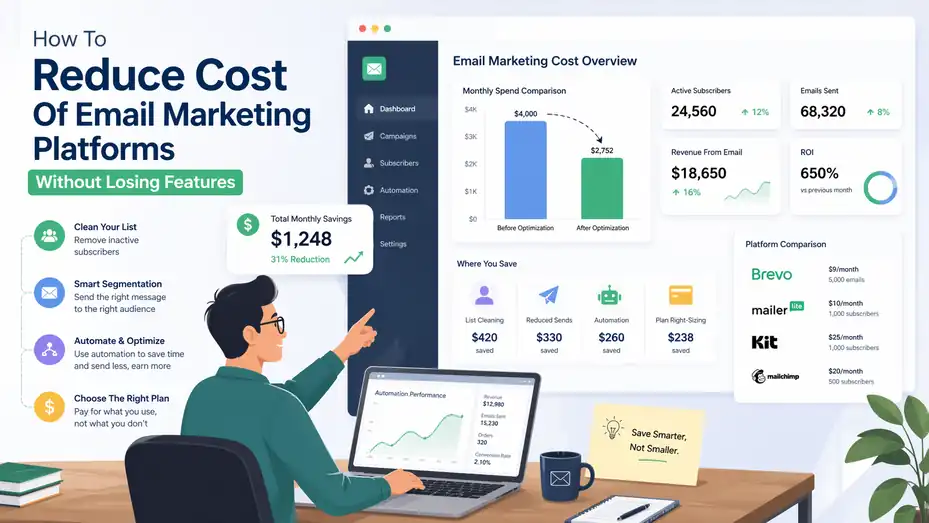
Figuring out how to reduce cost of email marketing platforms usually starts with one frustrating realization: you are not really paying for “email,” you are paying for contacts, sends, duplicate records, unnecessary features, and messy setup decisions.
Email still delivers strong ROI for many teams, with common benchmarks landing around 10:1 to 36:1, so the goal is not to slash spend blindly.
The goal is to keep the revenue engine while removing waste.
Understand What Is Actually Driving Your Platform Cost
Before you cut anything, you need to know what your bill is really reacting to. Most businesses assume the problem is the platform itself. In my experience, the bigger issue is usually the pricing model underneath it.
Pricing Model: Contacts, Sends, Or Feature Gates
Some platforms charge mainly by stored contacts, while others lean more on monthly email volume.
Mailchimp’s pricing is tied to contact tiers and send limits, and it notes that overages can trigger additional charges. Brevo’s entry pricing is structured around email volume, starting with 5,000 emails per month on Starter, and its free plan allows 300 daily sends while storing up to 100,000 contacts.
Kit, by contrast, emphasizes subscriber thresholds and feature unlocks, with a free tier up to 10,000 subscribers and paid plans beginning at $33 per month for 1,000 subscribers.
That matters because two businesses with the same list size can have wildly different costs. Imagine one store has 25,000 contacts but only emails once a week. Another has 8,000 contacts and sends daily behavior-based campaigns. The cheaper platform for one may be the expensive one for the other.
I suggest you ask one simple question first: Are you paying mostly for people you store, emails you send, or features you unlocked? That answer tells you where savings will come from.
Hidden Cost Sources Most Teams Miss
The monthly plan price is only part of the story. A lot of extra spend sneaks in through operational decisions.
Common examples include duplicate contacts across audiences, inactive subscribers you keep forever, overage billing when you exceed limits, paying for seats your team does not use, and upgrading to a higher plan just to access one automation or reporting feature.
Mailchimp specifically states that if contacts or send counts exceed plan limits, extra charges can appear instead of service being interrupted.
I’ve seen this happen with small ecommerce brands all the time. They think they “need” a $200 to $400 plan, but after a cleanup they realize 20% to 35% of their bill came from records that should have been archived or removed months ago.
The first win is usually not switching platforms. It is stopping accidental waste.
A Simple Cost Audit You Can Do In One Hour
Here is the fastest way to find savings without wrecking performance:
- Step 1: Export your total contact count, active subscribers, unsubscribed records, bounced emails, and suppressed contacts.
- Step 2: Compare monthly sends to actual revenue-driving campaigns.
- Step 3: List which paid features you used in the last 90 days.
- Step 4: Check whether you are storing the same person multiple times across lists or audiences.
- Step 5: Note any overage, credit, SMS, or add-on charges from the past three invoices.
This gives you a cost map. Once you have that, the platform becomes easier to manage because you are no longer making decisions based on vague feelings like “our email tool is expensive.”
Cut Waste In Your Subscriber Database First
This is where the fastest savings usually live. If your platform charges by contacts, database hygiene is money hygiene.
Remove Or Archive Non-Revenue Contacts
Not every stored email should stay active forever. Some contacts belong in your CRM, not your email marketing bill.
A practical rule I like is this: if someone has not opened, clicked, purchased, or visited from email in a long time, they should move into a re-engagement process and then into archive or suppression if they stay inactive. The exact timeframe depends on your sales cycle, but for many brands it falls somewhere between 60 and 180 days.
This is not about being harsh. It is about protecting deliverability and cost at the same time. Low-engagement contacts often hurt both. You keep paying for them, and they make your engagement averages weaker.
Imagine you have 40,000 subscribers, but 11,000 of them have not engaged in 12 months. If your platform cost rises sharply at the next contact tier, removing or archiving those records could delay an upgrade for months.
Merge Duplicate Records And Consolidate Audiences
Duplicate contacts are one of the least exciting problems in email marketing, and one of the most expensive.
This happens a lot when businesses run separate lists for newsletters, lead magnets, customers, webinar signups, and abandoned carts. One person can end up counted two or three times if your setup relies on multiple audiences instead of one master database with tags or segments.
I believe this is one of the biggest silent budget killers in email operations. You pay more, segmentation gets messier, and reporting becomes less trustworthy.
A cleaner model looks like this:
- One master audience when the platform supports it well.
- Tags for source, behavior, and lifecycle stage.
- Segments for campaigns and targeting.
- Custom fields only when truly useful.
This setup usually reduces contact inflation and makes automation easier to manage.
Build A Re-Engagement And Sunsetting Flow
Deleting cold subscribers immediately is not always the best move. A better approach is to give them one last chance to stay.
A basic flow can look like this:
- Email 1: Ask whether they still want to hear from you.
- Email 2: Offer a reason to stay, such as better content frequency or a useful resource.
- Email 3: Confirm they will be removed unless they click to remain subscribed.
This does two things. First, it recovers some valuable subscribers. Second, it gives you confidence when you suppress the rest.
If you are wondering whether this really matters financially, it does. Many platforms become more expensive as contacts grow, and platforms like Mailchimp openly tie pricing and additional charges to contact storage and send thresholds.
Reduce Send Volume Without Hurting Revenue
A lot of brands oversend because it feels productive. But more campaigns do not always mean more profit.
Stop Sending Every Campaign To Everyone
Blanket campaigns are expensive in two ways. They increase send volume, and they usually underperform because the message is too generic.
Segmentation fixes both. You send fewer emails overall, but each email becomes more relevant. HubSpot notes that email remains efficient partly because personalization and automation improve relevance while reducing manual effort.
Let me make this real. Say you run an online skincare store. Instead of sending one big campaign to 30,000 people, you send:
- A replenishment email to recent serum buyers.
- A win-back email to lapsed customers.
- A product education email to new subscribers who have not purchased.
That approach typically reduces wasted sends and raises conversion efficiency.
In most cases, the right message to 8,000 people beats the wrong message to 30,000.
Shift More Volume Into Triggered Emails
Triggered emails often outperform broad campaigns because they respond to behavior, not your calendar.
Examples include welcome series, browse abandonment, abandoned cart, post-purchase follow-up, replenishment reminders, and review requests. These flows are usually lower volume than constant batch campaigns, but more efficient per send.
This is one reason email ROI tends to remain strong. Automated messages keep working without the same level of manual cost every week. Both HubSpot and Litmus point to automation and personalization as major contributors to email’s strong returns.
I recommend looking at revenue per email type, not just total campaign revenue. When you do that, you often find that a handful of automated journeys are carrying a surprising share of the program.
Lower Frequency For Low-Intent Segments
Not every segment deserves the same send cadence. Your hottest buyers can handle more. Your colder segments usually cannot.
A simple frequency model might look like this:
- High-intent segment: 3 to 5 emails per week.
- Mid-intent segment: 1 to 2 emails per week.
- Low-intent segment: 2 to 4 emails per month.
- Inactive segment: Re-engagement only.
This is one of those changes that feels small but compounds quickly. Cutting weekly sends to low-intent subscribers can reduce total volume by thousands or tens of thousands of emails per month without touching your most profitable audience.
You are not emailing less across the board. You are emailing with more intent.
Match Your Plan To The Features You Truly Use
A lot of teams are overpaying for theoretical future needs. That is an expensive habit.
Audit Feature Usage Instead Of Assuming You Need The Premium Tier
Paid plans often look justified because the feature list sounds impressive: advanced reporting, multivariate testing, predictive recommendations, complex automations, multi-user controls, and audience scoring.
But here is the uncomfortable question: which of those did you actually use in the last quarter?
Kit’s pricing page is a good example of how features are stacked by tier. Its free plan includes up to 10,000 subscribers, unlimited landing pages and forms, unlimited broadcasts, and basic automation.
The Creator plan adds unlimited visual automations, sequences, A/B subject line testing, polls, RSS campaigns, and support, while Pro adds deliverability reporting, engagement scoring, collaborative editing, advanced A/B testing, and a referral system.
For some businesses, that extra layer is worth every dollar. For others, it is pure overhead.
I suggest marking each premium feature as one of three things: revenue-critical, occasionally useful, or unused. You should only pay premium prices for the first category.
Keep The Few Features That Protect Revenue
There are features I would be careful about removing.
In many cases, the features worth paying for are:
- Automation builder for core flows.
- Segmentation and tagging.
- Basic A/B testing.
- Reliable reporting.
- Ecommerce or CRM integration.
- Deliverability controls if you send at scale.
Everything else should defend itself financially.
For example, if advanced attribution saves your team hours and helps prove email-driven revenue, keep it. If collaborative editing matters because three marketers touch every campaign, keep it. But if you upgraded for predictive extras you never operationalized, that is a good place to trim.
Cheap software becomes expensive when it blocks revenue. Expensive software becomes cheap when it replaces manual work or improves conversion enough to justify itself. The trick is knowing which side you are on.
Watch For Plan Creep
Plan creep happens when your account gets more expensive in tiny, almost invisible steps. One extra seat here. One SMS add-on there. One list threshold crossed. One premium testing feature switched on.
Mailchimp notes that overages may apply if contact or email send limits are exceeded, and its free plan is capped at 250 contacts and 500 sends per month with a daily send limit of 250.
That is why I recommend a monthly “platform bill review” with three questions:
- What changed in cost?
- What caused it?
- Did that change increase revenue or save labor?
If you cannot answer the third question, the spend is suspicious.
Choose A Pricing Model That Fits Your Business Pattern
Sometimes the cheapest fix is not optimization inside your current platform. It is switching to a platform whose billing logic matches your business better.
Contact-Based vs Send-Based Pricing
This is the decision many people miss.
If you have a large list but modest email frequency, a send-based model can be more economical. Brevo is a useful example because it stores a large number of contacts on free and charges Starter from $9 per month based on send volume tiers.
If you have a smaller but highly engaged list and need creator-focused automation, subscriber-based platforms can still be efficient. Kit’s free plan covers up to 10,000 subscribers, while paid tiers increase as feature needs and subscriber counts rise.
If your platform prices heavily by contacts and you hold many low-frequency subscribers, that mismatch can become painful fast.
A Quick Comparison Of Common Cost Structures
| Platform | Pricing Signal | Entry-Level Public Reference | Best Fit Pattern |
|---|---|---|---|
| Mailchimp | Contacts + send limits + overages | Free plan up to 250 contacts and 500 monthly sends; overages may apply on paid tiers | Smaller lists needing familiar ecosystem |
| Brevo | Email volume more than contact count | Starter starts at $9/month for 5,000 emails; free includes 300 daily emails and large contact storage | Large stored list, lower monthly send intensity |
| Kit | Subscriber tiers + feature unlocks | Free up to 10,000 subscribers; Creator starts at $33/month for 1,000 subscribers | Creators and newsletter-first businesses |
This does not mean one platform is “best.” It means the billing mechanics matter more than the brand name.
When Migration Actually Saves Money
Migration is worth considering when at least one of these is true:
- Your database model is fundamentally mismatched to billing.
- Your must-have features live on a lower-cost competitor.
- Your current platform charges heavily for scale, while your usage pattern is light.
- Your team only uses a small portion of a premium suite.
Kit even promotes free migrations on its pricing page, which can reduce switching friction if your use case fits its model.
Still, I would not migrate for a tiny monthly saving. Migration only makes sense when the annual savings are meaningful, the features are equivalent or better, and the transition risk is manageable.
Rebuild Your Account Architecture For Efficiency
A messy account costs more to run, even if the subscription looks fine on paper.
Use One Clean Data Structure
The simplest lower-cost architecture usually has:
- One primary audience.
- Clear lifecycle stages.
- Tags for behaviors and acquisition source.
- Segments for campaign targeting.
- Suppression rules for unengaged or risky contacts.
This reduces duplication, cuts reporting confusion, and makes automations easier to maintain. It also makes future migration easier because your data logic is cleaner.
When I review bloated accounts, I often find they were built campaign by campaign. A webinar list here, a launch list there, a customer list somewhere else. That feels manageable at first, then becomes expensive chaos.
You want a system, not a pile of temporary fixes.
Simplify Automations That Nobody Maintains
Automation can save money, but only if it is doing useful work.
Look for flows that are:
- Triggering on outdated conditions.
- Sending to old segments.
- Duplicating other journeys.
- Producing no measurable clicks, conversions, or assists.
- So complex that no one on the team wants to touch them.
I suggest keeping your “core five” first: welcome, abandoned cart, post-purchase, win-back, and lead nurture. Everything else should justify itself with either revenue or time savings.
A smaller set of healthier automations often beats a giant map of neglected workflows.
Reduce Manual Work Alongside Subscription Cost
Software cost is only one part of platform cost. Team time matters too.
HubSpot’s definition of email marketing costs explicitly includes software, team time, and creative production, which is the right way to think about the budget.
This means a platform that costs slightly more can still be cheaper overall if it:
- Saves campaign setup time.
- Makes segmentation easier.
- Improves reporting visibility.
- Reduces copy-paste errors.
- Supports better templates and reusable modules.
I believe this is where many cost-cutting efforts go wrong. They focus only on invoice price and ignore labor. The smartest move is often the one that lowers total operating cost, not just the subscription line item.
Negotiate, Downgrade, Or Restructure Before You Switch
You do not always need a dramatic platform change to get a better deal.
Ask For Annual Discounts, Usage Reviews, Or Plan Resets
Many teams never ask their provider for help, even when their usage pattern has changed.
A useful message can be simple: your database was cleaned, your send volume dropped, and you want the most appropriate plan. Ask whether there is a lower tier, annual discount, nonprofit rate, startup support, or usage-based alternative.
Some pricing pages also clearly promote annual savings. Kit, for example, shows yearly billing discounts of roughly two months free on paid plans. Mailchimp pricing pages also promote savings for annual commitments in some tiers and contact levels.
This is not glamorous, but it works more often than people expect.
Downgrade Intentionally, Not Emotionally
Downgrading becomes dangerous when it is done in panic. You want a controlled downgrade.
Before you step down, test these questions:
- Which automations would stop working?
- Would forms or landing pages change?
- Would branding reappear on emails?
- Would support access disappear?
- Would reporting history be affected?
Then compare those losses against the savings.
For example, Brevo’s Starter is positioned for basic multi-channel marketing and includes templates, forms, segmentation, analytics, and no branding, while higher tiers add more advanced capability.
If your actual needs fit Starter, downgrading is rational. If your revenue depends on higher-level automation or collaboration, the cheaper tier may cost more than it saves.
Use Add-Ons More Carefully
Add-ons are where platform spending gets slippery. SMS packs, extra seats, credit bundles, premium support, deliverability consulting, and advanced modules can quietly turn a reasonable plan into a bloated one.
Brevo’s prepaid email credits, for example, can be useful for occasional sending because they do not expire, but they should be used strategically rather than as a habit that masks poor planning.
A good rule is this: Every add-on should have a clear owner, a use case, and a measurable purpose. If it does not, remove it.
Protect Performance While You Lower Costs
Saving money is easy if you are willing to break the machine. The harder and smarter move is cutting cost while keeping revenue stable.
Track The Right Metrics During Cost Reduction
Do not judge success by subscription savings alone. Track:
- Revenue per subscriber.
- Revenue per email sent.
- Open and click trends by segment.
- Unsubscribe and complaint rates.
- Flow revenue share.
- Cost per attributed conversion.
- Monthly platform cost as a percentage of email-attributed revenue.
This is the part I care about most. You want efficiency, not just lower spend.
A 20% platform reduction sounds great until you realize revenue fell 35%. That is not a win. On the other hand, if you trim inactive contacts, lower low-intent send frequency, and keep flow revenue steady, then you found real savings.
Run Changes In Stages
Do not do everything at once. Stage the changes so you can see what actually helped.
A practical rollout might look like this:
- Month 1: Clean list and suppress inactive contacts.
- Month 2: Reduce low-intent campaign frequency.
- Month 3: Remove unused add-ons and extra seats.
- Month 4: Reassess plan tier.
- Month 5: Compare migration options if needed.
That sequence lowers risk and keeps your team from misreading the data.
Treat Cost Reduction As An Optimization Project
I think this is the mindset shift that matters most. Do not frame this as “how can we pay less for email?” Frame it as “how can we make every stored contact, every send, and every feature earn its place?”
Email keeps delivering strong returns for many organizations because it combines owned audience access, personalization, and automation. The brands that protect those advantages while removing waste usually come out ahead.
The best outcome is not a cheaper tool. It is a leaner email program that does more with less.
Common Mistakes That Make Email Platforms More Expensive
A lot of overspending comes from habits that feel harmless in the moment.
Keeping “Maybe Useful Someday” Contacts Forever
This is probably the most common mistake. Businesses hold old leads, dead records, and cold subscribers because deleting them feels risky.
But if those people are not engaging, they are often doing more harm than good. They increase cost, weaken engagement averages, and make segmentation less meaningful.
It is fine to keep historical data somewhere. It does not always belong in your billable marketing audience.
Buying The Biggest Plan Too Early
Teams often upgrade because they are planning for growth rather than paying for present reality. I understand the instinct, but it is usually backwards.
Start with the features that directly support acquisition, conversion, and retention. Add advanced layers later when the team is actually ready to use them.
A platform is not cheaper because it looks “future-proof.” It is cheaper when you are fully using what you pay for.
Ignoring Operational Complexity
This one gets less attention than it should. Even if the invoice is okay, a complicated platform setup creates hidden cost in labor, errors, and missed opportunities.
If your team needs extra meetings just to explain who gets which email, your setup is too expensive operationally.
Clean systems make cheaper decisions easier.
A Practical 30-Day Plan To Lower Your Email Platform Costs
This is the part I would follow if I were fixing an account from scratch.
Week 1: Audit And Baseline
Pull the last three invoices. Record plan fees, add-ons, overages, seats, and credits. Export audience counts, active contacts, inactive contacts, and duplicate records. List every automation and feature used in the last 90 days.
At the same time, set your baseline metrics: email-attributed revenue, revenue per send, revenue per subscriber, and current platform cost as a share of email revenue.
You need this before making changes.
Week 2: Clean Database And Suppress Waste
Archive or suppress invalid, bounced, unsubscribed, and deeply inactive contacts. Merge duplicates. Consolidate fragmented audiences where possible. Create a re-engagement sequence for borderline subscribers before removing them.
This is usually the week where the first measurable savings appear.
Week 3: Reduce Low-Value Sending And Unused Features
Cut batch campaigns to low-intent segments. Shift effort into core automated flows. Remove add-ons, seats, and premium functions that are not clearly supporting revenue or labor savings.
This is also the right time to compare whether your pricing model still matches your business.
Week 4: Reprice, Renegotiate, Or Migrate
Now that your account is cleaner, review lower plan tiers or annual discounts. If the current platform still looks misaligned, compare alternatives based on your actual usage pattern, not your assumptions from six months ago.
At the end of 30 days, you should know whether the answer was cleanup, downgrade, renegotiation, or migration.
Final Thoughts
Learning how to reduce cost of email marketing platforms is really about removing waste without removing capability. In most cases, the biggest savings come from cleaner data, smarter send strategy, tighter feature discipline, and a pricing model that matches how your business actually emails people.
I would start with the database, then the send strategy, then the plan itself. Do that in order, and you usually keep the features that matter while cutting the spend that never should have been there in the first place.

Juxhin B is a digital marketing researcher and founder of JAK Digital Hub, specializing in email marketing software, marketing automation platforms, and digital growth tools. His work focuses on software testing, platform comparisons, and real-world performance analysis to help businesses choose the right marketing technology.
Related posts:
 How To Build A Better Email Campaign Strategy For Ecommerce
 The Better Way To Manage Email Leads No One Talks About
 Should I Leave AWeber? The Signs Your Email Platform Is Holding You Back
 How to Migrate From MailerLite Without Losing Data
 How To Migrate From GetResponse Without Breaking Your Automations
 Email Marketing Tools Comparison For Ecommerce (Best Picks)