Table of Contents
Some links on JAK Digital Hub are affiliate links, meaning we may earn a small commission at no extra cost to you. Read full disclaimer.
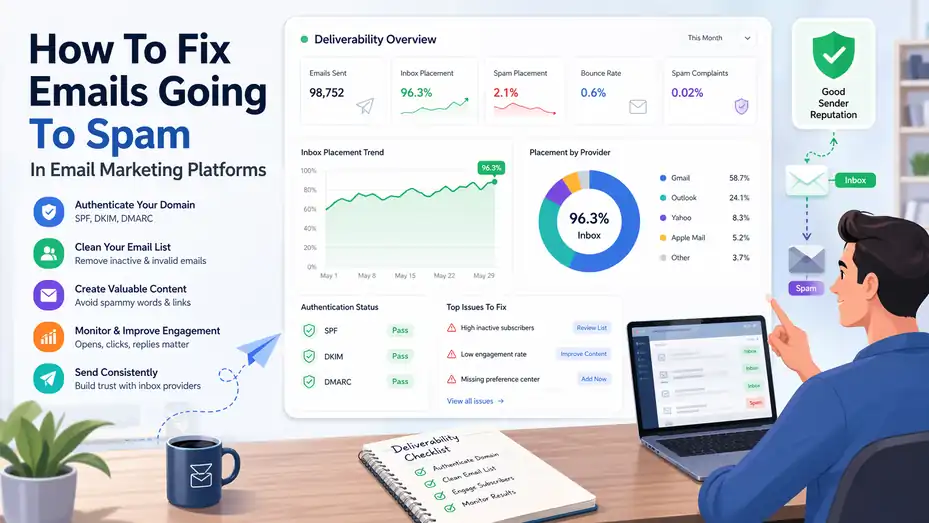
If you’re trying to learn how to fix emails going to spam in email marketing platforms, you’re probably already feeling the pain: good campaigns, weak results, and that frustrating sense that your messages are disappearing before anyone even sees them.
I’ve seen this happen to brands with solid offers, decent copy, and healthy lists. The problem usually is not just “spammy content.” It’s a mix of sender reputation, authentication, list quality, engagement, and campaign setup.
Let me walk you through the full process so you can diagnose the real issue, fix it properly, and improve inbox placement over time.
Understand Why Emails Go To Spam In The First Place
Getting emails out of spam starts with understanding what mailbox providers are actually judging. Gmail, Outlook, Yahoo, and Apple Mail do not make one simple yes-or-no decision based on a single trigger word. They look at patterns.
What Spam Filters Actually Measure
Spam filters evaluate trust. That trust is tied to your sending domain, your IP reputation, your authentication setup, your list behavior, your complaint rate, and how people interact with your emails. In simple terms, mailbox providers are asking, “Do recipients want this email, and can we trust the sender?”
A lot of marketers think deliverability is mostly about copy. That is only one small part of it. In my experience, the bigger problems usually come from weak sending habits.
For example, a business imports an old list, sends to everyone at once, gets low opens and a spike in unsubscribes, and then wonders why the next campaign also lands in spam. The platform may send the message, but inbox providers decide where it lands.
Another thing worth knowing is that inbox placement is not the same as delivery. Your email platform may say 99% delivered, but that does not mean 99% reached the primary inbox. It often just means the server accepted the email. That email may still go to promotions, spam, or a filtered folder.
This is why fixing spam placement requires a full-system approach. You are not just editing a subject line. You are rebuilding trust with mailbox providers.
The Five Biggest Causes Of Spam Placement
Most spam problems come from the same handful of issues. Once you know them, troubleshooting becomes much easier.
- Poor sender reputation: Your domain or IP has a history of low engagement, complaints, or suspicious sending patterns.
- Missing authentication: SPF, DKIM, and DMARC are not set up correctly, which makes your email look less trustworthy.
- Low-quality lists: You are emailing outdated, purchased, scraped, or disengaged contacts.
- Weak engagement signals: Too few opens, replies, clicks, and saves compared to deletes, complaints, and unsubscribes.
- Inconsistent sending behavior: Large spikes in volume, irregular schedules, or sudden blasts from a new domain.
Imagine you run a small ecommerce brand and normally send 5,000 emails a week. Then during a seasonal promotion, you suddenly send 80,000 emails to everyone you have collected over the last four years. That jump alone can look risky, especially if many of those addresses have not engaged in months. The issue is not just the promotion. It is the mismatch between your normal behavior and your sudden volume.
I believe this is where many businesses go wrong. They chase short-term reach and accidentally damage long-term deliverability.
How To Tell If The Problem Is Content, Reputation, Or Setup
Before you fix anything, you need to identify the type of problem you have. Otherwise, you can spend weeks editing copy when the real issue is a broken DNS record or a stale list.
A setup problem usually shows up early. Your domain is new, authentication is incomplete, or your “from” setup looks inconsistent. A reputation problem tends to build over time. Open rates decline, complaint rates rise, and even your better campaigns start underperforming. A content problem is usually more campaign-specific. One email goes to spam because it looks deceptive, overly promotional, or structurally messy.
Here is a practical way to think about it. If nearly every campaign struggles across multiple audience segments, look first at reputation and technical setup. If one specific campaign performs badly while others do fine, the issue is more likely content or targeting. If performance is good on one mailbox provider but poor on another, that can point to domain reputation differences or provider-specific filtering.
When I troubleshoot email deliverability, I start with the broadest signals first: domain health, authentication, list quality, and engagement trends. Only after that do I focus on content tweaks.
Fix The Technical Foundation First
This is the part many people skip because it feels less exciting than writing campaigns. But if your technical setup is weak, great copy will not save you.
Set Up SPF, DKIM, And DMARC Correctly
These three records are the foundation of trustworthy email sending.
SPF tells inbox providers which servers are allowed to send mail on behalf of your domain. DKIM adds a digital signature that proves the message was not altered in transit. DMARC ties SPF and DKIM together and tells providers how to handle messages that fail authentication.
You do not need to become a DNS expert to understand the goal. You are giving mailbox providers proof that your email platform is legitimately sending for your domain. Without that proof, your messages can look suspicious, especially if the “from” address shows your brand but the underlying sending path does not align properly.
A common mistake is partially setting this up and assuming it is done. For example, SPF may be added, but DKIM is missing. Or DMARC exists but is configured too loosely to provide real protection or insight. Another frequent issue is using multiple platforms without keeping records updated. If you use one tool for newsletters, another for CRM automation, and another for support emails, your authentication must reflect that reality.
I suggest treating authentication as a non-negotiable baseline. Before you test subject lines or redesign templates, make sure your DNS records are accurate, aligned, and actively verified inside your email marketing platform.
Use A Branded Sending Domain Instead Of A Generic Address
One of the easiest ways to look unprofessional is sending marketing emails from a free domain address like Gmail or Yahoo. That does not mean the message will always fail, but it creates trust issues quickly.
A branded sending domain tells providers that your company owns the identity behind the campaign. It also lets you build a sender reputation attached to your brand rather than borrowing credibility from a consumer mailbox. This matters more as your volume grows.
For example, sending a campaign from hello@yourstore.com is much stronger than sending from yourstorepromo@gmail.com. The first looks like a real business communication. The second can resemble affiliate spam, temporary outreach, or an unofficial sender.
There is also a consistency benefit. When subscribers see the same branded “from” identity over time, they are more likely to recognize, open, and trust your messages. Recognition improves engagement, and engagement improves inbox placement.
If you want to go one step further, use a dedicated subdomain for marketing mail, such as news.yourbrand.com or mail.yourbrand.com. This can help separate marketing reputation from transactional email reputation. That way, a heavy promotional campaign is less likely to affect essential messages like receipts or password resets.
Warm Up New Domains And Sending Patterns Gradually
One of the fastest ways to trigger spam filtering is acting like a brand-new sender with the volume of an established publisher. Trust in email is earned, not assumed.
If you have a new domain, a new subdomain, a new dedicated IP, or a newly cleaned list, start small. Send first to your most engaged subscribers. These are the people who opened, clicked, or purchased recently. They are far more likely to interact positively with your emails, and those signals help build trust.
The same rule applies after big list changes. Let’s say you migrated to a new platform and are excited to launch. Do not send to your full database on day one. Start with the last 30 days of engaged contacts, then 60, then 90, and expand gradually if engagement remains healthy.
This is one area where patience really pays off. I know it is tempting to “just send to everyone,” especially during a launch. But inbox placement usually gets worse when senders rush. A controlled ramp-up often beats a big blast followed by weeks of damage control.
A simple warm-up mindset works well: Send smaller volumes, target engaged users first, stay consistent, and increase only when the metrics support it.
Clean Your List And Protect Your Sender Reputation
If you want a practical answer to how to fix emails going to spam in email marketing platforms, list quality has to be near the top.
A bad list can ruin an otherwise healthy setup.
Remove Inactive And Risky Subscribers
Many marketers hold onto dead weight for too long because list size feels emotionally important. A large list looks impressive in a dashboard, but an unengaged list quietly damages deliverability.
Inactive subscribers lower open rates, reduce clicks, and increase the chance of spam complaints. Over time, mailbox providers notice that many recipients are ignoring your messages. That makes future campaigns look less relevant.
Start by defining inactivity clearly. For many brands, that means no opens, clicks, or purchases within 90 to 180 days, depending on frequency. If you send daily, inactivity thresholds should be shorter. If you send monthly, they can be longer. The key is being honest.
You should also remove obviously risky addresses, including invalid emails, role-based inboxes used carelessly, typo-heavy entries, and old imported contacts with unknown consent quality. Purchased lists should not be used at all. Scraped contacts are even worse.
A smaller list of people who recognize and want your emails will almost always outperform a huge list of half-interested strangers. In my experience, this is one of the most painful but profitable cleanup moves a brand can make.
Use Double Opt-In And Better Signup Standards
If weak list quality caused the issue, your signup process may be part of the problem. Double opt-in is one of the cleanest ways to improve list health from the start.
With double opt-in, someone enters their email address and then confirms it through a follow-up email before being fully added. This reduces fake signups, typos, bot entries, and low-intent subscribers. It may slightly reduce total signups, but the quality improvement is usually worth it.
The bigger advantage is intent. A confirmed subscriber has taken two actions, not one. That makes them more likely to engage with future campaigns. Stronger early engagement sends the right signals to mailbox providers.
You can also improve form quality by being clearer about what people are signing up for. Instead of “Join our newsletter,” say something more specific, like “Get weekly product tips, launch alerts, and exclusive offers.” Clear expectations reduce disappointment later.
I recommend reviewing every list entry point: popups, footer forms, checkout boxes, lead magnets, and webinar registrations. If any of them are vague, pre-checked, or too aggressive, they may be filling your database with people who never truly wanted your emails.
Segment By Engagement Before Every Major Campaign
Segmentation is not just for personalization. It is also a deliverability safeguard.
Before a major campaign, break your audience into at least three groups: highly engaged, moderately engaged, and inactive. Your most engaged audience should be the first group to receive important sends, especially if deliverability has already weakened.
This approach helps in two ways. First, it protects your reputation by generating stronger positive signals early in the campaign cycle. Second, it shows you whether the campaign itself is healthy. If your most engaged users are not opening, the issue may be subject line, timing, offer, or inbox placement. That is useful information before you expand the send.
A realistic example: Suppose you have 100,000 subscribers. Instead of blasting all of them, send first to the 15,000 who engaged in the last 30 days. Monitor opens, clicks, soft bounces, and unsubscribes. If performance is strong, extend to the next 30,000 with recent activity. Leave the coldest segment out unless you are running a dedicated re-engagement sequence.
Segmentation feels slower, but it is smarter. Better to protect sender reputation and build momentum than to sacrifice inbox placement for one oversized send.
Improve The Content And Structure Of Your Emails
Content alone does not cause most spam problems, but weak content can absolutely make a struggling sender perform even worse.
Write Subject Lines That Are Clear, Not Manipulative
Spam filters and recipients both dislike misleading subject lines. If your subject line feels like clickbait, even a technically perfect setup can suffer because people ignore, delete, or complain about the email.
A good subject line is specific, believable, and connected to the actual content inside. It creates interest without overpromising. That means avoiding exaggerated punctuation, fake urgency, all-caps language, or vague bait like “You won’t believe this.”
Here is the deeper issue: Deceptive subject lines often create expectation mismatch. When someone opens expecting one thing and gets another, engagement quality drops. They may leave quickly, unsubscribe, or mark the email as spam. Those user reactions matter more than whether a filter “likes” a phrase.
Compare these two approaches:
- “Last Chance!!! Open Immediately”
- “Your 20% Spring Discount Ends Tonight”
The second still creates urgency, but it tells the truth. That matters.
I suggest writing subject lines with three tests in mind. First, would a human trust this? Second, does it match the actual email? Third, does it sound like something a real brand would send repeatedly? If the answer is no, rewrite it.
Balance Text, Links, Images, And Layout
An email that looks chaotic can trigger suspicion quickly. A message with one giant image, too many buttons, broken formatting, or a wall of links feels low quality even before anyone reads it.
Mailbox providers want to see email structures that resemble legitimate communication. That usually means a balanced layout with real text, a clear hierarchy, one primary call to action, and only the links you actually need. If every other line is clickable, your message can feel overly promotional.
I also recommend avoiding image-only emails. Some marketers love sleek visual blasts, but they often perform poorly because filters and recipients cannot easily interpret the message. Use images to support the message, not replace it.
Here is a practical content checklist:
- Use real text: Make sure the main message is readable even with images turned off.
- Limit link overload: Keep only essential links and one main CTA when possible.
- Keep branding consistent: Use the same logo, sender name, and tone subscribers expect.
- Include a plain-text version: This adds legitimacy and improves compatibility.
A clean, readable email usually beats a flashy one. In most cases, clarity earns more trust than design tricks.
Make The Email Feel Wanted, Not Forced
This is where strategy and copy meet. The best deliverability improvement often comes from making emails more welcome, not more clever.
Ask yourself: Why should this subscriber care today? Not in theory. Today.
If every campaign is a hard sell, engagement eventually drops. That does not mean you should stop promoting. It means the value exchange has to feel fair. Educational content, useful recommendations, insider updates, product guidance, and timing that matches customer behavior all help.
Imagine you run a skincare brand. A generic promotional email saying “Shop now” may get ignored. But an email saying “How to build a simple nighttime routine for dry skin” with product suggestions woven in naturally feels more useful. It earns attention rather than demanding it.
I think many brands send too often without asking whether they are actually adding value. Inbox providers are increasingly good at spotting the difference between wanted email and tolerated email. The more your messages feel relevant and anticipated, the better your engagement signals become.
That is the real content goal: not just avoiding spammy wording, but creating emails people genuinely want to open.
Monitor Performance And Troubleshoot The Right Metrics
Once your setup, list, and content improve, you need a reliable way to monitor what is working. Otherwise, spam issues can creep back in without obvious warning.
Track The Metrics That Actually Affect Deliverability
A lot of marketers obsess over open rate alone. Opens matter, but they are only part of the story. Deliverability is shaped by a cluster of signals.
The most useful metrics to monitor are complaint rate, unsubscribe rate, bounce rate, click rate, reply rate, and engagement by segment. You also want to compare performance by mailbox provider when possible. If Gmail engagement falls sharply while Outlook stays stable, that tells you something specific.
Here is a simple reference table:
| Metric | What It Tells You | Why It Matters |
|---|---|---|
| Open Rate | Whether people notice and trust the email enough to open | Falling opens can signal inbox placement or weak subject lines |
| Click Rate | Whether the message content is relevant | Strong clicks support sender quality |
| Spam Complaint Rate | How often people mark you as spam | Even small increases can damage reputation |
| Bounce Rate | List hygiene and email validity | High bounces suggest poor list quality |
| Unsubscribe Rate | Audience fit and expectation match | High unsubscribes often mean poor targeting or over-mailing |
| Reply Rate | Human engagement and trust | Replies can be a strong positive signal in some contexts |
Do not evaluate these metrics in isolation. A campaign with average opens but excellent clicks from engaged segments may be healthier than one with inflated opens and poor downstream actions.
Run Seed Tests And Segment Tests Before Full Sends
When deliverability is unstable, smaller tests are your friend. Seed tests involve sending campaigns to controlled inboxes you can monitor across providers. Segment tests involve sending to a specific audience slice before going broad.
Segment tests are especially practical. If a campaign performs well with your hottest subscribers but poorly with colder segments, that usually points to audience quality or campaign relevance. If it performs poorly even with highly engaged users, the issue may be inbox placement, timing, or message quality.
I like this approach because it gives you usable signals fast. Instead of making assumptions after a full send, you create smaller checkpoints. That reduces risk and helps isolate the problem.
For example, before a major launch, you could send to:
- subscribers active in the last 30 days
- customers who purchased in the last 90 days
- readers who clicked in the last 3 campaigns
If all three segments underperform at the same time, something broader is wrong. If one group performs well and another collapses, your fix is probably in targeting rather than infrastructure.
Small tests make troubleshooting more precise. They also protect your reputation while you learn.
Watch For Provider-Specific Patterns
Not all mailbox providers behave the same way. Gmail may emphasize engagement heavily. Outlook can be more sensitive to reputation and formatting issues. Yahoo may react differently to list quality and authentication alignment. That means you should not treat “email performance” as one giant average.
If possible, break down campaign results by provider. Even a rough split between Gmail, Outlook, Yahoo, and custom domains can reveal patterns that overall reporting hides. A 24% average open rate might look acceptable, but if Gmail is at 10% and Outlook is at 34%, you likely have a provider-specific deliverability issue.
This matters because your fixes may differ. Gmail problems often point toward engagement and list quality. Outlook issues may highlight sender reputation or message formatting. Custom corporate domains may involve stricter gateways or domain-level filtering.
I recommend keeping a simple deliverability log. Record campaign date, audience size, segment, provider trends, complaint rate, and any major changes in content or sending behavior. Over time, patterns become easier to spot.
That kind of disciplined tracking sounds basic, but it gives you a major edge. Most teams guess. The teams that improve inbox placement usually document what changed and what happened next.
Use Recovery And Optimization Strategies To Stay Out Of Spam
Once you stop the immediate damage, the next goal is staying healthy. Deliverability is not something you fix once and forget.
Build A Re-Engagement And Sunset Policy
A re-engagement sequence helps you test whether inactive subscribers still want your emails. A sunset policy defines when you stop mailing people who do not respond.
These two systems are essential because inactive users slowly drag down your reputation. You do not need to purge them instantly, but you do need a process.
A basic re-engagement flow might include two or three emails asking whether the subscriber still wants updates, offering a preference center, or highlighting your best content or offer. The tone should be respectful, not desperate. If there is no engagement after that, suppress the contact from future marketing sends.
This feels uncomfortable because removing subscribers can feel like losing assets. But unresponsive contacts are often liabilities, not assets. They consume sending volume while weakening inbox trust.
A smart sunset policy might look like this:
- 60 days inactive: reduce send frequency
- 90 days inactive: move to lighter segmentation
- 120 to 180 days inactive: enter re-engagement flow
- No response after re-engagement: suppress from campaigns
I believe every serious email program should have this baked in. It protects your domain and keeps your list honest.
Match Frequency To Audience Expectations
Sometimes emails go to spam because the problem is not technical at all. You are simply sending too often for the relationship you have built.
Frequency should match subscriber intent. Someone who signed up for weekly product education may not appreciate daily promotions. Someone who joined for flash-sale alerts may expect more frequent messages. The point is alignment.
When sending frequency rises faster than subscriber tolerance, negative signals follow. Opens drop. Unsubscribes climb. Spam complaints increase. Inbox providers notice. Many brands misread this as a content issue when it is really a cadence issue.
One of the best ways to fix this is by offering preferences. Let subscribers choose weekly, biweekly, monthly, or promo-only communication. Preference centers are underrated because they turn an all-or-nothing choice into a smarter middle ground.
Here is a realistic example. Suppose a fashion retailer emails six times a week during peak season and sees complaints spike. Instead of only rewriting copy, they create a preference option for “launches only” and “best deals only.” Complaint rates drop because subscribers now control the relationship.
That is a powerful reminder: better inbox placement often comes from respecting subscriber intent more carefully.
Create A Long-Term Deliverability Workflow
The most effective answer to how to fix emails going to spam in email marketing platforms is building a repeatable deliverability workflow. You want habits, not heroics.
A strong workflow includes regular list hygiene, authentication checks, segmented sending, engagement monitoring, and post-campaign reviews. It also means coordinating across teams. Marketing, CRM, ecommerce, and support should not all send independently without shared standards. Too many mixed signals from one domain can create chaos.
Here is a practical monthly workflow:
- Week 1: Review authentication, sender domain health, and bounce trends.
- Week 2: Clean inactive contacts and update engagement segments.
- Week 3: Test campaigns on smaller engaged audiences first.
- Week 4: Review complaints, unsubscribes, provider trends, and re-engagement results.
You do not need enterprise-level complexity to do this well. Even a lean team can manage deliverability if the process is consistent.
The big shift is this: stop treating spam placement as a random platform problem. In most cases, it is a reputation and relevance problem. Once you manage those on purpose, inbox performance gets much more predictable.
Common Mistakes That Keep Emails Going To Spam
Even after teams learn the basics, a few mistakes show up again and again.
Sending To Everyone Instead Of The Right People
This is the classic mistake. A campaign underperforms, and the response is to send to a larger list next time. That usually makes things worse.
Broad sends to cold subscribers reduce engagement quality and can push marginal campaigns into spam territory. It is much safer to win with smaller, high-intent segments first and expand only when the data supports it.
Changing Too Many Variables At Once
If you switch platforms, update your domain, rewrite templates, change frequency, and clean your list all in the same week, troubleshooting becomes messy. When performance changes, you will not know why.
I suggest making major changes in controlled phases. That makes cause and effect easier to see and protects your reputation while you improve.
Ignoring The Subscriber Experience After Signup
The first few emails set the tone for everything that follows. If your welcome sequence is confusing, overly aggressive, or disconnected from what people expected, future engagement suffers.
A strong welcome flow confirms value quickly, sets expectations, and encourages early interaction. That early interaction can help your inbox placement more than many brands realize.
Advanced Tips For Better Inbox Placement Over Time
Once the basics are handled, a few advanced strategies can push results further.
Separate Transactional And Marketing Sending Streams
Receipts, shipping updates, account notices, and password emails should not share risk with promotional sends if you can avoid it. Using separate subdomains or sending streams helps isolate reputation.
This matters most for growing brands with higher volume. If a promotional campaign performs poorly, you do not want essential customer emails affected too.
Encourage Positive Engagement Signals
You cannot force engagement, but you can design for it. Ask subscribers to reply with a question. Invite them to save the email. Send useful content that earns clicks naturally. Encourage them to move your email to the primary inbox or add you to contacts in your welcome sequence.
These are small moves, but they can strengthen long-term reputation.
Align Campaigns With Lifecycle Timing
The best-performing emails often match where the subscriber is in their journey. New leads need trust-building. Recent buyers need onboarding and product usage tips. Repeat customers may respond well to loyalty messaging. Cold users need reactivation, not heavy sales pressure.
Lifecycle alignment increases relevance, and relevance improves deliverability. That is one reason advanced email programs outperform generic batch sending.
Final Thoughts
If you want to know how to fix emails going to spam in email marketing platforms, the real answer is to stop looking for a single trick. Spam placement is rarely caused by one bad word or one unlucky campaign. It is usually the result of weak trust signals across setup, list quality, engagement, and sending behavior.
Start with authentication. Then clean your list, send to engaged segments, improve content quality, and monitor provider-level performance. After that, build long-term habits around re-engagement, frequency control, and ongoing reputation management.
In my experience, inbox placement improves when you make email more wanted, more consistent, and more trustworthy. That is the standard worth aiming for, and it is the one that keeps paying off long after the next campaign ends.

Juxhin B is a digital marketing researcher and founder of JAK Digital Hub, specializing in email marketing software, marketing automation platforms, and digital growth tools. His work focuses on software testing, platform comparisons, and real-world performance analysis to help businesses choose the right marketing technology.
Related posts:
 Moosend Emails Going to Spam: Top Causes Explained
 Why Is My Email Marketing Strategy Not Working Anymore?
 Email Marketing Strategy for 100K Subscribers That Scales
 Free Email Marketing For 10K Subscribers: Is It Enough?
 Should I Stop Using Free Email Marketing Right Now?
 Should I Leave Moosend or Stick With It? Clear Criteria